Images, upgraded—introducing ChatGPT Images 2.6. Now with GIFs and reference images. Plus, two new models are coming to the API with 50% faster image generation.
Gerador de imagens com IA ChatGPT Images 2.6
Em breveExplore o ChatGPT Images 2.6 para criar ilustrações e cartazes ou editar fotos. Mude o título ou a iluminação de uma composição pronta sem perder os detalhes do personagem, do produto ou da marca que tornam a imagem reconhecível.
0 / 5000
Loading...
Guia da família ChatGPT Images
Veja como um briefing por escrito e uma foto de referência orientam a criação da imagem, do primeiro rascunho à segunda edição.
Crie um retrato editorial, uma cena de produto ou um cartaz a partir de um briefing por escrito e refine o resultado com uma imagem de referência. Na família ChatGPT Images 2.6, o Flare é indicado para explorar ideias visuais rapidamente e criar no dia a dia. Já o Sunburst dá mais atenção aos detalhes da edição quando a precisão importa mais do que a velocidade.
Principais recursos do modelo de imagem com IA ChatGPT Images 2.6
Explore um cartaz com a palavra LIFE e duas reações animadas às altas e baixas em um gráfico de ações. Veja como uma imagem estática de uma lontra à beira de um riacho e um farol em pixel art se transformam em animações curtas em loop.
Uma vida em letras e duas reações do mercado
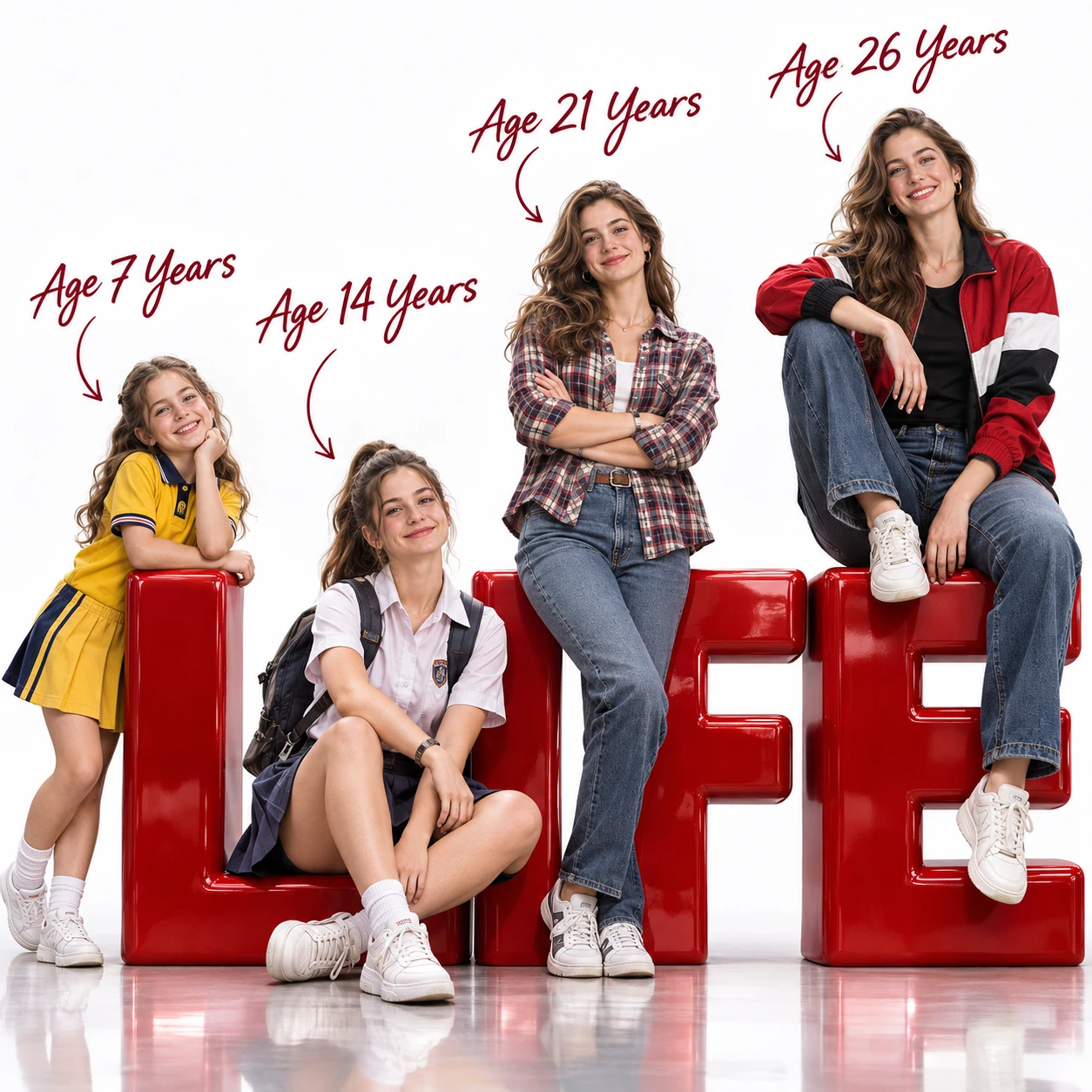
Prompt
Create an ultra-photorealistic, cinematic 3D advertising poster in a perfect 1:1 square aspect ratio, rendered in stunning 8K quality. Main Concept — Four Stages of Life Depict four different age versions of the same beautiful European-American female, aged 7, 14, 21, and 26, arranged from left to right in ascending age and physical size. The woman has naturally beautiful Western facial features: fair luminous skin, captivating blue-gray eyes, long softly wavy chestnut-brown hair, a refined straight nose, delicate rosy lips, elegant facial proportions, and a warm, charming smile. All four versions must share highly consistent facial identity, eye shape, nose structure, hair color, skin tone, and distinctive features. Age progression should be biologically realistic, making them instantly recognizable as the same person throughout different stages of her life. Four Age Versions and Outfits Age 7 — Playful Childhood An adorable, cheerful little girl with round youthful cheeks, bright sparkling eyes, and shoulder-length wavy chestnut hair. Wearing a cute yellow school uniform, white socks, and small sneakers. Standing playfully beside the first giant red 3D letter, gently leaning against it with an innocent, joyful expression. Age 14 — Confident Teenage Years A charming teenage schoolgirl with naturally developing facial features and long chestnut hair in a casual ponytail. Wearing a neat white school uniform, a pleated skirt, white sneakers, and a school backpack. Sitting casually in front of the second giant red letter, smiling confidently with a relaxed, youthful posture. Age 21 — Stylish Young Adulthood A beautiful young adult woman with elegant facial features, expressive blue-gray eyes, and long flowing chestnut waves. Wearing a fashionable plaid shirt, fitted blue jeans, and stylish casual sneakers. Standing confidently with her arms crossed, casually leaning against the third oversized red 3D letter. Natural fashion-model confidence and realistic body proportions. Age 26 — Elegant Adulthood The most prominent, visually striking, and slightly larger version. A stunning 26-year-old European-American woman with mature yet youthful facial beauty, luminous natural skin, and voluminous wavy chestnut hair. Wearing a fashionable red, black, and white color-block jacket over a fitted black T-shirt, stylish blue jeans, and clean white sneakers. Sitting stylishly on top of the final giant red 3D letter, one leg hanging casually downward and the other naturally bent. Relaxed, elegant posture, confident smile, looking directly toward the camera. Composition and Giant 3D Typography Arrange all four female characters from left to right, progressively increasing in height and age. Place enormous, bold, glossy, sculptural red 3D letters across the lower portion of the composition, spelling "LIFE". Each age version interacts naturally with one corresponding letter. The giant letters have a premium polished lacquer finish, realistic reflections, dimensional depth, and subtle highlights. Make the composition feel like a luxury commercial campaign celebrating a woman's journey through life. Age Labels and Graphic Details Add elegant, dark burgundy handwritten calligraphy above each respective character: - Age 7 Years - Age 14 Years - Age 21 Years - Age 26 Years Connect each label to its corresponding character with a thin, graceful, hand-drawn curved arrow. Position the labels carefully in the upper negative space without covering faces or overlapping with other labels. Background and Lighting Pure white seamless professional photography studio. Clean white cyclorama background, polished slightly reflective white studio floor, realistic contact shadows under all four characters and the oversized 3D letters. Premium cinematic studio lighting, large softboxes, realistic global illumination, subtle rim lighting, soft natural highlights, gentle shadows, and realistic reflections. Highly detailed skin pores, natural facial expressions, individual hair strands, fine fabric textures, realistic clothing folds, accurate human anatomy, and detailed footwear. Final Rendering Quality Ultra-photorealistic 3D rendering, cinematic commercial photography, high-end luxury advertising aesthetic, sophisticated composition, physically based materials, ray-traced reflections, realistic subsurface skin scattering, beautiful color grading, crisp focus, extraordinary texture detail. Strict Requirements Perfect square composition, 1:1 aspect ratio. Exactly four female characters. All four fully visible and clearly separated. Consistent facial identity throughout all ages. Realistic anatomy, naturally proportioned bodies, no duplicated characters, no extra limbs, no distorted hands, no cropped heads or feet, no overlapping faces, no cartoonish rendering, no watermark, no logos, no additional text beyond the specified typography.
Prompt
Using ChatGPT Images 2.6 native GIF generation, create a downloadable auto-looping multi-frame GIF. A super-cute chibi adult office worker with an oversized round head, tiny body, messy fluffy hair, white shirt and loosened tie sits at a desk in a cozy miniature office, fixed front three-quarter camera, square near-shot. The computer monitor shows a clearly plunging stock-market line chart. Loop: hopeful look at the screen, notices the drop, eyes widen, face crumples, large cartoon tears stream down both cheeks, quietly wipes tears while still staring at the falling chart, then returns smoothly to the starting pose. Keep the same character, desk, monitor, outfit, and background. Warm pastel lighting, polished kawaii chibi 3D toy-like style, funny and sympathetic mood. No captions, words, numbers, logos, speech bubbles, or borders. Loop about two to three seconds. Output an animated GIF file only; do not output a sprite sheet, collage, or split still frames.
Prompt
Using ChatGPT Images 2.6 native GIF generation, create a downloadable auto-looping multi-frame GIF. A super-cute chibi adult office worker with an oversized round head, tiny body, big sparkling eyes, messy fluffy hair, white shirt and loosened tie sits at a desk in a cozy miniature office, fixed front three-quarter camera, square near-shot. The computer monitor shows a clearly soaring stock-market line chart with a large upward arrow. Loop: notices the rise, eyes widen with delight, jumps up cheering, grabs a handful of generic paper banknotes with no readable currency markings, happily tosses them into the air like confetti while laughing, then returns smoothly to the starting pose. Keep the same character, desk, monitor, outfit, and background. Bright celebratory pastel lighting, polished kawaii chibi 3D toy-like style, funny joyful mood. No captions, words, numbers, logos, real currency symbols, speech bubbles, or borders. Loop about two to three seconds. Output an animated GIF file only; do not output a sprite sheet, collage, or split still frames.
Uma lontra enxuga uma lágrima
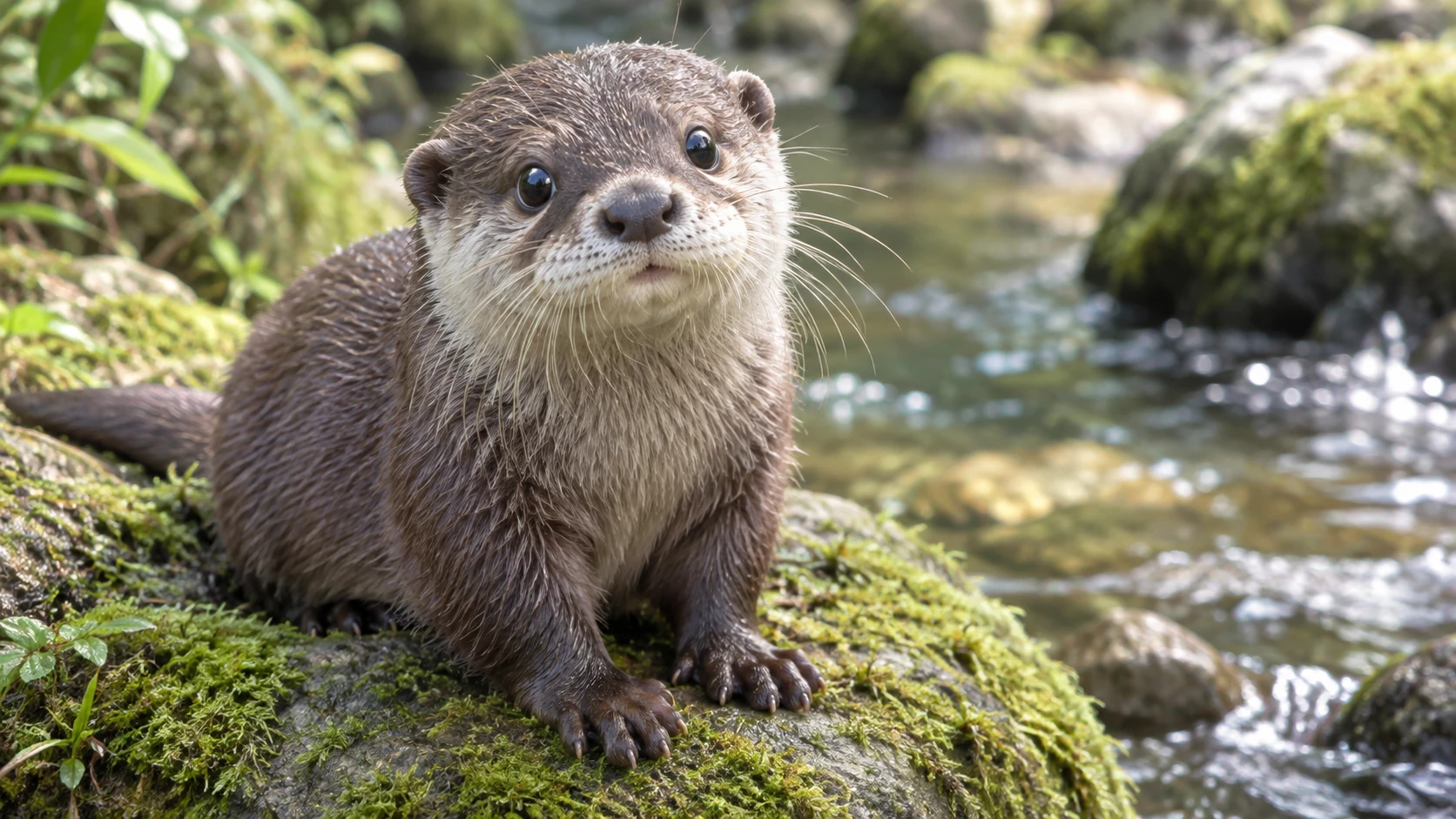
Original (Prompt)
Photorealistic cute small-clawed otter sitting on a mossy rock beside a clear stream, round dark eyes, wet brown fur with a cream chin, natural soft daylight, shallow depth of field, 16:9 landscape near-shot, no text, no logos, no watermark.
Gerada (Prompt)
Using ChatGPT Images 2.6 native GIF generation, based on the previous still image, create a downloadable auto-looping multi-frame GIF. Keep the same otter, mossy stream rock, 16:9 framing, and lighting. Loop: eyes well up, one or two tears slide down the cheek, one small paw gently rubs an eye, then return to the starting pose. Fixed camera, stable background, no captions. Loop about two to three seconds. Output an animated GIF file only; do not output a sprite sheet, collage, or split still frames.
Pôr do sol no farol em pixel art
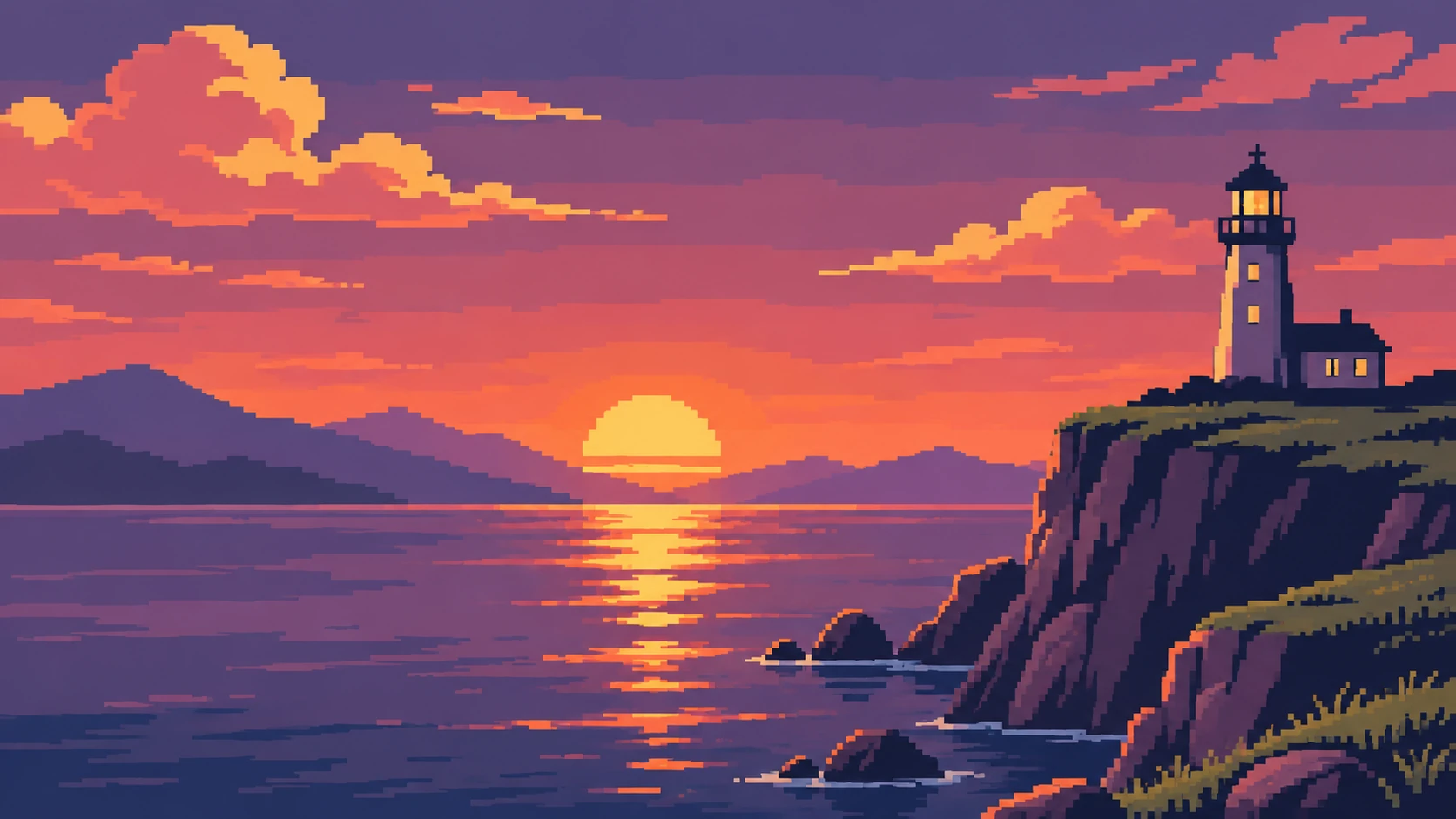
Original (Prompt)
Pixel-art coastal cliff sunset: about 16 colors, retro pixel style, 16:9 landscape. A white lighthouse on a rocky cliff, distant mountain silhouettes, calm sea with sun reflection, sun just above the horizon ready to set. No characters, no text, no UI, no logos.
Gerada (Prompt)
Using ChatGPT Images 2.6 native GIF generation, based on the previous still image, create a downloadable auto-looping multi-frame GIF. Keep the same pixel-art coastal cliff, lighthouse, palette skeleton, and fixed 16:9 camera. Loop: the sun slowly sets below the horizon as sky and sea darken into a brief night, then the same sun rises again and the scene warms back to the opening brightness, returning smoothly to the start. Clear continuous sun path, stable pixels without jitter or morphing, no characters, captions, text, or UI. Loop about two to three seconds. Output an animated GIF file only; do not output a sprite sheet, collage, or split still frames.
Vantagens do gerador de imagens com IA ChatGPT Images 2.6
Desenvolva uma ideia com ajustes fáceis de gerenciar, uma direção criativa mais clara e menos necessidade de refazer uma composição promissora.
Esboços mais rápidos para cartazes e campanhas
Experimente colocar o título acima do assunto principal e depois ao lado. O Flare foi desenvolvido para ajustes rápidos de layout, assim você pode comparar a leitura de cada composição antes de refinar a arte.
Edição de imagens de alta fidelidade com linguagem natural
Use o ChatGPT Images 2.6 como editor de imagens com IA para trocar o fundo, ajustar a cor ou modificar um objeto. Indique o que deve ser preservado para manter a edição fiel à ideia original.
Luz e texturas naturais para destacar os detalhes
Crie cenas realistas com luz natural e superfícies ricas em detalhes, dos veios de uma escrivaninha de madeira à suavidade de um retrato ou aos reflexos no vidro.
Consistência visual para o trabalho em equipe
Mantenha o estilo escolhido em edições sucessivas e variações guiadas por referências. Desenvolva uma apresentação, uma história de marca ou uma série editorial com uma direção visual em comum.
Usos do gerador de imagens com IA ChatGPT Images 2.6
Crie imagens para publicações, marketing e design. Comece pelo público e pelo local de exibição, depois desenvolva cada imagem de acordo com o que ela precisa comunicar.
Imagens para blogs e páginas de destino
Crie capas de artigos, imagens de destaque para sites e ilustrações de apoio sobre o seu tema. Ajuste a composição para deixar espaço para o título ou o conteúdo da página.
Imagens de produtos e peças para campanhas de e-commerce
Explore apresentações sobre uma mesa, cenários sazonais e ideias de lançamento a partir de uma foto de referência. Defina os acessórios, as superfícies e a iluminação em torno do produto em destaque.
Marketing em redes sociais e anúncios pagos
Esboce peças para redes sociais, miniaturas e imagens de campanha com um estilo em comum. Compare fundos e pontos focais antes de desenvolver a opção que preferir.
Storyboards conceituais e protótipos criativos
Transforme uma cena escrita em um quadro de storyboard ou em uma ideia para um painel de referências. Explore personagens, cenários e enquadramentos antes de planejar a arte final ou a sessão.
Como usar o gerador de imagens com IA ChatGPT Images 2.6
Comece com uma ideia ou uma foto original. Crie uma primeira versão, confira o resultado e refine os detalhes que importam para o seu projeto.
Insira o prompt e defina o objetivo
Descreva o assunto principal, o cenário, a iluminação e a composição. Para editar imagens, adicione uma foto de referência e indique tanto a mudança desejada quanto os detalhes que deseja manter.
Defina a direção e gere
Escolha as configurações adequadas entre as opções disponíveis, confira o briefing e gere uma primeira versão. Deixe claros o assunto principal e o uso pretendido.
Refine, gere novamente e exporte
Confira o resultado e revise um detalhe de cada vez. Use sua imagem preferida como referência para novas edições e depois baixe a versão escolhida.
Exemplos da comunidade do ChatGPT Images

We have a gif for you—ChatGPT Images 2.6 is here. ChatGPT Images 2.6 can turn your prompts and pictures into animated GIFs. You can also keep reference images of yourself, pets, and characters ready to reuse in new creations...no need to upload them again. Go on. Make it

呃,用最新的 GPT Image 2.6 做了个测试。终于,能够直接生成动图了,我直接鹈鹕测试哈哈哈哈😂 谁能想到生图模型现在都可以直接上鹈鹕测试了啊! 说真的在我心里 GPT Image 2.5 应该已经是最强的生图模型了,我甚至不知道他后续还有什么地方可以继续升级了,没想到还是带来了 GPT Image 2.6

GIFS! With ChatGPT Images 2.6, turn a prompt or image into an animated GIF. Adjust the speed, edit individual frames, and share it on repeat.

The GPT Image 2.6 API gives you more control over image complexity and lets you create GIFs. So as fun short experiment - I asked Flare to create a GIF of a man doing a standing backflip. Compare low, medium and high complexity side by side. 👇 Detailed explanation below
Perguntas frequentes sobre o gerador de imagens com IA ChatGPT Images 2.6
Mais artigos sobre o gerador com IA ChatGPT Images 2.6
Sua próxima ideia começa aqui
Crie uma imagem a partir do seu próprio briefing
Transforme suas ideias em modelos 3D, imagens e vídeos com o HeyDream AI. Explore ferramentas criativas, experimente diferentes modelos e dê vida ao seu próximo projeto.