Images, upgraded—introducing ChatGPT Images 2.6. Now with GIFs and reference images. Plus, two new models are coming to the API with 50% faster image generation.
Générateur d'images IA ChatGPT Images 2.6
Bientôt disponibleDécouvrez ChatGPT Images 2.6 pour créer des illustrations et des affiches ou retoucher des photos. Modifiez le titre ou l'éclairage d'une composition aboutie tout en conservant les détails du personnage, du produit ou de la marque qui rendent l'image reconnaissable.
0 / 5000
Loading...
Guide de la famille ChatGPT Images
Voyez comment un brief écrit et une photo de référence guident la création d'une image, de la première ébauche à la deuxième retouche.
Créez un portrait éditorial, une mise en scène de produit ou une affiche à partir d'un brief écrit, puis peaufinez l'image à l'aide d'une référence visuelle. Dans la famille ChatGPT Images 2.6, Flare convient à l'exploration visuelle rapide et à la création au quotidien, tandis que Sunburst privilégie les retouches minutieuses lorsque la précision compte plus que la vitesse.
Fonctionnalités clés du modèle d'images IA ChatGPT Images 2.6
Découvrez une affiche LIFE et deux réactions animées à la baisse ou à la hausse d'un cours en Bourse. Voyez comment l'image fixe d'une loutre au bord d'un ruisseau et celle d'un phare en pixel art deviennent de courtes boucles animées.
Une vie en lettres et deux réactions aux cours de la Bourse
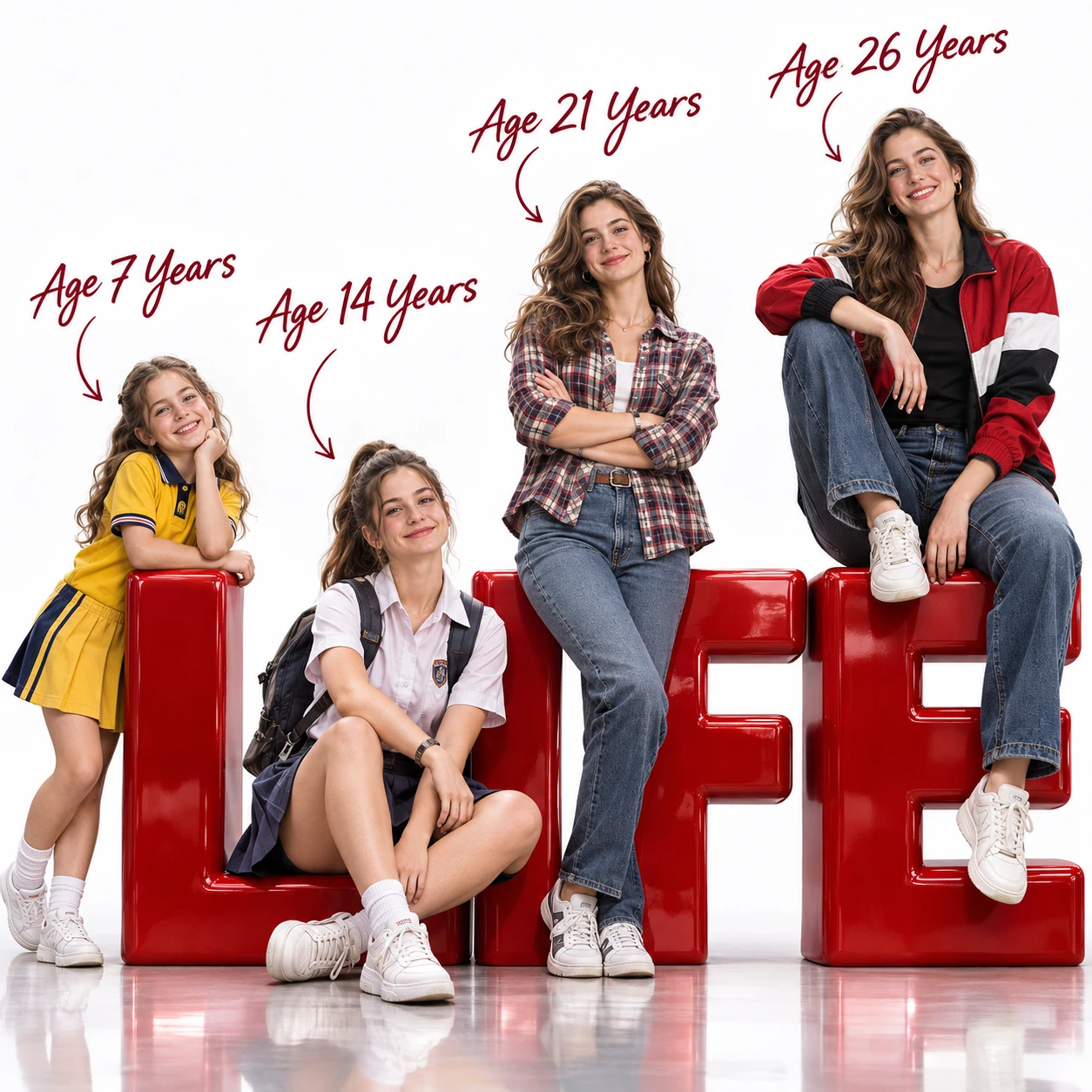
Invite
Create an ultra-photorealistic, cinematic 3D advertising poster in a perfect 1:1 square aspect ratio, rendered in stunning 8K quality. Main Concept — Four Stages of Life Depict four different age versions of the same beautiful European-American female, aged 7, 14, 21, and 26, arranged from left to right in ascending age and physical size. The woman has naturally beautiful Western facial features: fair luminous skin, captivating blue-gray eyes, long softly wavy chestnut-brown hair, a refined straight nose, delicate rosy lips, elegant facial proportions, and a warm, charming smile. All four versions must share highly consistent facial identity, eye shape, nose structure, hair color, skin tone, and distinctive features. Age progression should be biologically realistic, making them instantly recognizable as the same person throughout different stages of her life. Four Age Versions and Outfits Age 7 — Playful Childhood An adorable, cheerful little girl with round youthful cheeks, bright sparkling eyes, and shoulder-length wavy chestnut hair. Wearing a cute yellow school uniform, white socks, and small sneakers. Standing playfully beside the first giant red 3D letter, gently leaning against it with an innocent, joyful expression. Age 14 — Confident Teenage Years A charming teenage schoolgirl with naturally developing facial features and long chestnut hair in a casual ponytail. Wearing a neat white school uniform, a pleated skirt, white sneakers, and a school backpack. Sitting casually in front of the second giant red letter, smiling confidently with a relaxed, youthful posture. Age 21 — Stylish Young Adulthood A beautiful young adult woman with elegant facial features, expressive blue-gray eyes, and long flowing chestnut waves. Wearing a fashionable plaid shirt, fitted blue jeans, and stylish casual sneakers. Standing confidently with her arms crossed, casually leaning against the third oversized red 3D letter. Natural fashion-model confidence and realistic body proportions. Age 26 — Elegant Adulthood The most prominent, visually striking, and slightly larger version. A stunning 26-year-old European-American woman with mature yet youthful facial beauty, luminous natural skin, and voluminous wavy chestnut hair. Wearing a fashionable red, black, and white color-block jacket over a fitted black T-shirt, stylish blue jeans, and clean white sneakers. Sitting stylishly on top of the final giant red 3D letter, one leg hanging casually downward and the other naturally bent. Relaxed, elegant posture, confident smile, looking directly toward the camera. Composition and Giant 3D Typography Arrange all four female characters from left to right, progressively increasing in height and age. Place enormous, bold, glossy, sculptural red 3D letters across the lower portion of the composition, spelling "LIFE". Each age version interacts naturally with one corresponding letter. The giant letters have a premium polished lacquer finish, realistic reflections, dimensional depth, and subtle highlights. Make the composition feel like a luxury commercial campaign celebrating a woman's journey through life. Age Labels and Graphic Details Add elegant, dark burgundy handwritten calligraphy above each respective character: - Age 7 Years - Age 14 Years - Age 21 Years - Age 26 Years Connect each label to its corresponding character with a thin, graceful, hand-drawn curved arrow. Position the labels carefully in the upper negative space without covering faces or overlapping with other labels. Background and Lighting Pure white seamless professional photography studio. Clean white cyclorama background, polished slightly reflective white studio floor, realistic contact shadows under all four characters and the oversized 3D letters. Premium cinematic studio lighting, large softboxes, realistic global illumination, subtle rim lighting, soft natural highlights, gentle shadows, and realistic reflections. Highly detailed skin pores, natural facial expressions, individual hair strands, fine fabric textures, realistic clothing folds, accurate human anatomy, and detailed footwear. Final Rendering Quality Ultra-photorealistic 3D rendering, cinematic commercial photography, high-end luxury advertising aesthetic, sophisticated composition, physically based materials, ray-traced reflections, realistic subsurface skin scattering, beautiful color grading, crisp focus, extraordinary texture detail. Strict Requirements Perfect square composition, 1:1 aspect ratio. Exactly four female characters. All four fully visible and clearly separated. Consistent facial identity throughout all ages. Realistic anatomy, naturally proportioned bodies, no duplicated characters, no extra limbs, no distorted hands, no cropped heads or feet, no overlapping faces, no cartoonish rendering, no watermark, no logos, no additional text beyond the specified typography.
Invite
Using ChatGPT Images 2.6 native GIF generation, create a downloadable auto-looping multi-frame GIF. A super-cute chibi adult office worker with an oversized round head, tiny body, messy fluffy hair, white shirt and loosened tie sits at a desk in a cozy miniature office, fixed front three-quarter camera, square near-shot. The computer monitor shows a clearly plunging stock-market line chart. Loop: hopeful look at the screen, notices the drop, eyes widen, face crumples, large cartoon tears stream down both cheeks, quietly wipes tears while still staring at the falling chart, then returns smoothly to the starting pose. Keep the same character, desk, monitor, outfit, and background. Warm pastel lighting, polished kawaii chibi 3D toy-like style, funny and sympathetic mood. No captions, words, numbers, logos, speech bubbles, or borders. Loop about two to three seconds. Output an animated GIF file only; do not output a sprite sheet, collage, or split still frames.
Invite
Using ChatGPT Images 2.6 native GIF generation, create a downloadable auto-looping multi-frame GIF. A super-cute chibi adult office worker with an oversized round head, tiny body, big sparkling eyes, messy fluffy hair, white shirt and loosened tie sits at a desk in a cozy miniature office, fixed front three-quarter camera, square near-shot. The computer monitor shows a clearly soaring stock-market line chart with a large upward arrow. Loop: notices the rise, eyes widen with delight, jumps up cheering, grabs a handful of generic paper banknotes with no readable currency markings, happily tosses them into the air like confetti while laughing, then returns smoothly to the starting pose. Keep the same character, desk, monitor, outfit, and background. Bright celebratory pastel lighting, polished kawaii chibi 3D toy-like style, funny joyful mood. No captions, words, numbers, logos, real currency symbols, speech bubbles, or borders. Loop about two to three seconds. Output an animated GIF file only; do not output a sprite sheet, collage, or split still frames.
Une loutre essuie une larme
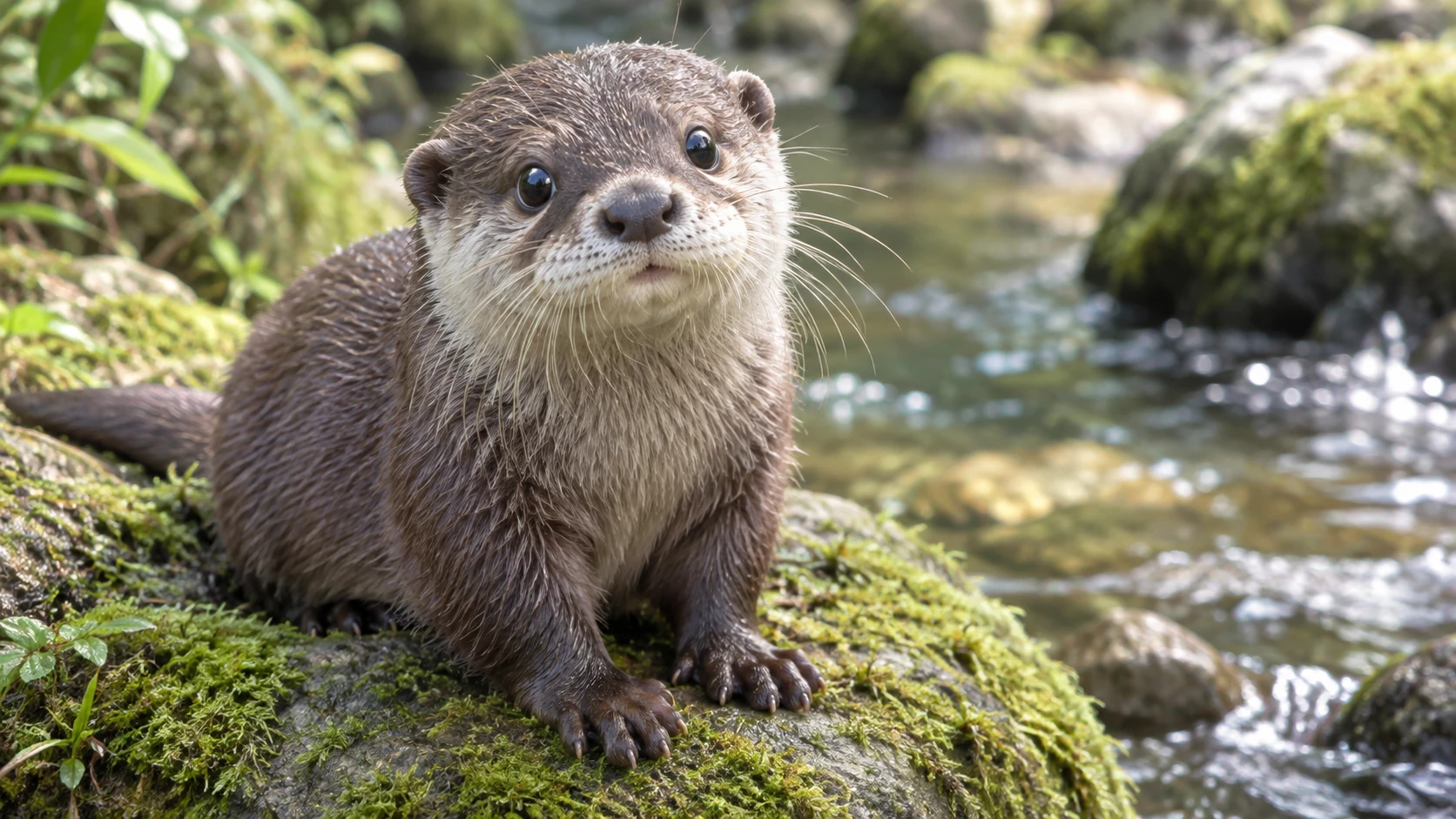
Original (Invite)
Photorealistic cute small-clawed otter sitting on a mossy rock beside a clear stream, round dark eyes, wet brown fur with a cream chin, natural soft daylight, shallow depth of field, 16:9 landscape near-shot, no text, no logos, no watermark.
Généré (Invite)
Using ChatGPT Images 2.6 native GIF generation, based on the previous still image, create a downloadable auto-looping multi-frame GIF. Keep the same otter, mossy stream rock, 16:9 framing, and lighting. Loop: eyes well up, one or two tears slide down the cheek, one small paw gently rubs an eye, then return to the starting pose. Fixed camera, stable background, no captions. Loop about two to three seconds. Output an animated GIF file only; do not output a sprite sheet, collage, or split still frames.
Coucher de soleil au phare en pixel art
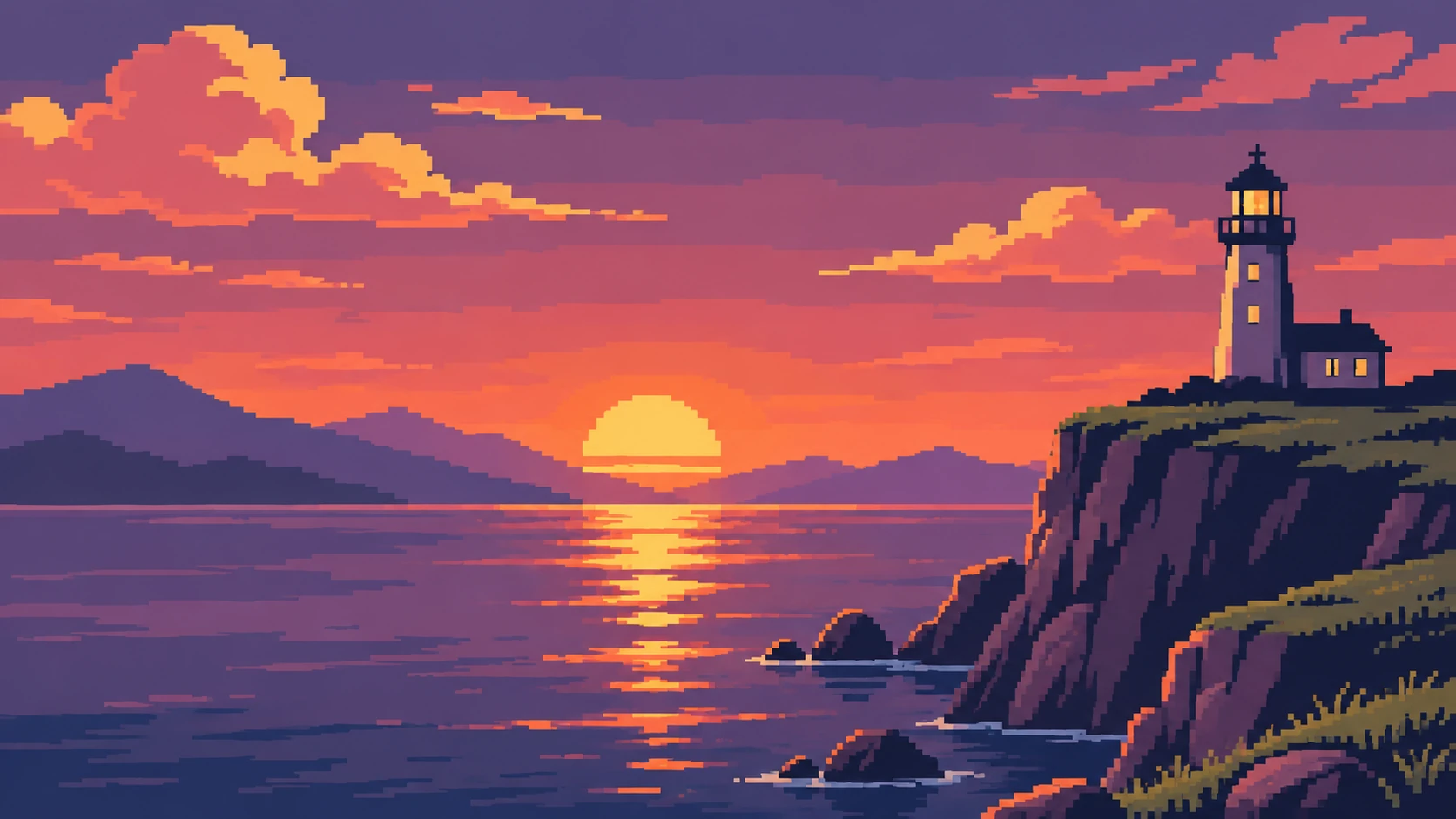
Original (Invite)
Pixel-art coastal cliff sunset: about 16 colors, retro pixel style, 16:9 landscape. A white lighthouse on a rocky cliff, distant mountain silhouettes, calm sea with sun reflection, sun just above the horizon ready to set. No characters, no text, no UI, no logos.
Généré (Invite)
Using ChatGPT Images 2.6 native GIF generation, based on the previous still image, create a downloadable auto-looping multi-frame GIF. Keep the same pixel-art coastal cliff, lighthouse, palette skeleton, and fixed 16:9 camera. Loop: the sun slowly sets below the horizon as sky and sea darken into a brief night, then the same sun rises again and the scene warms back to the opening brightness, returning smoothly to the start. Clear continuous sun path, stable pixels without jitter or morphing, no characters, captions, text, or UI. Loop about two to three seconds. Output an animated GIF file only; do not output a sprite sheet, collage, or split still frames.
Avantages du générateur d'images IA ChatGPT Images 2.6
Développez votre idée par petites retouches pour garder un cap créatif plus clair et éviter de repartir trop souvent de zéro lorsqu'une composition est prometteuse.
Ébauches d'affiches et de campagnes plus rapides
Essayez de placer le titre au-dessus du sujet, puis à côté. Flare est conçu pour modifier rapidement la mise en page, afin que vous puissiez comparer la lisibilité de chaque composition avant de peaufiner le visuel.
Retouche d'images haute fidélité en langage naturel
Utilisez ChatGPT Images 2.6 comme éditeur d'images IA pour remplacer un arrière-plan, ajuster les couleurs ou modifier un objet. Précisez ce qui doit rester inchangé pour que la retouche reste fidèle à votre idée de départ.
Éclairage naturel et textures détaillées
Créez des scènes réalistes à la lumière naturelle et aux surfaces riches en détails : le grain d'un bureau en bois, la douceur d'un portrait ou les reflets sur le verre.
Une production visuelle cohérente en équipe
Conservez le style choisi au fil des retouches et des variantes créées à partir de références. Développez une présentation, un récit de marque ou une série éditoriale autour d'une direction visuelle commune.
Cas d'usage du générateur d'images IA ChatGPT Images 2.6
Créez des visuels pour la publication, le marketing et le design. Partez du public et de l'emplacement prévus, puis façonnez chaque image en fonction du message à transmettre.
Visuels pour blogs et pages de destination
Créez des images de couverture pour vos articles, des visuels d'en-tête pour vos sites et des illustrations d'accompagnement adaptées à votre sujet. Prévoyez de la place dans la composition pour un titre ou le contenu de la page.
Visuels produits et campagnes e-commerce
À partir d'une photo de référence, imaginez des présentations sur table, des décors saisonniers ou des concepts de lancement. Choisissez les accessoires, les surfaces et l'éclairage autour du produit mis en avant.
Marketing sur les réseaux sociaux et publicités payantes
Ébauchez des visuels pour les réseaux sociaux, des miniatures et des images de campagne dans un style commun. Comparez les arrière-plans et les points d'intérêt avant de développer la piste que vous préférez.
Storyboards et prototypes créatifs
Transformez une scène écrite en image de storyboard ou en idée de planche d'ambiance. Explorez les personnages, les décors et les cadrages avant de préparer le visuel final ou la prise de vue.
Comment utiliser le générateur d'images IA ChatGPT Images 2.6
Partez d'une idée ou d'une photo source. Créez une première version, examinez-la et affinez les détails qui comptent pour votre projet.
Saisir un prompt et définir l'objectif
Décrivez le sujet, le décor, l'éclairage et la composition. Pour retoucher une image, ajoutez une photo de référence et indiquez à la fois la modification souhaitée et les détails à conserver.
Définir la direction et générer
Sélectionnez les réglages adaptés parmi les options disponibles, relisez votre brief créatif et générez une première version. Indiquez clairement le sujet principal et l'usage prévu.
Affiner, régénérer et exporter
Examinez le résultat et retouchez un détail à la fois. Servez-vous de votre image préférée comme référence pour les retouches suivantes, puis téléchargez la version retenue.
Exemples ChatGPT Images de la communauté

We have a gif for you—ChatGPT Images 2.6 is here. ChatGPT Images 2.6 can turn your prompts and pictures into animated GIFs. You can also keep reference images of yourself, pets, and characters ready to reuse in new creations...no need to upload them again. Go on. Make it

呃,用最新的 GPT Image 2.6 做了个测试。终于,能够直接生成动图了,我直接鹈鹕测试哈哈哈哈😂 谁能想到生图模型现在都可以直接上鹈鹕测试了啊! 说真的在我心里 GPT Image 2.5 应该已经是最强的生图模型了,我甚至不知道他后续还有什么地方可以继续升级了,没想到还是带来了 GPT Image 2.6

GIFS! With ChatGPT Images 2.6, turn a prompt or image into an animated GIF. Adjust the speed, edit individual frames, and share it on repeat.

The GPT Image 2.6 API gives you more control over image complexity and lets you create GIFs. So as fun short experiment - I asked Flare to create a GIF of a man doing a standing backflip. Compare low, medium and high complexity side by side. 👇 Detailed explanation below
Questions fréquentes sur le générateur d'images IA ChatGPT Images 2.6
Autres articles sur le générateur d'images IA ChatGPT Images 2.6
Votre prochaine idée commence ici
Créez une image à partir de votre propre brief
Transformez vos idées en modèles 3D, images et vidéos avec HeyDream AI. Explorez les outils créatifs, essayez différents modèles et donnez vie à votre prochain projet.