Pinterest Pin AI Generator: Tạo hình ảnh cho Pinterest Chia sẻ
Tạo hình ảnh Pinterest chất lượng cao từ văn bản hoặc ảnh bằng Trình tạo Pinterest Pin của chúng tôi. Dễ dàng tạo hình ảnh để quảng cáo sản phẩm, bảng tâm trạng, nội dung phong cách sống hoặc chiến dịch và chia sẻ chúng trực tiếp với Pinterest.
Các tính năng cốt lõi của Trình tạo Pinterest Pin AI
Pinterest Pin Generator giúp người sáng tạo, người bán hàng thương mại điện tử, người viết blog, nhà thiết kế và nhóm tiếp thị tạo ra hình ảnh sẵn sàng Pinterest từ văn bản hoặc hình ảnh, hỗ trợ kiểm soát phong cách linh hoạt, chỉnh sửa hình ảnh và chia sẻ Pinterest thuận tiện.
Chuyển đổi văn bản thành hình ảnh Pinterest. Mô tả sản phẩm, chủ đề, phong cách, bối cảnh, đối tượng và mục tiêu chiến dịch của bạn, sau đó tạo hình ảnh Pin bóng bẩy sẵn sàng cho khám phá Pinterest.
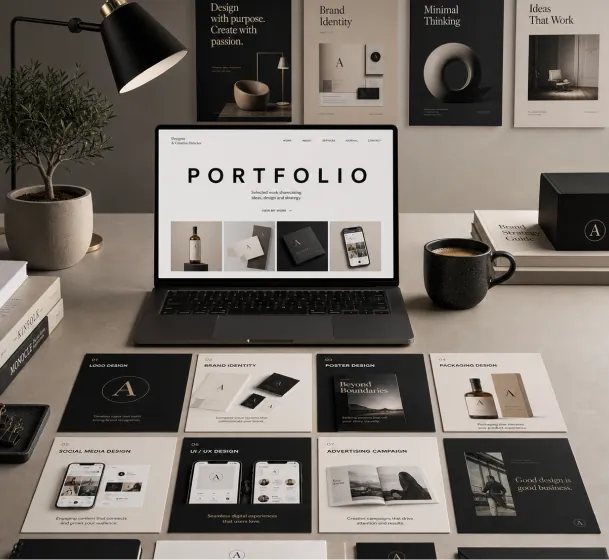
Create a premium graphic design portfolio mockup in a professional creative studio style. Show a clean, elegant workspace presentation featuring multiple graphic design project cards arranged in a refined grid layout, a modern laptop screen displaying a portfolio homepage, and several printed posters laid out neatly on the desk and mounted on the wall.Use a polished creative-director aesthetic with soft shadows, subtle depth, realistic materials, and a high-end studio atmosphere. Include sleek typography placeholders, branding samples, editorial-style poster designs, business cards, stationery, notebook, pen, coffee cup, desk lamp, and small plant for a realistic studio setup.The design should have a clean grid layout, balanced spacing, soft realistic shadows, premium lighting, and neutral luxury tones such as black, white, warm beige, gray, champagne, and cream. Make the laptop screen show a minimal portfolio interface with project thumbnails, navigation menu, and bold hero text.Add multiple portfolio project cards such as logo design, brand identity, poster design, packaging design, social media design, UI/UX design, and advertising campaign mockups. Arrange everything professionally with a modern minimalist style, sharp details, clean typography, elegant composition, and a premium creative agency presentation look.Style: high-end graphic design portfolio, modern creative studio, luxury branding mockup, clean desk setup, realistic shadows, editorial layout, minimalist premium design, professional presentation, 4K, ultra-detailed.
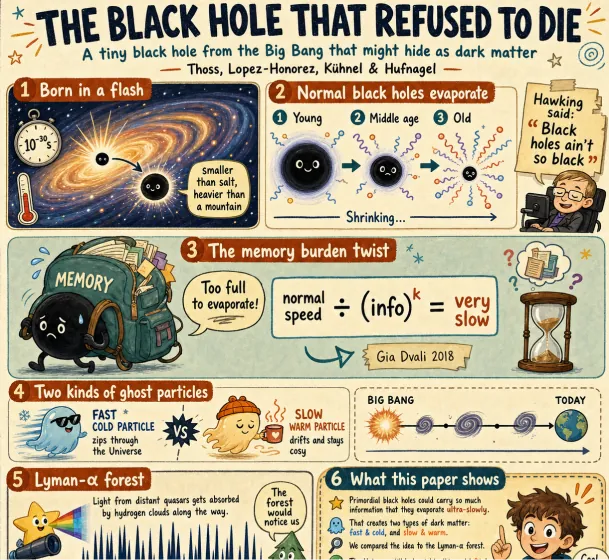
Create a fun, friendly magazine-style educational infographic poster for teenagers.Topic: Primordial black holes, Hawking evaporation, and memory-burden dark matter.Style: Playful hand-drawn diagrams, cute cartoon characters, clean bold typography. Warm and approachable.Canvas: Portrait orientation, warm cream paper texture, thin muted gray border.Headline: "THE BLACK HOLE THAT REFUSED TO DIE"Subtitle: "A tiny black hole from the Big Bang that might hide as dark matter"Credit: Thoss, Lopez-Honorez, Kuhnel & HufnagelLayout sections:Top left: "Born in a flash" - Early universe swirl, tiny PBH (smaller than salt but heavier than mountain), 10^-30s clock, thermometer.Top right: "Normal black holes evaporate" - 3 shrinking stages with particle squiggles, Hawking quote sticker: "Black holes ain't so black".Center: "The memory burden twist" - Sad cartoon black hole with big "MEMORY" backpack, speech bubble "Too full to evaporate!", simple equation: normal speed / (info)^k = very slow. Gia Dvali 2018.Lower middle: "Two kinds of ghost particles" - Fast cold particle vs slow warm particle, Big Bang to Today timeline.Bottom left: "Lyman-alpha forest" - Spiky absorption forest graphic, note "The forest would notice us".Bottom right: Rounded box "What this paper shows" - final summary.Colors: warm beige, dark navy, rust orange, dusty teal, soft brown, gray.Flat vector style with sketchy outlines, soft shadows, rounded friendly shapes.Dense but clear single-page poster with easy top-to-bottom flow. Make advanced physics feel fun for curious teens.
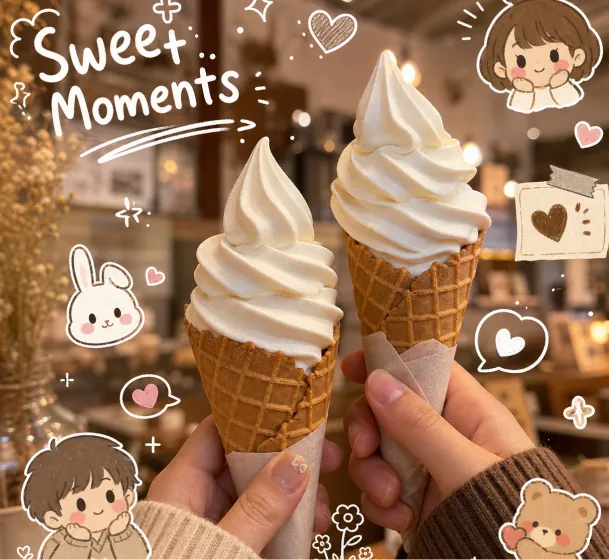
Close-up aesthetic photo of two hands holding vanilla soft serve ice cream cones, cozy warm cafe lighting, creamy texture, dreamy beige and brown color palette, shallow depth of field, soft bokeh background, kawaii doodle stickers and white hand-drawn illustrations around the image, cute cartoon kids and bunny characters, handwritten typography saying "Sweet Moments", playful sparkles and hearts, cozy lifestyle photography, cinematic warm tones, Instagram story aesthetic, soft glow, realistic food photography, adorable scrapbook journal style, ultra detailed, high quality
Sử dụng tính năng tạo hình ảnh Pinterest để biến ảnh sản phẩm, tài liệu tham khảo về phong cách sống, bảng tâm trạng hoặc tài sản thương hiệu thành hình ảnh Pin rõ ràng với bố cục và phong cách mạnh mẽ hơn.
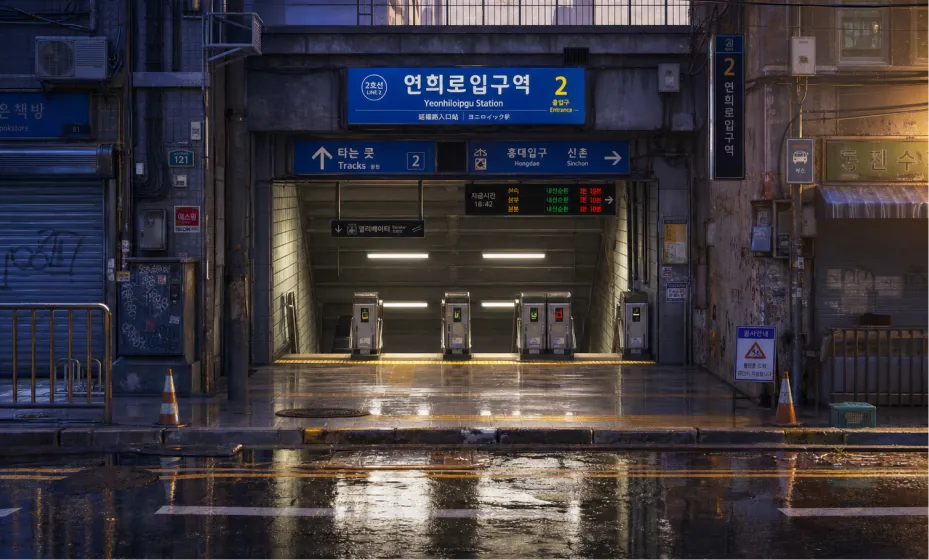
Create a highly detailed cinematic 3D environment concept art image of a quiet Seoul subway station entrance after rain, inspired by urban Korean transit architecture, without using any input image as reference. Scene/backdrop: A street-level entrance to a Korean subway station, viewed straight on from across the wet road. The station descends underground in the center with visible ticket gates and glowing card readers. Surrounding it are dense urban details: Korean-style transit signs, overhead direction boards, small electronic displays, wall-mounted air conditioning units, exposed black cables, metal railings, shuttered storefronts, utility boxes, posters, graffiti, traffic cones, drainage channels, cracked curbs, puddles, and damp tiled pavement. Subject: The subway entrance is the main subject, centered and slightly recessed, with large blue station signage above it. The sign should feel Korean and transit-authentic, with Hangul-like characters and smaller English-style station text, but no need for perfectly readable real-world text. Style/medium: Premium stylized 3D render, anime-background-meets-cinematic-concept-art, realistic materials, painterly color grading, high production value, clean composition, not photorealistic photography. Composition/framing: Ultra-wide 16:9 landscape frame, symmetrical frontal composition, eye-level camera, station entrance centered, road and reflective puddles in the foreground, building facades framing left and right, dense signage across the top third, strong depth into the dark stairwell. Lighting/mood: Golden low-angle sunlight from the right side, cool blue-purple shadows on the left, soft atmospheric haze, rainy-day freshness, calm empty city mood, gentle glow from fluorescent station lights and small signal LEDs. Color palette: Warm amber sunlight, saturated blue transit signs, cool violet-blue shadows, muted concrete gray, small accents of red and green LED lights, glossy reflections on wet asphalt. Materials/textures: Wet asphalt with mirror-like puddle reflections, damp concrete, old painted metal, scratched plastic signs, grime, water stains, rust, ceramic tile, glass, fluorescent tubes, weathered posters. Constraints: 16:9 aspect ratio, no people, no cars, no animals, no watermark, no visible brand logos, no fantasy creatures, no futuristic vehicles, no excessive cyberpunk neon. Keep the scene grounded, believable, and richly detailed.
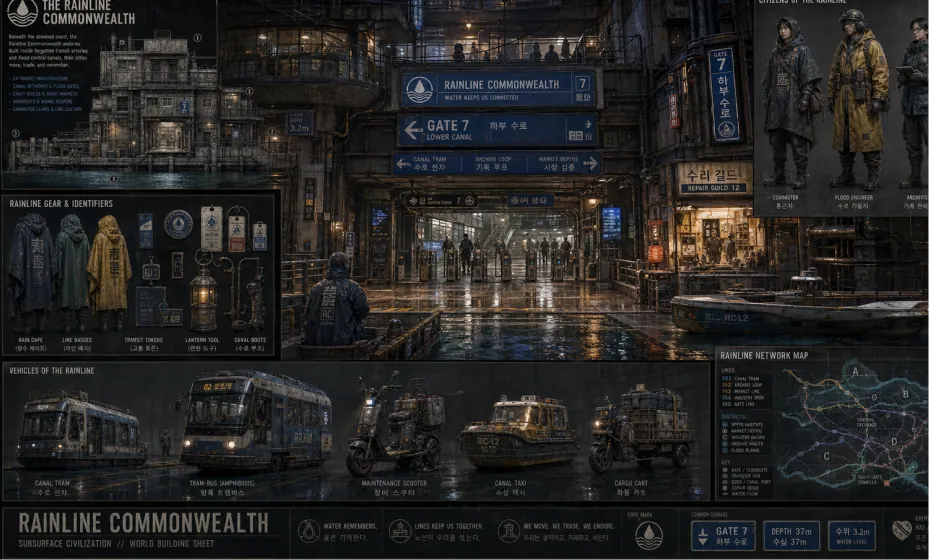
Create a complete visual world-building model for a civilization with the style of reference image, including multiple images of buildings, characters, clothing, vehicles and maps, using a unified design language and featuring a cinematic-like realism with extremely rich details.
Chỉnh sửa hình ảnh cho hình ảnh Pin bằng cách tinh chỉnh nền, màu sắc, cảnh, bố cục và hướng hình ảnh thông qua lời nhắc, sau đó chuẩn bị kết quả để chia sẻ Pinterest.
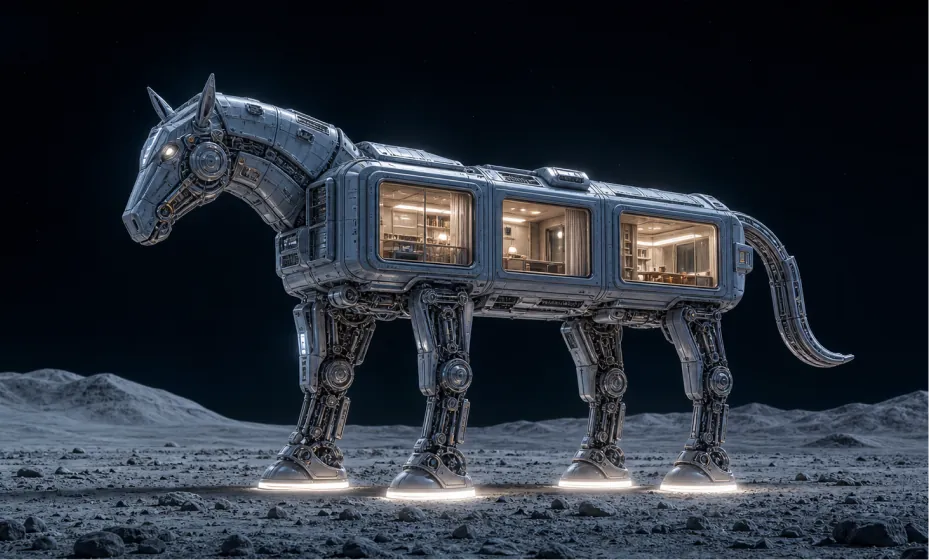
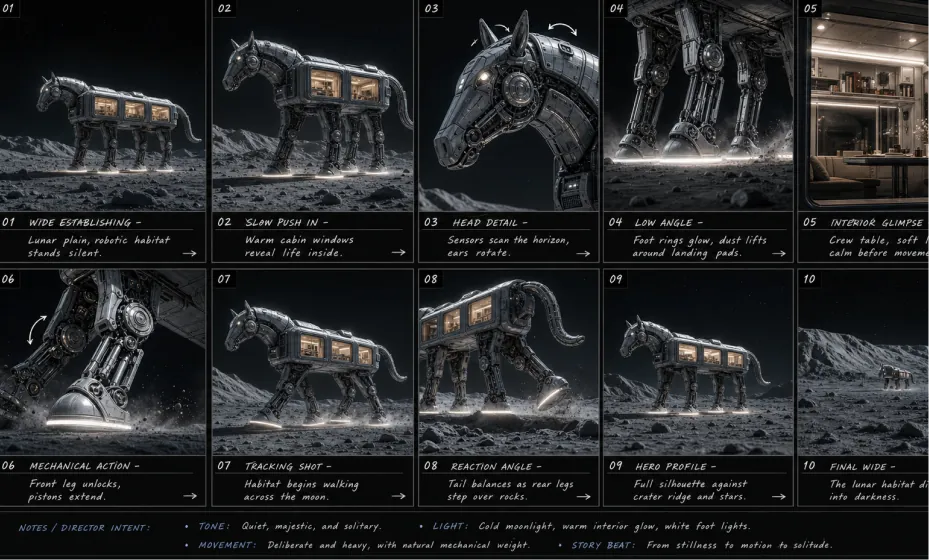
Use case: stylized-concept. Asset type: cinematic 16:9 sci-fi concept art. Primary request: Create a wide 16:9 text-to-image scene of a futuristic animal-shaped lunar habitat, resembling a mechanical horse or elegant robotic pack animal standing on the moon. Do not use any input image as a visual reference; generate from this text prompt only. Scene/backdrop: A quiet lunar surface at night, pale dusty ground with scattered rocks and soft rolling crater hills in the distance, deep black outer space above, minimal stars, vast empty atmosphere. Subject: A large quadruped robotic habitat shaped like a sleek horse-like creature. Its body is a modular architectural living pod, with rounded rectangular cabin sections, thick sci-fi paneling, recessed seams, visible bolts, vents, hatches, and industrial spacecraft details. The head is mechanical and sculptural, with a subtle horse profile, angular armor plates, small sensor lights, circular side components, and horn-like antenna fins. The tail is a curved segmented mechanical appendage. Architecture/interior: Several large rectangular windows are built into the body, glowing warmly from within. Through the windows, show refined miniature interiors: cream-white walls, soft ceiling lights, shelves, tables, curtains, and a calm luxury cabin feeling, like a tiny futuristic moon hotel inside the robot. Legs/mechanics: Four tall articulated robotic legs with exposed pistons, hydraulic joints, cables, circular knee mechanisms, polished metal struts, and heavy rounded landing feet. Each foot has a bright thin white ring light at the base, casting soft illumination onto the lunar dust. Style/medium: Ultra-detailed cinematic 3D render, high-end sci-fi concept design, architectural visualization mixed with futuristic vehicle design, photorealistic materials, premium industrial design, no cartoon look. Composition/framing: Wide landscape composition, 16:9 aspect ratio. The full robotic habitat is visible in side view, facing left, centered slightly lower in the frame. Keep generous dark negative space above for a monumental lonely feeling. Low camera angle at human eye level, 35mm cinematic lens, sharp silhouette, full body visible, no cropping. Lighting/mood: Cold blue moonlight on the metallic exterior, warm golden-white interior window glow, white glow from the foot rings, subtle rim lighting around the robot, quiet mysterious atmosphere, elegant and lonely, high contrast night scene. Color palette: Deep black sky, blue-gray lunar ground, cool silver-blue metal, warm cream and amber cabin interiors, clean white light accents. Materials/textures: Brushed metal, matte ceramic spacecraft panels, glass windows, rubberized seals, polished mechanical joints, dusty lunar regolith, fine surface scratches, realistic panel seams, soft reflections. Constraints: 16:9 landscape. Text-to-image only, no image reference. No people, no logos, no readable text, no watermark, no extra vehicles, no Earth in the sky, no fantasy castle elements, no exaggerated cartoon proportions. Keep the design elegant, believable, and architectural.
Based on the reference image, create a professional English storyboard with 10 annotated frames, suitable for rehearsals, director's guidance, and action or scene planning, in a 16:9 ratio.
Ưu điểm cốt lõi của Trình tạo Pinterest Pin AI
Pinterest Pin Generator cung cấp trải nghiệm chỉnh sửa và tạo hình ảnh AI hiệu quả và có thể kiểm soát cho người sáng tạo, thương hiệu và nhóm tiếp thị Pinterest, giúp người dùng tạo ra hình ảnh Pin hấp dẫn nhanh hơn trong khi vẫn giữ được chủ đề rõ ràng và tập trung vào mục tiêu chiến dịch.
Pinterest-Sáng tạo trực quan sẵn sàng
Tạo hình ảnh rõ ràng, hấp dẫn phù hợp với hoạt động khám phá Pinterest, giới thiệu sản phẩm, bảng tâm trạng, cảm hứng mua sắm, hướng dẫn và hình ảnh chiến dịch trong khi vẫn giữ được chủ đề chính rõ ràng.
Tạo văn bản thành hình ảnh và hình ảnh thành hình ảnh
Bắt đầu từ lời nhắc hoặc tải hình ảnh lên, sau đó sử dụng AI để tạo Pinterest Pin hình ảnh với khả năng kiểm soát linh hoạt về kiểu dáng, nền, vị trí sản phẩm, màu sắc và bố cục.
Chỉnh sửa hình ảnh linh hoạt cho Pins
Tinh chỉnh hình ảnh được tạo hoặc tải lên bằng cách điều chỉnh cảnh, hình nền, tâm trạng hình ảnh và hướng thiết kế, giúp tạo nhiều biến thể Pin để thử nghiệm dễ dàng hơn.
Quy trình chia sẻ Pinterest thuận tiện
Sau khi tạo hình ảnh, hãy tiếp tục Pinterest để hình ảnh có thể được lưu, chia sẻ hoặc xuất bản mà không cần chuyển đổi thủ công giữa các công cụ sáng tạo và nền tảng xã hội.
Các trường hợp sử dụng cho Trình tạo Pinterest Pin AI
Pinterest Pin Generator trên heydream.im hỗ trợ quảng bá sản phẩm, lập kế hoạch nội dung mạng xã hội, tiếp thị thương hiệu, bảng truyền cảm hứng, hình ảnh chiến dịch và khám phá thiết kế sáng tạo cho quy trình làm việc Pinterest hiện đại.
Sản phẩm Pin Sáng tạo
Tạo sản phẩm bóng bẩy Pins cho các cửa hàng thương mại điện tử, chiến dịch theo mùa, cảm hứng mua sắm, giới thiệu sản phẩm, hướng dẫn quà tặng và bảng Pinterest.
Lập kế hoạch nội dung truyền thông xã hội
Tạo ý tưởng hình ảnh nhất quán cho các hướng dẫn, công thức nấu ăn, bài đăng về phong cách sống, hướng dẫn du lịch, bảng thời trang, cảm hứng trang trí nhà cửa và cách kể chuyện bằng hình ảnh trên Pinterest và các kênh xã hội.
Tiếp thị và quảng bá thương hiệu
Sản xuất đồ họa quảng cáo, hình ảnh chiến dịch, hình ảnh Pin có thương hiệu và nội dung Pinterest có thể chia sẻ để tiếp thị sản phẩm, chiến dịch của người sáng tạo và tăng lượng khán giả.
Cảm hứng sáng tạo và thiết kế
Khám phá các phong cách, hình nền, bố cục và hướng trực quan khác nhau, sau đó sử dụng kết quả được tạo dưới dạng hình ảnh sẵn sàng Pinterest cho bảng tâm trạng, bộ sưu tập cảm hứng hoặc lập kế hoạch thiết kế.
Cách sử dụng Trình tạo Pinterest Pin trên Heydream
Trình tạo Pinterest Pin trên heydream.im không yêu cầu kinh nghiệm thiết kế. Chọn kiểu máy AI của bạn, nhập lời nhắc hoặc tải hình ảnh lên, chọn cài đặt hình ảnh phù hợp và tạo hình ảnh sẵn sàng cho Pinterest trong vài giây.
Bước 1: Chọn mẫu AI ưa thích của bạn
Chọn mô hình hình ảnh AI phù hợp nhất với mục tiêu tạo hình ảnh Pinterest, phong cách hình ảnh và yêu cầu chi tiết của bạn.
Bước 2: Nhập văn bản hoặc tải lên hình ảnh
Nhập lời nhắc Pinterest, ý tưởng sản phẩm, chủ đề blog hoặc ý tưởng chiến dịch của bạn. Bạn cũng có thể tải ảnh sản phẩm, tài sản thương hiệu hoặc hình ảnh tham chiếu lên để tạo từ hình ảnh này sang hình ảnh khác.
Bước 3: Chọn Tỷ lệ khung hình hình ảnh
Chọn tỷ lệ khung hình hình ảnh phù hợp với nhu cầu hình ảnh Pinterest của bạn. Pinterest thường ưu tiên hình ảnh Pin kiểu 2:3 dọc, trong khi định dạng hình vuông cũng có thể hữu ích cho một số thử nghiệm sáng tạo nếu có.
Bước 4: Tạo và chia sẻ trên Pinterest
Nhấp vào tạo, xem lại hình ảnh Pin của bạn, tải xuống hình ảnh và tiếp tục Pinterest để lưu, chia sẻ hoặc xuất bản kết quả.

