AI 圣诞视频生成器
将照片变成圣诞老人变身、送礼场景、节日举杯或与圣诞老人拥抱的视频。选择圣诞模板,并在提示词中设定动作和节日场景。
圣诞视频模板与示例
探索圣诞老人变身、送礼、圣诞举杯及与圣诞老人拥抱的效果。以模板为起点,制作人物可辨认、带有圣诞道具与节日灯光的节庆视频。
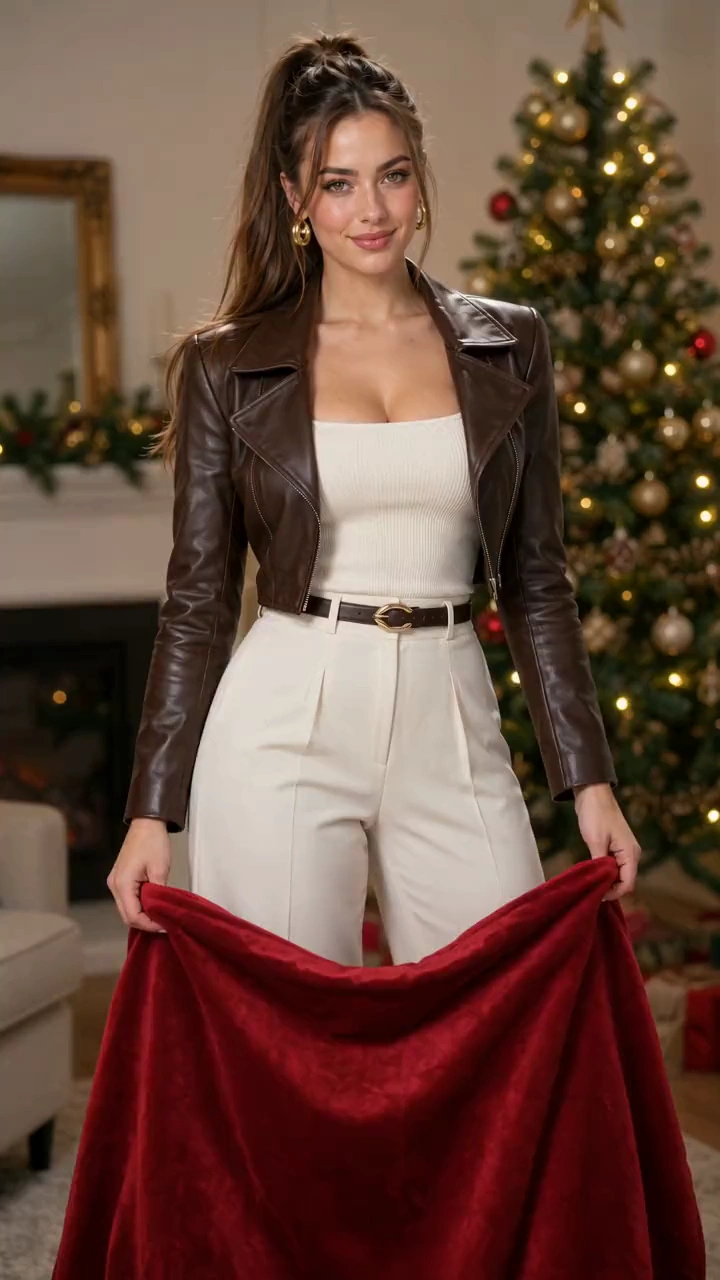
Photorealistic 10-second Santa transformation. Image 1, first in the images array, supplies the only subject. Preserve facial identity and hairstyle; the Santa hat sits over the existing hair. Begin in the reference clothing. Cozy room, Christmas tree, warm lights. One fixed, continuous 9:16 knee-up shot with headroom for raised cloth and hat; both hands stay in frame. No cuts, camera movement, extra people, text or watermarks. Hold the upper corners of one large opaque red velvet cloth, wide enough to hide the torso and long enough to extend below the knees when raised, with natural weight and folds. 0-2s: Smoothly lift it from the waist until the upper edge is above the head, fully concealing head and body. 2-2.5s: Remain completely hidden. 2.5-6s: Lower the edge fluidly and unhurriedly to the upper thighs. Reveal follows that descending edge exactly: red Santa hat and unchanged face, then white fur collar and red coat, then black belt and lower coat. Each area is fully transformed when it emerges; unrevealed areas stay hidden. Never expose original clothing then change it, or pop a hat onto an already visible head. A thin golden sparkle trail stays attached to the edge, without a separate sweeping arc. Velvet falls under gravity into soft folds without stopping midway. 6-10s: Cloth settles below the finished coat, still held naturally in both hands. Look at the camera and smile happily. Costume and hat remain stable, with natural fabric settling. Sound: Continuous soft velvet swish follows movement; a delicate descending magical shimmer follows the reveal and resolves in a bright sleigh-bell chime. Soft, warm Christmas instrumental underneath. No dialogue, singing or voice-over.
制作圣诞变身与节庆瞬间
以你的照片作为圣诞老人亮相或节日互动的参考,并根据场景调整提示词。
圣诞老人变身特效
利用红布、雪花、礼盒丝带、响铃、节日转身动作或圣诞树灯光,打造圣诞老人服装亮相效果。
圣诞互动
围绕圣诞老人送礼、圣诞举杯或温暖拥抱构建场景,在提示词中描述人物和动作。
圣诞道具、灯光与氛围
用包装好的礼物、圣诞树、暖色灯光和节日特效构建庆祝场景,再在模板提示词中调整场景或镜头方向。
多主题与多图一致性
让主角在不同照片和圣诞主题中保持可辨认的特征,使一组节日短片拥有一致的节庆风格。
让熟悉的照片融入节日
围绕观众熟悉的人物制作祝福,搭配可根据场合调整的圣诞场景。
从明确的创意开始
预设圣诞模板提供可继续完善的场景,让你专注于想呈现的人物、动作和祝福。
一致的人物特征
在圣诞老人变身、送礼、举杯和拥抱中保留可辨认的面部特征,让每个片段都像同一个人或品牌故事的一部分。
自然动态与节日氛围
通过协调的动作、表情和节庆环境,将递礼物、共同举杯或圣诞老人拥抱融入圣诞场景。
协调统一的节日内容
为祝福活动、季节性社交帖子或节日内容系列,制作风格一致的一组节庆短片。
适合祝福和社交帖子的圣诞视频创意
为粉丝、客户、朋友或家人创作一段简短的节庆瞬间。
圣诞 Reels 与限时动态
将圣诞老人变身、送礼瞬间、圣诞举杯或圣诞老人拥抱,分享为节庆 Reels、限时动态和短帖。
品牌节日帖子
以创始人或团队成员为主角,制作适合节日社交帖子的圣诞场景。
动态圣诞贺卡
在电子圣诞贺卡中,将送礼或圣诞老人拥抱短片与你自己的节日祝福搭配。
家庭庆祝短片
使用个人和家庭照片制作圣诞老人变身、共同庆祝或温暖的节日问候,分享至群聊和家庭相册。
如何使用 AI 圣诞视频生成器
只需简单三步,将照片制作成圣诞视频。
1. 选择圣诞模板
选择圣诞模板,载入该场景的示例图片和提示词。
2. 添加照片并编辑提示词
将示例图片替换为清晰的人像照片。编辑提示词,描述动作、场景和节日细节,再选择视频设置。
3. 生成并下载
查看显示的积分费用并选择生成。在历史记录中跟踪任务,检查视频和音频,然后下载结果。
AI 圣诞视频生成器常见问题
AI 圣诞视频生成相关文章与技巧

