
I made a Grok Bot that can use Suno, Midjourney, and Opus to make music videos "Claudia" (the Grok Bot) made this teaser autonomously with @imagine x.ai/bot/zvsgYtQHUc…
Midjourney Video AI 视频生成器
在 Hey Dream AI 上使用 Midjourney Video,让人像、插画或想象中的场景动起来。从一张图片出发,通过动态提示词探索镜头移动、人物动作或氛围变化。
Loading...
Midjourney Video AI 视频生成器介绍
探索静态画面之外的变化
想一想你希望观众注意到什么变化:人物的反应、镜头展现更多场景,或背景中经过的动态。从一个明确的动作开始,再查看并完善结果。
Midjourney Video AI 视频生成器创意示例
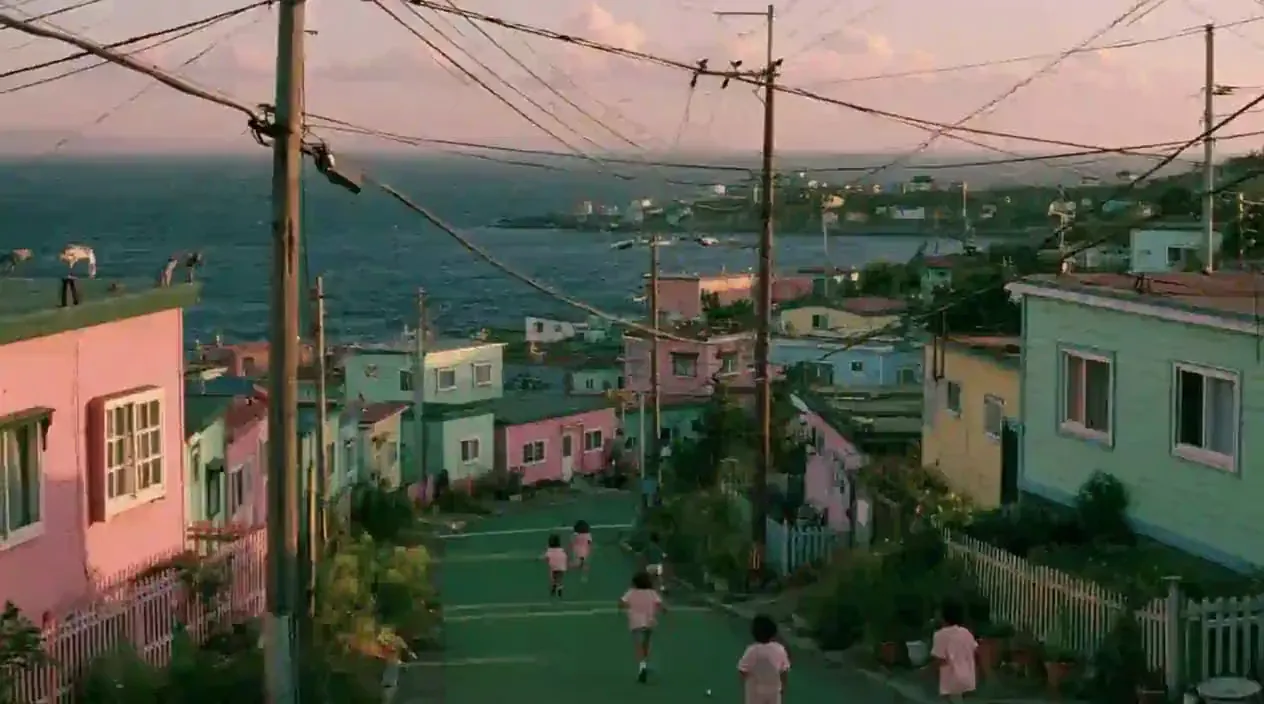
从俯瞰大海的山坡街道,到穿过客厅的虹彩丝带,这些示例探索了熟悉和想象场景中的动态。
原始图片
视频
提示词
Art style & Vibe: A nostalgic, whimsical 1990s film photograph with the warm, slightly faded color grading, low contrast, and natural film grain characteristic of a vintage movie frame. The color palette is dominated by dreamy pastel pinks, greens, and blues. Setting: A hillside coastal village under a soft, hazy sky with pale pink-tinged clouds. A green-painted paved road slopes downward toward the dark blue ocean, where several children wearing light pink t-shirts are running and playing freely on the street. Details: Dense clusters of small, pastel-colored houses in shades of pink, green, light blue, and yellow flank both sides of the sloping road, decorated with small fences, potted plants, and wild greenery. Old utility poles and a messy web of overhead power lines stretch across the sky. In the far background, the ocean meets a hazy horizon, and more tiny houses are scattered along a distant rocky peninsula. Camera & Composition: A natural, eye-level cinematic shot capturing everyday, nostalgic community life. Soft outdoor lighting, film-like blur, and candid movement.
用 Midjourney Video 塑造动态场景
图片确定起始构图,动态提示词描述场景应如何发展。
图生视频
上传一张静态图片作为首帧。图片中的主体、场景和构图将成为生成镜头的视觉起点。
设定主体、镜头与场景动态
描述转头、缓慢推进镜头或周围环境的动态。让指令聚焦于上传场景中应发生的变化。
选择输出分辨率
从可用的输出分辨率中选择一项,并在开始前查看显示的积分费用。
单张首帧图片
将一张起始图片与动态提示词搭配使用。此处接入的功能不支持上传尾帧,也没有独立的时长和宽高比设置。
探索人物、氛围与镜头运动
从细微动作到更具氛围的镜头,探索动态如何改变图片的感受。
塑造人物瞬间
使用人像或角色插画,探索眼神、点头或姿势变化。检查动作是否符合主体和氛围。
让环境更有生气
探索飘动的云、流动的水或背景活动如何改变场景。利用片段判断你希望营造的氛围。
找到合适的镜头运动
从选定的构图出发,尝试缓慢推进或横向移动镜头。比较取景和逐渐呈现的画面,决定镜头如何展开。
创作动态艺术画面
为海报艺术、开场画面或社交媒体预告尝试动态表现。下载选中的片段,用于更完整的剪辑作品。
如何使用 Midjourney Video AI 视频生成器
只需三步,从起始图片生成视频。
第 1 步:上传首帧
选择想要制作成动态效果的图片。必须提供起始图片,此生成器不能仅凭文字生成视频。
第 2 步:描述动态并选择分辨率
写下想看到的动作和镜头运动,然后选择 480p 或 720p。生成前查看显示的积分费用。
第 3 步:生成并查看
开始生成并查看视频。调整提示词或起始图片,探索另一种效果,再下载选中的结果。
在 X 上探索 Midjourney Video 作品

🎬New MV【composition】 新しいMVつくりました! Music : Suno Visual : Midjourney Video Generation : MiniMax H3 MiniMax H3はオブジェクトをレイヤーとして処理する能力が高くて面白い! プロンプトの通りも良すぎるので、いろんなタイプのプロンプト試すのが楽しいかもです🍿
have you tried the latest edit model updates? do you think there's anything we should add there? x.com/midjourney/sta… what do you think the updated animation and video tool should look like?

We’re gonna start testing our first V8.2 edit model today. This model supports editing with instructions, generating images with other images (up to 4 references), brush-based inpainting, and outpainting. It also works with personalization, moodboards, and srefs. Have fun!


sref 2687313947 –sv 6 Video by Midjourney @midjourney [prompt] --sref 2687313947 --sv 6 --sw 500 --stylize 500 --v 8.2

sref 2687313947 –sv 6 Midjourney, sref code. Iridescent Blue & Gold Chrome Style. V7 Style Reference: –sref random → sref 2687313947. [prompt] --sref 2687313947 --sv 6 --sw 500 --stylize 500 --v 8.2 sref-code.com/portfolio/sref…

Midjourney Video 模型指南
查看 Midjourney 官方指南,了解视频创作、动态效果及起始图片的使用方法。

