万圣节 AI 南瓜头变身
将照片变成南瓜头万圣节视频。围绕手势、道具或镜中惊喜设计变身亮相,通过模板和提示词引导动作、服装变化与氛围。
动态南瓜头亮相
探索以手势、道具、烟雾、蝙蝠和镜中反转打造的南瓜头亮相效果。精选片段展示了光环升起换装和南瓜灯亮相。
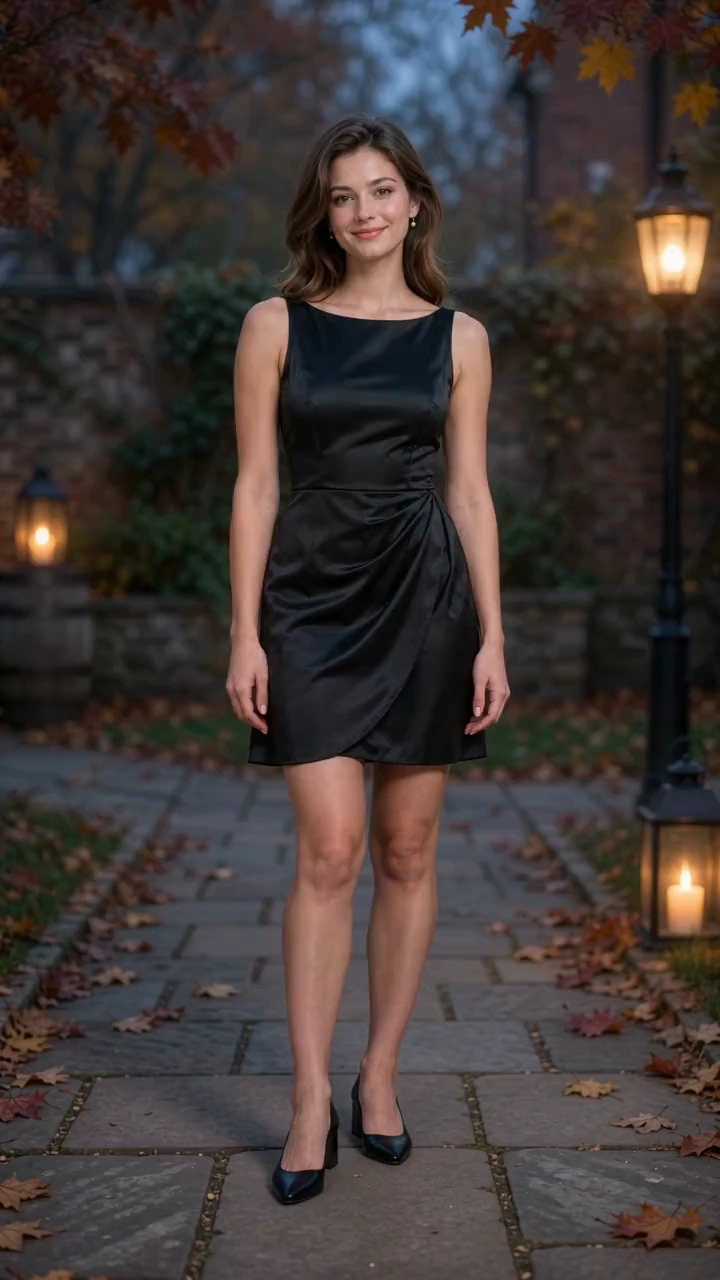
Use Image 1, the first uploaded image, as the exact reference for the only person. Start in the original outfit and shoes. Preserve body proportions, natural anatomy and hands; transform only clothing, footwear and the entire head including hair. Photorealistic 10-second, 9:16 Halloween video in an autumn courtyard at blue hour. One locked full-body shot; complete head, both hands and shoes always visible, generous headroom and floor space, constant scale. 50mm, f/5.6, subtle grain, cool dusk and warm lanterns. 0-3s: Standing naturally, raise the right hand beside the shoulder and snap once. Only afterward, a thin amber ring appears flat around the shoes. 3-7s: The ring rises continuously. Directly behind it, shoes become black ankle boots, then a tailored black-and-burnt-orange paneled party dress forms from hem to waist to shoulders with natural folds. Keep untouched regions unchanged and completed regions stable. The face stays human until the ring reaches the neck. An opaque warm band hides the head change, revealing one solid ribbed pumpkin attached to the same neck, with a short stem, triangular eye openings and a fixed glowing grin. Never show a human face through the rind or change everything in one pop. 7-10s: Light fades above the stem. Lower the right hand, open both hands slightly away from the hips and tilt the head confidently. Skirt settles, boots stay planted, pumpkin glow steady and carved face rigid. Sound: dry snap, rising magical shimmer following the ring, soft fabric movement, warm bell at illumination and light Halloween instrumental music. No dialogue, singing or voice-over. One unbroken shot; no zoom, reframing or approach. Tangible rind and fabric, realistic contact light. No plastic CGI, detached head, extra limbs, flicker, text or watermarks.
结合动态与氛围打造南瓜头亮相
通过照片和提示词,将头部变化、手势、服装与万圣节场景融合成一段短片。
发光的南瓜灯头
为主体添加有棱纹的南瓜头、雕刻双眼、瓜柄和发光笑脸,变成万圣节角色。
由动作触发的亮相
利用打响指、举起灯笼、烛烟、盘旋的蝙蝠、吃糖后的反应或镜中亮相,为变身赋予清晰的故事线。
万圣节服装与场景变化
为南瓜头搭配黑橙色服装、靴子、披风或灯笼照亮的环境。有些场景保留原有服装,有些则呈现完整的万圣节改造。
一致的南瓜角色造型
让南瓜形状、雕刻笑脸、服装和万圣节配色在动作推进至最终亮相时保持协调。
打造属于你的万圣节亮相
制作专属万圣节短片,带有清晰的亮相、选定的氛围和可调整的场景。
专属于你的万圣节角色
以自己的照片为起点,创造南瓜头版本的自己,再用肢体语言、服装和场景完善角色。
故事清晰的变身亮相
让变化拥有可见的触发动作和明确的结束画面,例如打响指,或放下南瓜灯露出新头部。
现成的创作起点
从模板图片和提示词开始,将调整重点放在所需的亮相方式、动作和氛围上。
用于万圣节剪辑的片段
下载南瓜头亮相片段,用于季节性帖子、动态邀请函、问候或更完整的万圣节视频。
万圣节南瓜头视频创意
用照片制作季节性帖子、专属问候、活动预告和视觉叙事演示。
万圣节问候
向朋友或家人发送南瓜头变身视频,搭配俏皮手势、发光笑脸或惊悚亮相。
Reels、限时动态与 Shorts
将灯笼亮相、镜中惊喜或蝙蝠飞舞中的变装,用作万圣节帖子或短视频开场。
品牌节日与活动帖子
以创始人、团队成员或主持人为主角,制作南瓜头短片,用于十月营销活动、派对公告或万圣节活动预告。
万圣节分镜与特效演示
使用亮相、道具互动或镜中片段来呈现万圣节分镜,或在课程及演示中说明视觉特效创意。
如何用 AI 制作南瓜头视频
只需简单三步,将人像照片制作成万圣节南瓜头视频。
1. 选择模板并添加照片
选择南瓜头模板,载入示例图片和提示词。将示例替换为清晰照片,为头部、手部和场景中使用的道具留出空间。
2. 设定动作并生成
编辑提示词,描述亮相方式、动作、服装和万圣节场景。选择可用的视频设置,查看显示的积分费用,然后选择生成。
3. 查看并下载
在历史记录中跟踪任务。检查南瓜头亮相、身体动作、道具和音频,然后下载完成的视频。
南瓜头 AI 视频生成器常见问题
进一步了解南瓜头变身 AI

