
MiniMax-H3 Is Now Publicly Available huggingface.co/MiniMaxAI/Mini…
MiniMax H3 AI 视频生成器:开源 Hailuo 3.0 AI
使用 MiniMax H3 AI 视频生成器(Hailuo 3.0 AI),通过文本提示词和图像创作运动一致性出色的电影级视频。该开源视频模型与 Seedance 2.0 相似,能以更低成本提供同等质量。
Loading...
MiniMax H3 AI 视频生成器简介
探索 MiniMax H3 的 2K 文生视频和首尾帧图生视频生成能力。
MiniMax H3 支持通过文本提示词或首尾帧图像进行可控的视频创作。使用详细指令描述主体、场景、运动、构图、光线和视觉风格,从而塑造生成结果。
MiniMax H3 AI 视频生成示例
了解 MiniMax H3 如何将详细提示词和首尾帧图像转化为 2K 视频创意,实现可控运动、电影级构图、产品细节和视觉连贯性。
原始图片
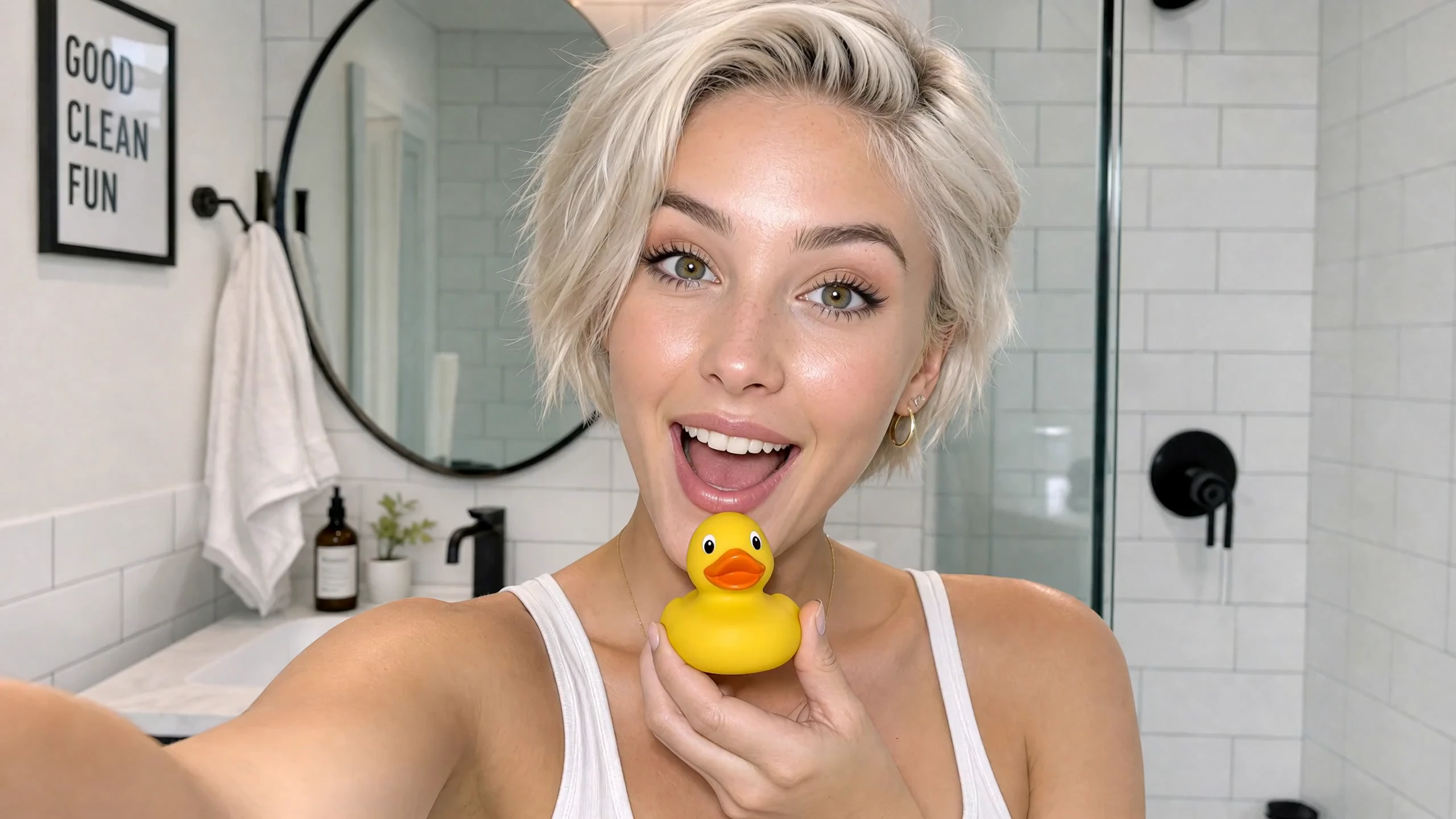
视频
提示词
Cinematic vertical 9:16 beauty vlog style, 4k resolution, ultra-realistic textures, clean lighting, and smooth camera stabilization. Scene & Timeline Choreography 00:00 - 00:02 Visual: A young woman with short, platinum-blonde hair and a glowing complexion looks directly into the camera with an excited expression inside a bright, modern white-tiled bathroom while holding a small yellow rubber duck under her chin. Voice Over: (Playful, surprised intake of breath or light chuckle) 00:02 - 00:05 Visual: She smiles warmly while looking down at the yellow rubber duck in her hand, then looks back up toward the camera with a playful expression. Voice Over: "Okay, wait..." 00:05 - 00:07 Visual: She brings a bottle of orange skincare serum up close to the camera, showcasing the label clearly while speaking with an enthusiastic expression. Voice Over: "I literally cannot believe how good this is." 00:07 - 00:08 Visual: A close-up shot of her hands dispensing a drop of the translucent, glossy serum onto her fingertip and rubbing it gently against her palm. Voice Over: (Soft ambient bathroom sounds / gentle product texture application) 00:08 - 00:10 Visual: Close-up of her face as she gently pats and applies the serum onto her cheek, highlighting her radiant skin and smooth application. Voice Over: "Look how it just melts in..." 00:10 - 00:13 Visual: Medium shot showing her full outfit—an off-the-shoulder white long-sleeve top, dark brown leather shorts, and white thigh-high stockings—standing by the bathroom counter with plants and a towel, gently touching her glowing cheek. Voice Over: "...my skin already feels insane." 00:13 - 00:15 Visual: She holds up the orange serum bottle again, flashing a wide, radiant smile directly at the camera while speaking excitedly. Voice Over: "Okay, I'm obsessed. I'm not going back!"
MiniMax H3 AI 视频模型的主要功能
MiniMax H3 将开放权重模型引入 2K 工作流,支持文生视频、首尾帧图像引导和基于提示词的控制,助力高效的创意制作。
开放权重的 2K 视频输出
使用细节丰富的 2K 输出制作商业创意、电影级场景、产品视觉、品牌内容和精致的社交媒体视频片段。
将文本提示词转化为视频
描述主体、动作、环境、镜头运动、光线、节奏和视觉风格,直接根据文本生成完整视频。
控制首帧和尾帧
同时上传起始帧和结束帧来引导图生视频,帮助确定初始构图、最终构图以及两者之间的视觉过渡。
成本可控的创意测试
在将创意方案投入成本更高的制作流程前,探索更多吸睛开场、产品场景、营销活动创意和视觉方向。
MiniMax H3 AI 视频生成器的应用场景
将 MiniMax H3 用于商业和创意视频工作流,充分利用 2K 细节、成本可控的迭代、可控取景、灵活时长和提示词驱动的创作方向。
广告与电子商务
通过可控的构图和运动,创作产品亮相视频、品牌场景、推广创意、电商视觉内容以及可用于营销活动的视频草稿。
电影片头与电影级创意
根据详细的创意简报,构思片头创意、电影级镜头、视觉转场、氛围短片、预告片和预演视频片段。
动态海报与社交内容
将海报创意和关键视觉帧转化为动态短视频,用于社交媒体帖子、营销活动预热、竖屏内容和创意公告。
产品与界面设计
将产品交互、界面动效、发布创意和设计构想可视化为精致的视频草稿,用于演示、评审和创意测试。
如何使用 MiniMax H3 AI 视频生成器
只需三个实用步骤,即可通过文本或首尾帧图像创作 2K MiniMax H3 视频。
第 1 步:输入提示词或上传帧图像
为文生视频编写详细的视频提示词,或同时上传首帧和尾帧,以控制图生视频片段的开头和结尾。
第 2 步:选择时长和画面比例
选择 5、10 或 15 秒的时长。文生视频可选择支持的画面比例;首尾帧生成将依据上传的图像,无需设置画面比例。
第 3 步:生成并查看
前往创作工作区,启动生成任务并查看 2K 结果;如需生成其他变体,可优化提示词或源帧。
在 Twitter 上探索 MiniMax H3 AI 视频作品

MiniMax H3 is native in ComfyUI, day zero with the weights. Model highlights: → Text-to-video, prompt only → Image-to-video → First-and-last-frame - control the opening frame, the closing frame, or both → Reference-to-video - carry a subject, a motion, or a voice

MiniMax's new model, @Hailuo_AI H3, is finally here! Specs: - 15-sec duration - 2560 x 1440 native resolution - Omni model with 12 references (image, video, audio) Here are a few cinematic scenes I tried. Prompts below 👇 #MiniMaxH3

MiniMax H3 actually surprised me. 👀🔥 Just tested my first generation with @Hailuo_AI and the difference is noticeable. The realism feels cleaner, the camera movement is much more natural, and the character consistency held up really well. This is only my first test… I’m

MiniMax H3 开源模型
MiniMax H3 模型仓库已在 Hugging Face 上开放。