AI Christmas Video Generator
Turn your photos into Santa transformations, gift-giving scenes, festive toasts, or hugs with Santa. Choose a Christmas template and shape the action and holiday setting in the prompt.
Christmas Video Templates and Examples
Explore Santa transformations, gift-giving, Christmas toasts, and hugs with Santa. Use the templates as starting points for festive videos with recognizable people, Christmas props, and seasonal lighting.
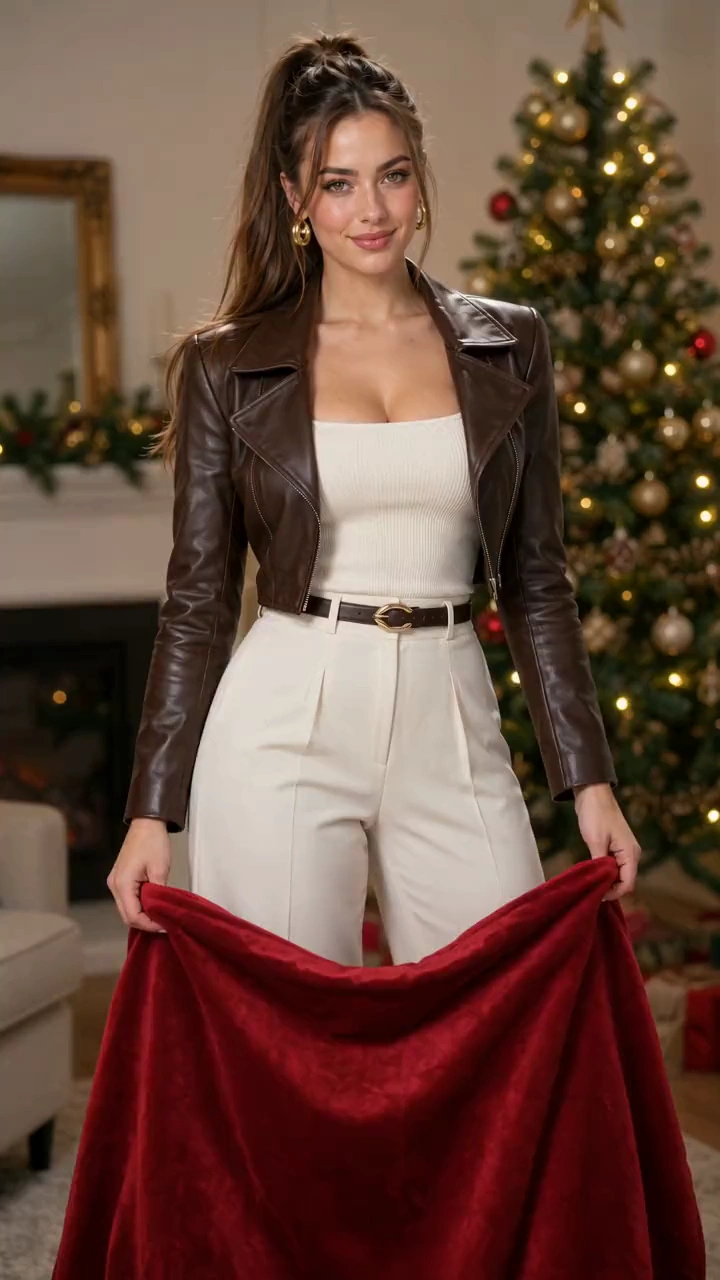
Photorealistic 10-second Santa transformation. Image 1, first in the images array, supplies the only subject. Preserve facial identity and hairstyle; the Santa hat sits over the existing hair. Begin in the reference clothing. Cozy room, Christmas tree, warm lights. One fixed, continuous 9:16 knee-up shot with headroom for raised cloth and hat; both hands stay in frame. No cuts, camera movement, extra people, text or watermarks. Hold the upper corners of one large opaque red velvet cloth, wide enough to hide the torso and long enough to extend below the knees when raised, with natural weight and folds. 0-2s: Smoothly lift it from the waist until the upper edge is above the head, fully concealing head and body. 2-2.5s: Remain completely hidden. 2.5-6s: Lower the edge fluidly and unhurriedly to the upper thighs. Reveal follows that descending edge exactly: red Santa hat and unchanged face, then white fur collar and red coat, then black belt and lower coat. Each area is fully transformed when it emerges; unrevealed areas stay hidden. Never expose original clothing then change it, or pop a hat onto an already visible head. A thin golden sparkle trail stays attached to the edge, without a separate sweeping arc. Velvet falls under gravity into soft folds without stopping midway. 6-10s: Cloth settles below the finished coat, still held naturally in both hands. Look at the camera and smile happily. Costume and hat remain stable, with natural fabric settling. Sound: Continuous soft velvet swish follows movement; a delicate descending magical shimmer follows the reveal and resolves in a bright sleigh-bell chime. Soft, warm Christmas instrumental underneath. No dialogue, singing or voice-over.
Create Christmas Transformations and Festive Moments
Use your photo as a reference for a Santa reveal or a holiday interaction, with a prompt you can tailor to the scene.
Santa Transformation Effects
Create a Santa outfit reveal with red cloth, snowflakes, gift-box ribbons, a ringing bell, a festive turn, or Christmas tree lights.
Christmas Interactions
Build a scene around Santa giving a gift, a Christmas toast, or a warm hug, with the people and actions described in your prompt.
Christmas Props, Lighting, and Atmosphere
Build a festive scene with wrapped gifts, Christmas trees, warm lights, and seasonal effects, then adjust the setting or camera direction in the template's prompt.
Multi-Theme & Multi-Image Consistency
Keep featured people recognizable across different photos and Christmas themes, with a consistent festive look for batches of holiday clips.
Give a Familiar Photo a Festive Role
Make a greeting around someone your audience knows, with a Christmas scene you can adapt for the occasion.
Start with a Clear Idea
Prepared Christmas templates give you a scene to build on, so you can focus on the person, action, and greeting you have in mind.
Consistent Character Features
Preserve recognizable facial features across Santa transformations, gift-giving, toasts, and hugs, helping each clip feel like part of the same personal or brand story.
Natural Motion and Festive Atmosphere
Bring a gift handover, a shared toast, or a Santa hug into a Christmas scene with coordinated gestures, expressions, and festive surroundings.
Coordinated Holiday Content
Create a matching set of festive clips for greeting campaigns, seasonal social posts, or a holiday content series.
Christmas Video Ideas for Greetings and Social Posts
Create a short festive moment for your followers, customers, friends, or family.
Christmas Reels and Stories
Share Santa transformations, gift-giving moments, Christmas toasts, or Santa hugs as festive Reels, Stories, and short posts.
Seasonal Brand Posts
Create a Christmas scene featuring a founder or team member for a seasonal social post.
Animated Christmas Cards
Pair a gift-giving or Santa-hug clip with your own holiday message in a digital Christmas card.
Family Celebration Clips
Use personal and family photos for Santa transformations, shared celebrations, or warm holiday greetings in group chats and family albums.
How to Use AI Christmas Video Generator
Create a Christmas video from your photo in three simple steps.
1. Choose a Christmas Template
Select a Christmas template to load a sample image and prompt for the scene.
2. Add Your Photo and Edit the Prompt
Replace the sample image with a clear portrait. Edit the prompt to describe the action, setting, and festive details, then choose your video settings.
3. Generate and Download
Check the displayed credit cost and select Generate. Track the task in your history, review the video and audio, then download the result.
FAQs about AI Christmas Video Generator
Articles & Tips about AI Christmas Video Generation

