UGC Ads Video Generator for Product Demos & Social Ads
Turn product photos into creator-style video ads with HeyDream AI. Build a product scene, describe the demonstration, and explore clips for your next social campaign.
See Product Photos Become UGC Video Ads
Explore product reveals and creator-style demonstrations. Use the reference images and prompts to plan your own opening shot, camera movement, and product close-up.
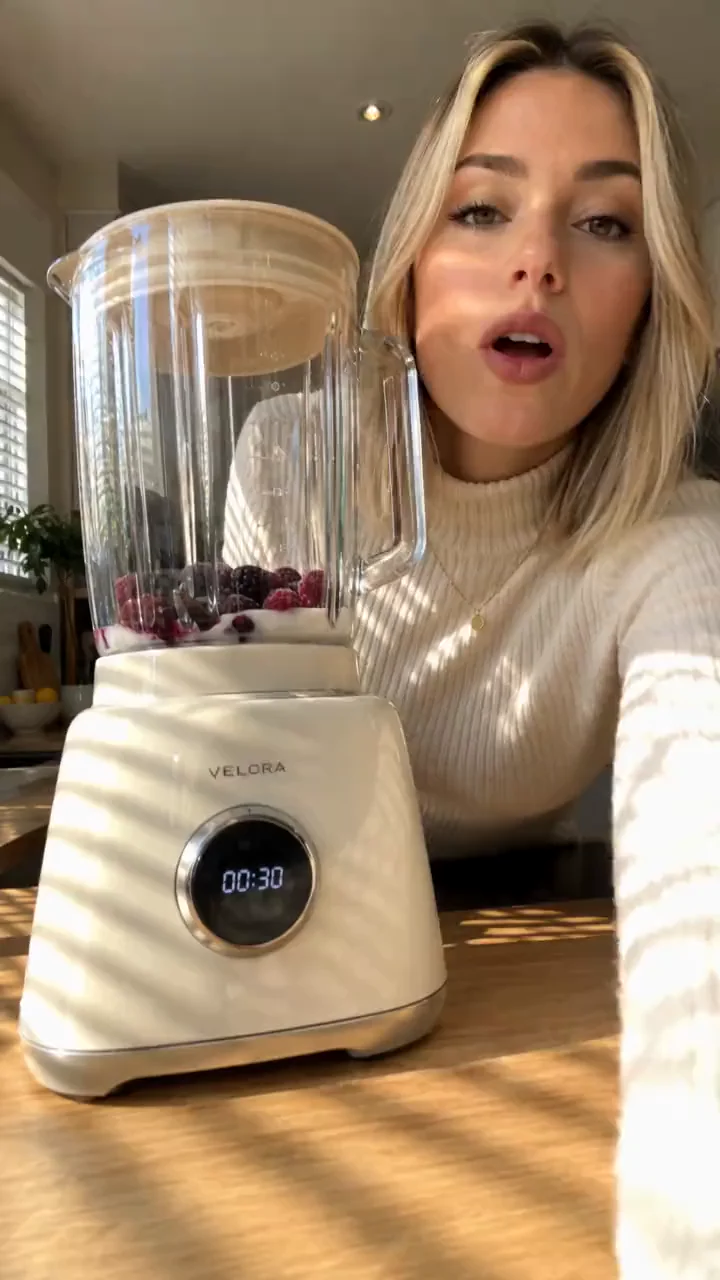
Create a 15-second vertical 9:16 realistic UGC smartphone video of a stylish young woman in a bright modern kitchen casually testing a premium white blender. 0–3s: She looks into the camera and says, “Wait… why is this actually so quiet?” She turns on the blender. 3–7s: Close handheld shots of frozen berries and milk blending into a smooth pink smoothie. Natural phone-camera movement, realistic blending physics, subtle motor sound. 7–11s: She stops the blender, opens the lid, and shows the perfectly smooth texture to camera: “Okay, that is ridiculously smooth.” 11–15s: She pours it into a glass, takes a sip, smiles naturally and says, “Yeah, this is staying on my counter.” Authentic TikTok/Instagram UGC aesthetic, smartphone quality, natural morning sunlight, realistic kitchen ambience, subtle handheld movement, genuine reactions, premium product appearance. No cinematic effects, no text, no subtitles, no watermark, no exaggerated acting, no unrealistic physics.
Create UGC Video Ads from Your Product Images
Prepare a reference image, direct the action, and generate a product-focused clip in one workspace.
Start with a Product Reference
Upload a product photo or create a scene with the image tab. Use your chosen visual to guide the product, styling, and setting in the video.
Direct the Demonstration & 3-Second Hook
Describe how the product is held, worn, or revealed. Specify the opening hook, camera motion, and distinctive details you want viewers to notice.
Choose Your Video Format & Audio
Start with a native 9:16 vertical composition, then adjust duration, resolution, and AI audio controls to match your campaign goals.
Explore Ready-to-Use Ad Hints
Load a product demo, reveal, or before-and-after prompt from the hints. Replace the reference image and adjust the scene for your own product.
Explore More Ways to Present One Product
Change the creative direction without organizing a separate shoot or shipping samples for every idea.
Compare Different Opening Hooks
Explore close-up reveals, problem-solution scenes, and lifestyle demonstrations to find a creative direction for your product.
Develop a Visual Before Animating It
Work on the product image first, then use it to guide the video. This gives you a starting point for composition, styling, and background.
Rapidly Test Hooks to Beat Ad Fatigue
Generate multiple variations of the opening 3 seconds with different hooks, creators, and visual styles to keep your TikTok and Meta ad performance high.
Refine One Detail at a Time
Change the setting, camera movement, or demonstration in your prompt and compare how each version presents the product.
UGC Ad Ideas for Your Next Campaign
Build product-focused clips for a launch, a seasonal collection, or a new creative direction.
Fashion and Accessories Try-On
Bring a virtual try-on look into motion, show the drape of a garment, or highlight the finish of jewelry with natural creator movements.
Beauty and Personal Care Routines
Develop routine-inspired scenes that showcase packaging, texture, and real-world application on camera.
Everyday Product Demonstrations
Place a kitchen, home, or tech gadget in a realistic setting and direct a clear action that highlights its core benefit.
Social Campaign Creative
Develop vertical product clips for TikTok, Instagram Reels, and other social feeds. Explore different scenes and opening hooks for your next campaign.
How to Create a UGC Video Ad
Upload a product reference, describe your ad, and review the generated video.
1. Prepare Your Product Image
Upload a clear product photo or choose a hint. To develop a new setting first, create an image with the image tab and use it as your video reference.
2. Describe the Ad and Choose Settings
Write the demonstration, opening hook, and closing shot. Choose a video model and review its available resolution and duration settings before generating.
3. Review and Download
Open the result in your video history. Check product fidelity and motion, then download the clip or revise the prompt for another version.

