HeyDream AI: Higgsfield AI Alternative for AI Video Creation
HeyDream gives creators, marketers, brands, and production teams a practical Higgsfield AI alternative for prompt-based and image-guided video creation. Start with Seedance 2.0 Mini or choose another supported model, describe the shot you want, add a source image when needed, and prepare social clips, product videos, campaign concepts, and cinematic drafts in one workflow.
Examples of Higgsfield-Style AI Videos
Explore the camera-driven, effect-heavy visual language often associated with Higgsfield AI videos. These HeyDream examples show how detailed prompts can guide dynamic camera movement, transitions, realistic motion, commercial lighting, and polished short-form results with an alternative AI video workflow.
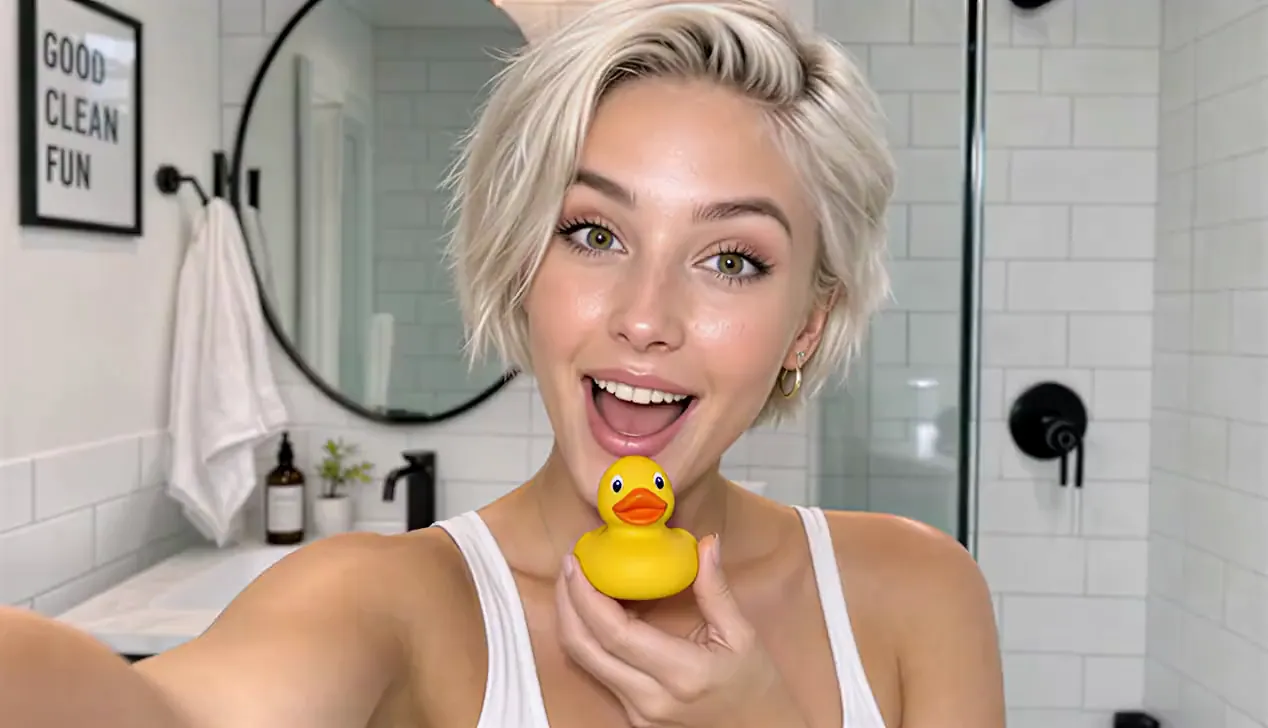
Cinematic vertical 9:16 beauty vlog style, 4k resolution, ultra-realistic textures, clean lighting, and smooth camera stabilization. Scene & Timeline Choreography 00:00 - 00:02 Visual: A young woman with short, platinum-blonde hair and a glowing complexion looks directly into the camera with an excited expression inside a bright, modern white-tiled bathroom while holding a small yellow rubber duck under her chin. Voice Over: (Playful, surprised intake of breath or light chuckle) 00:02 - 00:05 Visual: She smiles warmly while looking down at the yellow rubber duck in her hand, then looks back up toward the camera with a playful expression. Voice Over: "Okay, wait..." 00:05 - 00:07 Visual: She brings a bottle of orange skincare serum up close to the camera, showcasing the label clearly while speaking with an enthusiastic expression. Voice Over: "I literally cannot believe how good this is." 00:07 - 00:08 Visual: A close-up shot of her hands dispensing a drop of the translucent, glossy serum onto her fingertip and rubbing it gently against her palm. Voice Over: (Soft ambient bathroom sounds / gentle product texture application) 00:08 - 00:10 Visual: Close-up of her face as she gently pats and applies the serum onto her cheek, highlighting her radiant skin and smooth application. Voice Over: "Look how it just melts in..." 00:10 - 00:13 Visual: Medium shot showing her full outfit—an off-the-shoulder white long-sleeve top, dark brown leather shorts, and white thigh-high stockings—standing by the bathroom counter with plants and a towel, gently touching her glowing cheek. Voice Over: "...my skin already feels insane." 00:13 - 00:15 Visual: She holds up the orange serum bottle again, flashing a wide, radiant smile directly at the camera while speaking excitedly. Voice Over: "Okay, I'm obsessed. I'm not going back!"
What Makes HeyDream a Practical Higgsfield AI Alternative
HeyDream combines prompt-based and image-guided video creation, multiple supported models, model-specific settings, and a unified Create workspace for users comparing Higgsfield AI alternatives.
Prompt and Image to Video
Start from a written video brief or upload an image to guide the opening composition, character styling, product appearance, setting, or overall visual direction.
Multiple AI Video Models
Begin with Seedance 2.0 Mini on this page or compare other supported HeyDream models when your project needs a different balance of speed, resolution, duration, audio, or visual style.
Detailed Shot Direction
Use the prompt to define the subject, action, camera path, lighting, pacing, transition, atmosphere, and closing frame instead of relying on a vague one-line request.
Fast Creative Variation Testing
Revise the prompt, change the source image, or switch supported models and settings to explore more hooks, camera ideas, product angles, and campaign directions.
Why Choose HeyDream for AI Video Creation
Higgsfield and HeyDream do not offer identical tools, but HeyDream provides a direct alternative workflow when you want to move from a prompt or source image to an AI video without leaving the page. Seedance 2.0 Mini is selected by default for faster creative testing.
Unified Video Creation Form
Write a video prompt, upload a starting image when needed, choose a model, and adjust available generation settings in one unified form before transferring the complete setup to the Create workspace.
Seedance 2.0 Mini by Default
Start with Seedance 2.0 Mini as a lower-cost option for short-form text-to-video and image-to-video experiments, then compare other available models when a different balance of motion, fidelity, speed, or creative control is required.
Prompt and Image-Guided Direction
Describe the subject, action, camera path, lighting, timing, transition, and final shot. Add a source image to anchor composition, product appearance, character styling, or the opening frame of the video.
Continue in the Create Workspace
When you click Generate, HeyDream carries the selected model, prompt, uploads, ratio, duration, resolution, and supported switches into the Create page so you can continue without rebuilding the setup.
Best Use Cases for Higgsfield AI Alternative Workflows
Camera-led AI video works best when a short clip needs one clear visual idea, controlled movement, and an immediate payoff. These workflows are especially useful for creators and teams testing concepts before committing to a full production process.
Social Hooks and Viral Shorts
Create fast openings, dramatic reveals, transformations, reaction moments, and loop-friendly shots for TikTok, Instagram Reels, YouTube Shorts, and other vertical social formats.
Product and Brand Videos
Plan product reveals, beauty shots, fashion motion, lifestyle scenes, and commercial-style camera moves for campaign drafts, launch concepts, ecommerce visuals, and paid social tests.
Music Videos and Short Films
Explore surreal transitions, performance shots, character moments, cinematic movement, and stylized VFX for music visuals, trailers, mood pieces, storyboards, and short narrative sequences.
Creative Direction and Previsualization
Test shot composition, camera paths, lighting, color, pacing, and effect ideas before production, then use the strongest generated direction as a reference for a campaign, client review, or filmed scene.
How to Create AI Videos with HeyDream
Create a video with a focused Higgsfield AI alternative workflow in three steps.
Step 1: Enter a Prompt or Upload an Image
Describe your video idea with the subject, action, setting, camera movement, lighting, and final composition. Add a source image when the scene needs stronger visual guidance.
Step 2: Choose a Model and Video Settings
Keep Seedance 2.0 Mini selected or choose another supported model, then configure the ratio, resolution, duration, audio, and other options available for that model.
Step 3: Generate and Test Variations
Continue to Create, review the transferred setup, start the video task, and refine the prompt, source image, model, or settings to explore another version.
FAQ about HeyDream as a Higgsfield AI Alternative
More Articles & News about HeyDream as a Higgsfield AI Alternative
Your next idea starts here
Create AI Videos with a Higgsfield AI Alternative
Turn your ideas into 3D models, images, and videos with HeyDream AI. Explore creative tools, try different models, and bring your next project to life.