HeyDream AI:用於 AI 影片創作的 Higgsfield AI 替代方案
HeyDream 為創作者、行銷人員、品牌和製作團隊提供實用的 Higgsfield AI 替代方案,支援以提示詞和圖片引導影片創作。可從 Seedance 2.0 Mini 開始,或選擇其他支援的模型,描述想要的鏡頭,視需要加入來源圖片,並在同一工作流程中製作社群短片、產品影片、行銷活動概念和電影感草稿。
Higgsfield 風格 AI 影片範例
探索 Higgsfield AI 影片常見的鏡頭驅動、強烈特效視覺語言。這些 HeyDream 範例展示詳細提示詞如何引導動態鏡頭運動、轉場、自然動作、商業燈光,以及透過替代 AI 影片工作流程製作精緻的短影音成果。
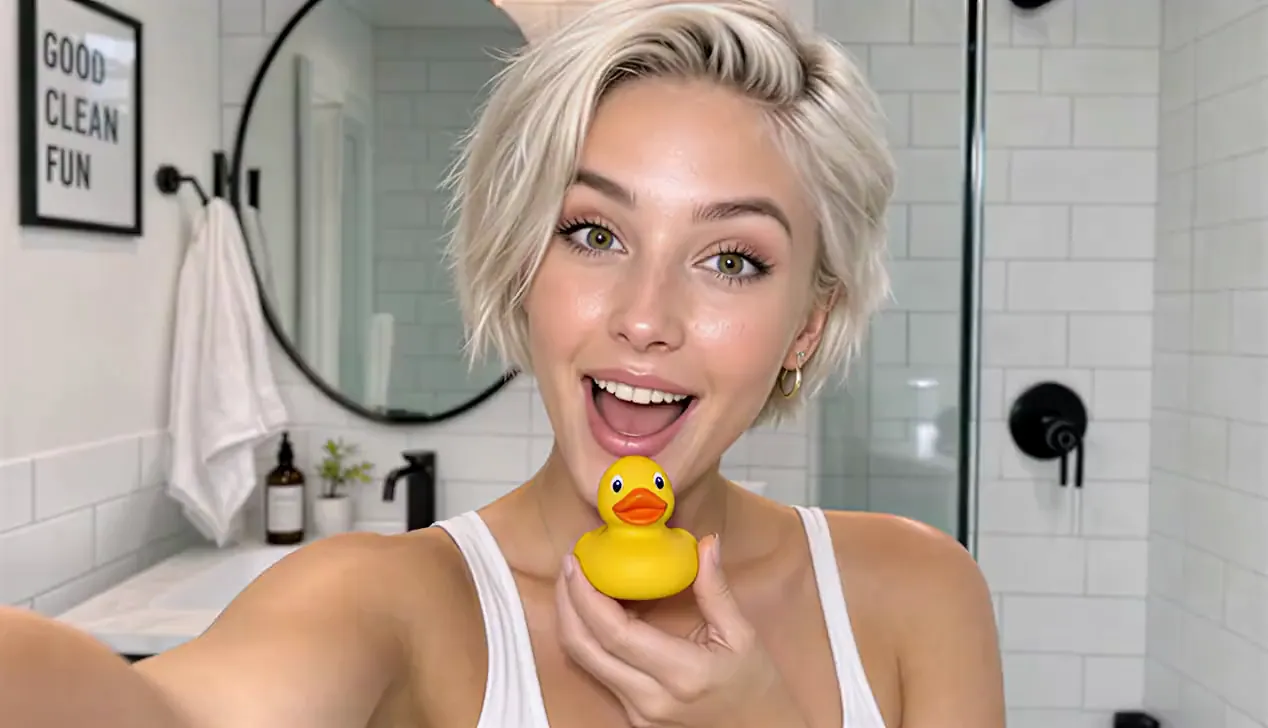
Cinematic vertical 9:16 beauty vlog style, 4k resolution, ultra-realistic textures, clean lighting, and smooth camera stabilization. Scene & Timeline Choreography 00:00 - 00:02 Visual: A young woman with short, platinum-blonde hair and a glowing complexion looks directly into the camera with an excited expression inside a bright, modern white-tiled bathroom while holding a small yellow rubber duck under her chin. Voice Over: (Playful, surprised intake of breath or light chuckle) 00:02 - 00:05 Visual: She smiles warmly while looking down at the yellow rubber duck in her hand, then looks back up toward the camera with a playful expression. Voice Over: "Okay, wait..." 00:05 - 00:07 Visual: She brings a bottle of orange skincare serum up close to the camera, showcasing the label clearly while speaking with an enthusiastic expression. Voice Over: "I literally cannot believe how good this is." 00:07 - 00:08 Visual: A close-up shot of her hands dispensing a drop of the translucent, glossy serum onto her fingertip and rubbing it gently against her palm. Voice Over: (Soft ambient bathroom sounds / gentle product texture application) 00:08 - 00:10 Visual: Close-up of her face as she gently pats and applies the serum onto her cheek, highlighting her radiant skin and smooth application. Voice Over: "Look how it just melts in..." 00:10 - 00:13 Visual: Medium shot showing her full outfit—an off-the-shoulder white long-sleeve top, dark brown leather shorts, and white thigh-high stockings—standing by the bathroom counter with plants and a towel, gently touching her glowing cheek. Voice Over: "...my skin already feels insane." 00:13 - 00:15 Visual: She holds up the orange serum bottle again, flashing a wide, radiant smile directly at the camera while speaking excitedly. Voice Over: "Okay, I'm obsessed. I'm not going back!"
HeyDream 為何是實用的 Higgsfield AI 替代方案
HeyDream 結合以提示詞和圖片引導的影片創作、多款支援模型、模型專屬設定,以及統一的「創作」工作區,適合正在比較 Higgsfield AI 替代方案的使用者。
提示詞與圖片轉影片
從書面影片簡述開始,或上傳圖片來引導開場構圖、角色造型、產品外觀、場景或整體視覺方向。
多款 AI 影片模型
在此頁面先使用 Seedance 2.0 Mini,或在專案需要不同的速度、解析度、長度、音訊或視覺風格平衡時,比較 HeyDream 支援的其他模型。
詳細鏡頭指導
使用提示詞定義主體、動作、鏡頭路徑、燈光、節奏、轉場、氛圍和結尾畫面,不必依賴模糊的一句話要求。
快速測試創意變化
修改提示詞、更換來源圖片,或切換支援的模型和設定,以探索更多吸睛開場、鏡頭構想、產品角度和行銷活動方向。
為何選擇 HeyDream 創作 AI 影片
Higgsfield 與 HeyDream 提供的工具並不完全相同,但如果你想直接將提示詞或來源圖片轉為 AI 影片,HeyDream 提供無須離開頁面的替代工作流程。系統預設選擇 Seedance 2.0 Mini,方便更快測試創意。
統一影片創作表單
撰寫影片提示詞、視需要上傳起始圖片、選擇模型並調整可用的生成設定,再將完整設定移至「創作」工作區。
預設使用 Seedance 2.0 Mini
先以成本較低的 Seedance 2.0 Mini 進行短影音文字轉影片和圖片轉影片實驗;需要不同的動態、保真度、速度或創意控制平衡時,再比較其他可用模型。
提示詞與圖片引導方向
描述主體、動作、鏡頭路徑、燈光、時機、轉場和最終鏡頭。加入來源圖片,以固定構圖、產品外觀、角色造型或影片開場畫面。
在「創作」工作區繼續
點擊「生成」時,HeyDream 會將所選模型、提示詞、上傳內容、比例、長度、解析度和支援的開關帶入「創作」頁面,讓你無須重新設定即可繼續。
Higgsfield AI 替代工作流程的最佳用途
當短片需要一個明確的視覺構想、受控動態和立即呈現的效果時,以鏡頭為核心的 AI 影片最為合適。這些工作流程尤其適合創作者和團隊在投入完整製作流程前測試概念。
社群吸睛開場與爆紅短片
為 TikTok、Instagram Reels、YouTube Shorts 和其他直式社群格式製作快速開場、戲劇性揭曉、變身、反應瞬間和適合循環播放的鏡頭。
產品與品牌影片
規劃產品亮相、美感鏡頭、時尚動態、生活風格場景和商業風格運鏡,用於行銷活動草稿、上市概念、電商視覺和付費社群測試。
音樂影片與短片
探索超現實轉場、表演鏡頭、角色時刻、電影感運動和風格化 VFX,用於音樂視覺、預告片、氛圍短片、故事板和短篇敘事段落。
創意指導與預視
在製作前測試鏡頭構圖、鏡頭路徑、燈光、色彩、節奏和特效構想,再將最出色的生成方向作為行銷活動、客戶審核或實拍場景的參考。
如何使用 HeyDream 創作 AI 影片
透過三個步驟,以聚焦的 Higgsfield AI 替代工作流程創作影片。
步驟 1:輸入提示詞或上傳圖片
描述影片構想,包括主體、動作、場景、鏡頭運動、燈光和最終構圖。場景需要更強的視覺引導時,可加入來源圖片。
步驟 2:選擇模型與影片設定
保留 Seedance 2.0 Mini 或選擇其他支援的模型,再設定該模型可用的比例、解析度、長度、音訊和其他選項。
步驟 3:生成並測試不同版本
前往「創作」、檢查已帶入的設定、啟動影片任務,再調整提示詞、來源圖片、模型或設定以探索另一個版本。
HeyDream 作為 Higgsfield AI 替代方案的常見問題
更多 HeyDream 作為 Higgsfield AI 替代方案的文章與新聞
你的下一個創意從這裡開始
使用 Higgsfield AI 替代方案創作 AI 影片
使用 HeyDream AI 將創意轉化為 3D 模型、圖片和影片。探索創意工具,嘗試不同模型,讓構想成為現實。