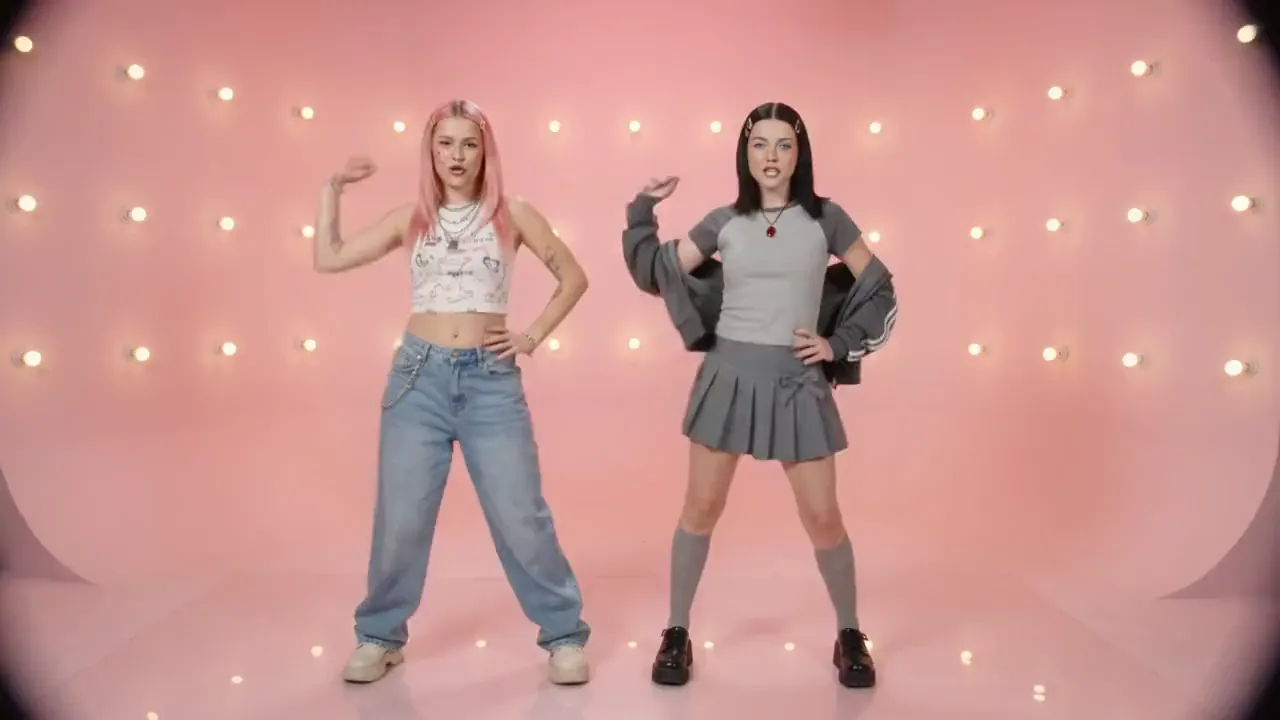
Create a 10-second 16:9 retro Y2K bubblegum dance-pop video with six hard cuts on 120-BPM downbeats. Only a consistent duo of young white women appears. A is playful: straight pink hair, gold clips, nose ring, cheek beauty mark, white printed crop top, silver chains, baggy light-blue jeans and off-white platforms. B is commanding: straight black hair, silver clips, light-blue eyes, silver glitter shadow, ruby pendant on a red cord, gray raglan tee with jacket over her shoulders, bow pleated skirt, knee socks and black platforms. Keep A left and B right in every two-shot. Use a pink cyclorama with bulbs, a cobalt cyclorama with a hard white spotlight circle, and a silver rain curtain with mirrored floor. High-key frontal studio light; candy pink, cobalt and chrome; 1999 broadcast look with soft bloom, chroma bleed, fine tape grain and faint interlace flicker. Start on the pink set in a medium two-shot with mirrored poses. At 0–2s, use a low fisheye synchronized bounce-groove with a 10% push-in. At 2–4s, B performs precise hand choreography with a punch zoom. At 4–6s on the silver set, A hair-whips and strides forward as camera pulls back, then the pair goes cheek-to-cheek for a wind-lifted synchronized tilt. At 6–8s, they wave arms, spin, groove, freeze, cross and reset. At 8–10s, they walk forward together with reflections, then cut to a back-to-back pose and fast zoom-out with a white flash. Instrumental bubblegum dance-pop only; no vocals. Natural weighted choreography, stable faces and wardrobe, clean hands, no text, logos, watermarks or artifacts.