AI 生日影片生成器:用一張照片線上製作生日快樂影片
從六種慶祝範本中選擇,將一張人像照片變成帶有生成音訊的生日快樂影片。選擇蛋糕慶祝、彩紙驚喜或舞台登場,再調整提示詞,打造專屬祝福。
AI 生日影片產生器範例
了解 AI 生日影片產生器如何將一張上傳的照片變成溫馨的、可供家人、朋友和社群媒體分享的生日影片。
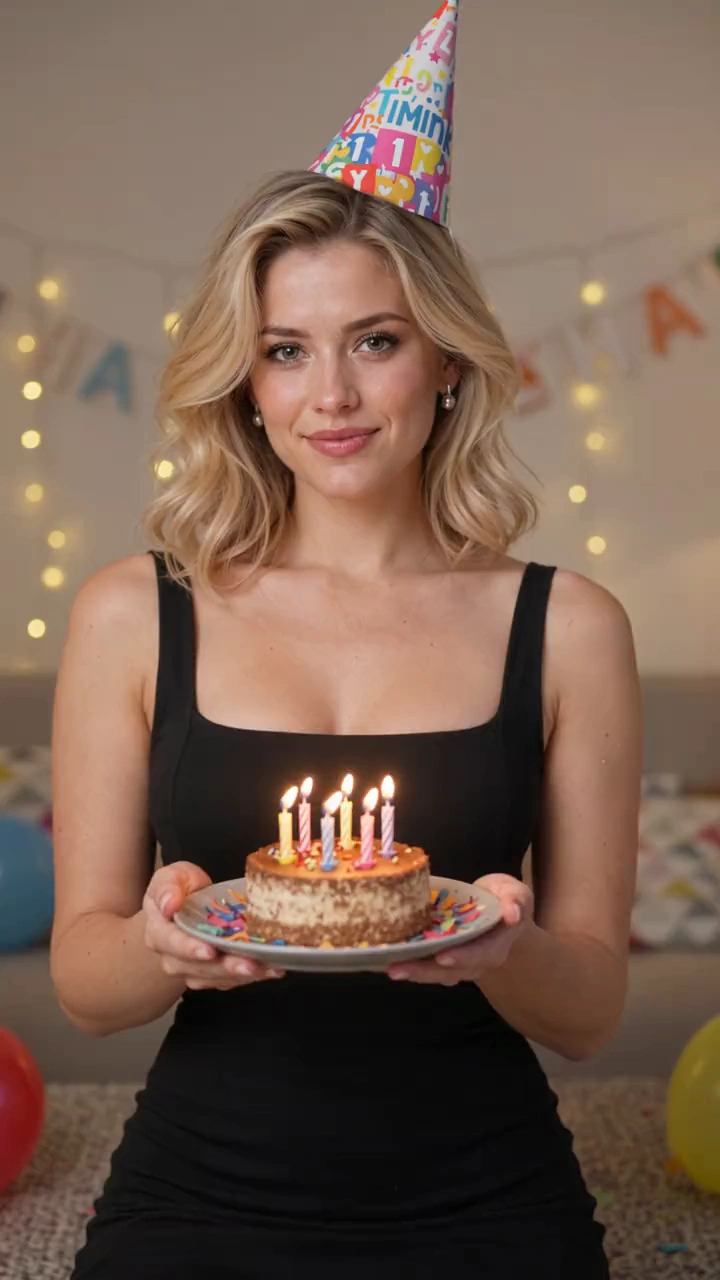
Create a photorealistic birthday celebration video. REFERENCE ROLES Image 1 is the first image supplied in the images array. The person in Image 1 is the birthday celebrant and the main subject. Preserve the referenced identity throughout the video. Use the image as the person reference; create the setting and props described below. SCENE AND ACTION In a warmly lit birthday room decorated with colorful balloons and string lights, the celebrant wears a colorful cone-shaped birthday party hat. The hat sits naturally on top of the head without covering the face, stays securely in place, and maintains the same shape and colors throughout the video. The celebrant holds a round plate with a small birthday cake and lit candles at chest height. The celebrant smiles naturally and gently sways from side to side, keeping the plate level and the cake steady. A few pieces of confetti drift slowly through the background. CAMERA Portrait medium shot from the waist upward. Center the celebrant, with the cake and plate below the face. Leave clear space above the hat. Only the celebrant is visible; keep the foreground free of other hands. One continuous fixed native 9:16 portrait shot. Keep the entire birthday hat inside the frame with clear space above its tip, and keep hands and the main props fully visible. Keep the face unobstructed. All bodies and hands remain naturally connected. No cuts, subtitles, logos or watermarks. SOUND Light, cheerful instrumental birthday-party music with a bright piano melody and soft percussion plays throughout. Add subtle indoor party ambience and occasional gentle off-screen applause. Keep the music at a comfortable background level, with a natural fade-out at the end. No dialogue, singing, or voice-over.
AI生日影片產生器的核心特點
AI生日影片產生器專注於單張照片生成,幫助用戶快速輕鬆地將一張圖像記憶體變成高品質的生日影片。
圖片上傳生日影片創建
上傳一張照片,並將其變成一個完整的生日視頻,其中包含自然的動作和以慶祝為中心的視覺故事講述。
自動場景建立和轉換
AI 增加了自然的動作和節日氣氛,讓您的生日影片感覺情感豐富、精美且易於分享。
照片優先的影片工作流程
此工作流程僅圍繞圖像上傳而設計,因此用戶可以快速創建生日快樂視頻,而無需編寫提示或配置複雜的設定。
一鍵匯出社交平台
快速生成並下載您的生日快樂視頻,然後在 TikTok、Instagram Reels、YouTube Shorts、WhatsApp 或私人訊息上分享。
AI生日影片產生器的優點
專為快速、簡單和情感衝擊而設計,因此您無需複雜的編輯工具即可從一張照片創建令人難忘的生日影片。
初學者友善的工作流程
無需時間軸編輯或專業軟體知識。只需上傳一張照片,然後讓 AI 產生生日影片。
僅照片簡單
只需上傳一張圖像,這對於只想從照片製作生日影片的用戶來說,使過程保持清晰和高效。
比手動編輯更快
只需幾分鐘即可製作精美的生日視頻,而無需花費數小時手動編輯動作和效果。
一致的生日視覺輸出
AI 保持上傳的照片視覺上一致,同時為最終的生日影片添加有凝聚力的慶祝風格。
如何使用AI生日影片產生器
只需三個簡單的步驟即可從一張照片生成生日快樂影片 - 即使是初學者也可以立即開始。
上傳一張生日照片
首先上傳一張您想要在最終影片中製作動畫的生日照片。
產生影片
點擊“生成”,讓 AI 自動建立具有自然動作和節日氣氛的生日影片。
生成、預覽和共享
預覽產生的結果,然後下載您的生日影片並在您喜愛的平台上分享。