Gemini Omni 1.1 Flash AI Video Generator

Create 5- or 10-second videos from text prompts, a first frame, or first-and-last-frame images with Gemini Omni 1.1 Flash. Choose landscape or portrait output from fast 360p drafts through polished 4K video.

0 / 5000

Introduction to Gemini Omni 1.1 Flash AI Video Generator

Explore prompt-led video creation, image-guided motion, and optional ending-frame direction.

Gemini Omni 1.1 Flash gives creators a focused workflow for turning a prompt or starting image into a short video. Use the prompt to direct the subject, action, camera, lighting, and visual style, then add an ending image when the result needs a deliberate final composition.

Gemini Omni 1.1 Flash Video Examples

Explore how detailed prompts and image guidance become short clips with directed motion, cinematic framing, smooth transitions, and a clear visual story.

Original Image
Preview
Video
Prompt

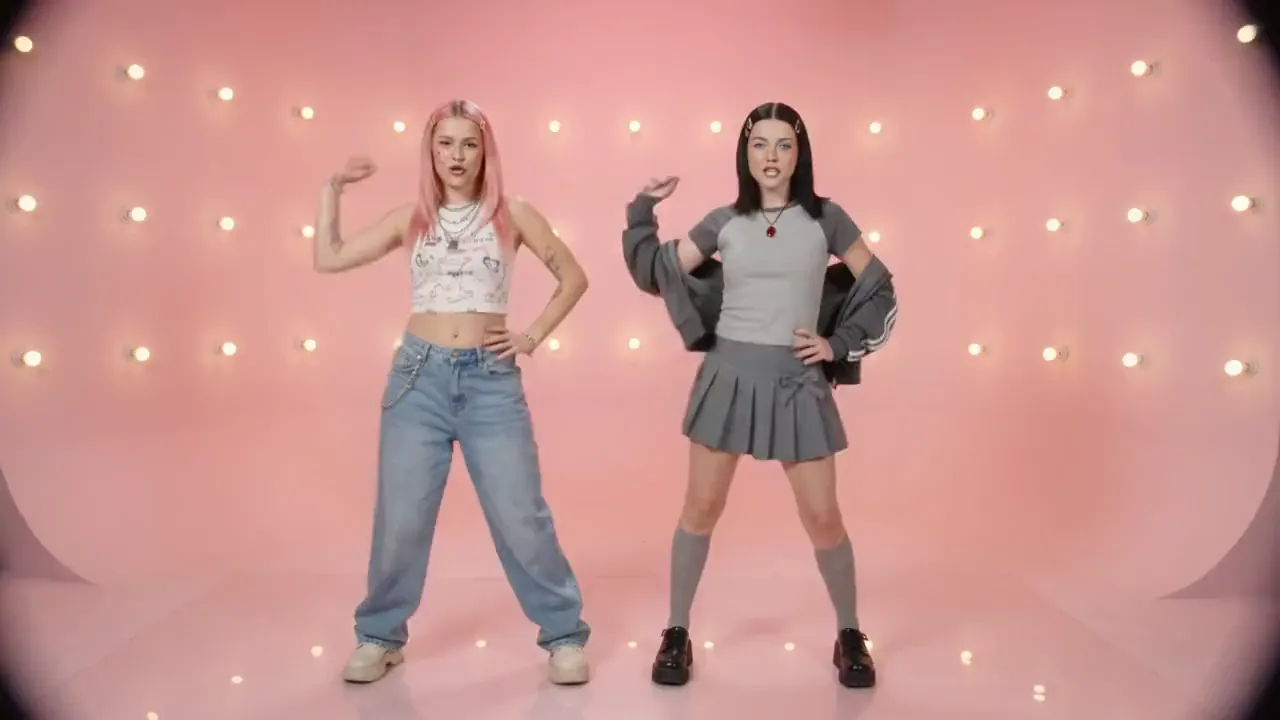
Create a 10-second 16:9 retro Y2K bubblegum dance-pop video with six hard cuts on 120-BPM downbeats. Only a consistent duo of young white women appears. A is playful: straight pink hair, gold clips, nose ring, cheek beauty mark, white printed crop top, silver chains, baggy light-blue jeans and off-white platforms. B is commanding: straight black hair, silver clips, light-blue eyes, silver glitter shadow, ruby pendant on a red cord, gray raglan tee with jacket over her shoulders, bow pleated skirt, knee socks and black platforms. Keep A left and B right in every two-shot. Use a pink cyclorama with bulbs, a cobalt cyclorama with a hard white spotlight circle, and a silver rain curtain with mirrored floor. High-key frontal studio light; candy pink, cobalt and chrome; 1999 broadcast look with soft bloom, chroma bleed, fine tape grain and faint interlace flicker. Start on the pink set in a medium two-shot with mirrored poses. At 0–2s, use a low fisheye synchronized bounce-groove with a 10% push-in. At 2–4s, B performs precise hand choreography with a punch zoom. At 4–6s on the silver set, A hair-whips and strides forward as camera pulls back, then the pair goes cheek-to-cheek for a wind-lifted synchronized tilt. At 6–8s, they wave arms, spin, groove, freeze, cross and reset. At 8–10s, they walk forward together with reflections, then cut to a back-to-back pose and fast zoom-out with a white flash. Instrumental bubblegum dance-pop only; no vocals. Natural weighted choreography, stable faces and wardrobe, clean hands, no text, logos, watermarks or artifacts.
Key Features of Gemini Omni 1.1 Flash AI Video Model

Gemini Omni 1.1 Flash combines prompt-led creation, image-guided motion, and optional ending-frame direction for focused short-video concepts.

Generate Video from Text

Describe the subject, action, environment, camera movement, lighting, and visual style to create a complete short video directly from a prompt.

Guide Motion with Start and End Frames

Upload a starting image to guide the opening composition, then add an ending image when the final composition, transition, or reveal matters.

Refine a Clear Visual Direction

Use prompt details and source imagery to shape movement, camera behavior, lighting, pacing, and the visual transition across a focused creative idea.

Adapt Ideas for Different Channels

Develop product moments, campaign hooks, social concepts, and story ideas in the available framing that fits the way the video will be shared.

Applications of Gemini Omni 1.1 Flash AI Video Generator

Use Gemini Omni 1.1 Flash to explore and refine short-video concepts for advertising, ecommerce, social content, storytelling, and previsualization.

Advertising and Campaign Drafts

Create product reveals, lifestyle scenes, visual hooks, and branded video concepts for campaign planning, creative testing, and client review.

Ecommerce Product Videos

Animate product images with controlled motion and framing for storefront previews, launch concepts, product pages, and promotional social content.

Social Media Video

Create focused clips for short-form social, broader publishing, presentations, and campaign testing while keeping the idea, motion, and visual hook easy to understand.

Storyboards and Previsualization

Test camera movement, scene transitions, lighting, composition, and visual direction before committing to a larger campaign or production workflow.

How to Use Gemini Omni 1.1 Flash AI Video Generator

Create a Gemini Omni 1.1 Flash video from text or images in three practical steps.

Step 1: Enter a Prompt or Add a Starting Image

Write a detailed prompt for text-to-video, or upload a starting image for image-to-video. Add an ending image only when you need to guide the final composition.

Step 2: Set Available Video Options

Select 16:9 or 9:16, choose 360p, 720p, 1080p, or 4K resolution, and set the duration to 5 or 10 seconds.

Step 3: Generate and Review

Continue to the Create workspace, start the generation task, review the result, and refine the prompt, source frames, or output settings when needed.

Explore Gemini Omni 1.1 Flash Video Creations on Twitter

FAQs about Gemini Omni 1.1 Flash

More Articles & News about Gemini Omni 1.1 Flash

bg-mobile

Start with Gemini Omni 1.1 Flash

