Photo to Rap Video Generator: Create Rap Performances from Photos
Bring your portrait and rap recording together in a performance video with HeyDream. Describe the scene, gestures, and camera style, or start with one of five Rap Hints. Create expressive clips for artist introductions, personal greetings, music teasers, and social video stories.
Photo to Rap Video Templates and Performance Examples
Explore a recording-studio performance and a rooftop verse, each with a photo, rap audio, and an editable prompt. Preview the videos to see how the performer, setting, and movement come together before creating your own clip.
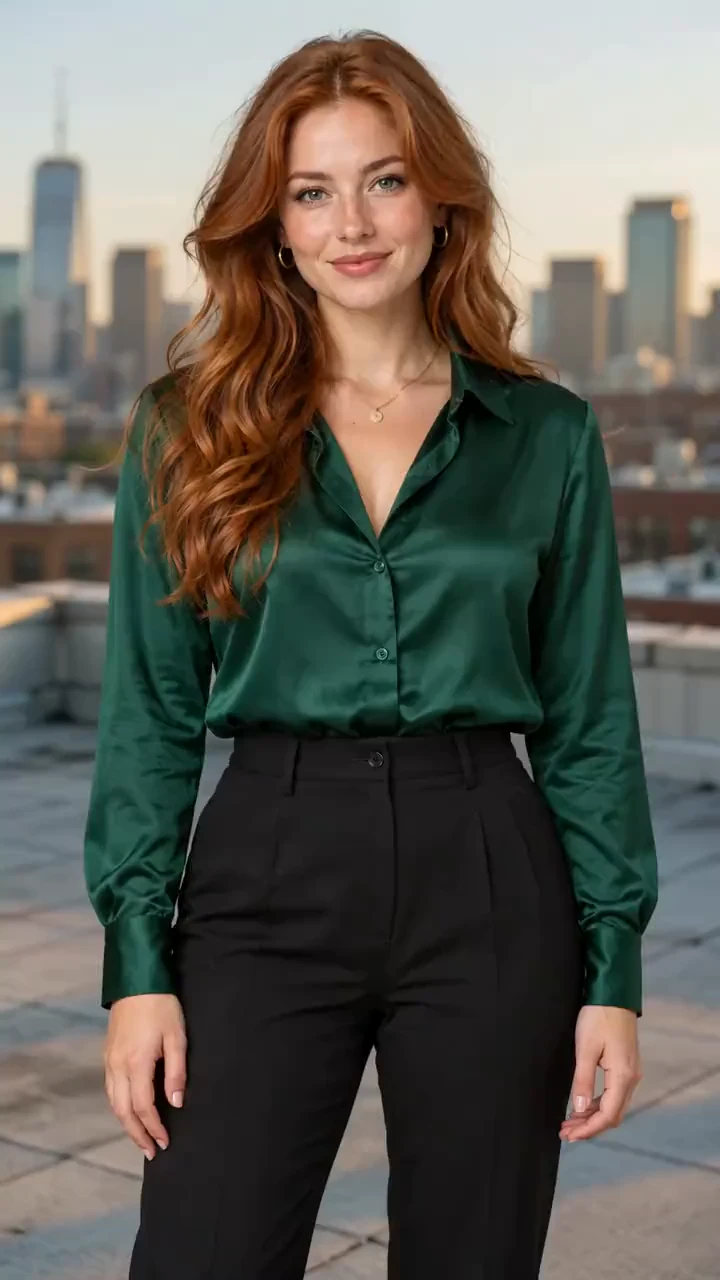
Use <<<image_1>>> as the sole identity reference for exactly one adult performer. Preserve the face, age, skin tone, hairstyle, outfit and body proportions. Photorealistic 10-second vertical 9:16 solo rap performance. Empty rooftop at golden hour with a softly blurred city skyline, warm rim light and neutral fill on the face. Light breeze in the hair and shirt. Eye-level 50mm waist-up shot with a gentle 30cm push-in; keep both hands in the lower frame. Original 100 BPM 4/4 laid-back melodic hip-hop: firm kick, dry snare, crisp hats, rounded bass, warm electric piano and sparse guitar plucks. One clear warm female rap voice with rhythmic consonants and lightly melodic rhyme endings; rap rather than sustained singing. Audible instrumental beat from frame one to the end, slightly beneath the lead voice. No backing vocal layers. 0.0-0.6s: Soft shoulder sway on the beat; look into camera. 0.6-3.0s: "SUN goes LOW / but my DREAMS stay HIGH." Gentle open-palm lift below chest, relaxed nod. 3.0-5.4s: "NEW day, new ROAD / got my own blue SKY." One low outward sweep, maintain lens eye contact. 5.4-7.8s: "MY pace, my PLACE / watch me learn to FLY." Chest touch then open palm, confident smile. 7.8-10s: Vocals end; mouth rests, gentle sway continues while the instrumental stays audible. One continuous shot, no cuts. Keep the mouth visible and hands below the face. Precisely articulate the quoted words with visible lip, cheek and jaw movement synchronized to the audible rap. Only the quoted lyrics are spoken; slashes are silent rhythmic separators and capitals mark accents. Exactly one visible performer and one lead voice. No duet, backing singers, crowd, narration, conversational delivery, subtitles, text, logos, duplicate people, identity changes or malformed hands. Generate actual audible vocals AND instrumental music in the video, not a silent mime.
Create Rap Videos with Your Photo, Audio, and Performance Style
Combine a recognizable performer, a rap recording, and a scene prompt in one workflow. Guide the vocal rhythm, gestures, lighting, and camera direction to suit the verse you want to visualize.
Portrait Photos as Performer References
Use an artist portrait, character image, or personal photo to guide the performer appearance. Choose a clear face and describe which features and clothing should stay consistent.
Your Own Rap Audio and Vocal Rhythm
Upload a rap recording with an audio-supported reference model to guide the phrasing and timing. Preview and trim the section you want to feature.
Custom Rap Scenes and Camera Direction
Set the performance in a recording booth, on a rooftop, or against a stage backdrop. Describe the framing, lighting, head movement, and hand gestures in your prompt.
Ready-to-Use Rap Performance Examples
Choose from five Rap Hints with photos, audio, and prompts. Replace the reference materials and customize the scene for your recording.
Make Personalized Rap Performance Videos Without Filming a New Take
Build a short rap video around your portrait and recording. Use prepared examples to get started, then refine the scene and performance direction for your music or message.
Start with a Photo and a Recorded Verse
Make a rap performance using a portrait and a short recording you already have. Add a scene prompt to turn those materials into a video for your music or message.
Let Your Audio Guide the Performance
Use the recording to communicate the verse rhythm and phrasing. Focus the prompt on the visual performance, then review how the generated movement follows the audio.
Explore Different Scenes for the Same Verse
Try a close studio performance or a wider rooftop scene. Change the lighting, gestures, and camera movement in the prompt to explore another visual direction.
Short Clips for Your Music and Social Content
Download a performance for a release teaser, artist introduction, personal greeting, or larger music edit. Review the face, vocal timing, and sound before sharing.
Photo to Rap Video Ideas for Music Promotion and Social Media
Create release teasers, artist introductions, personalized rap greetings, and short music videos with HeyDream. Match the performer, verse, and scene to the story you want to share.
Rap Release Teasers and Track Previews
Give an upcoming track a short visual preview. Feature a verse or hook in a performance clip for TikTok, Instagram Reels, YouTube Shorts, or your artist page.
Artist Introductions and Profile Videos
Turn an artist portrait into a performance that introduces the face and sound behind the music. Choose a setting and lighting style that fit the artist identity.
Personalized Rap Greetings and Shout-Outs
Combine a personal photo with a recorded birthday verse, celebration message, or friendly shout-out. Customize the background and gestures for the occasion.
Rap Performances for Music Video Edits
Generate a studio, rooftop, street, stage, or monochrome performance. Use the clip on its own or combine selected takes in a longer music video edit.
How to Use Photo to Rap Video Generator
Create a rap performance video in three simple steps by combining your portrait, rap audio, and scene direction, then previewing the finished result.
1. Add Your Photo and Rap Audio
Choose a Rap template example or upload a clear portrait and rap recording. Use the audio controls to select a section that fits the chosen model limits.
2. Describe the Scene and Generate
Edit the prompt for the location, gestures, lighting, and camera movement. Choose the available video settings, check the displayed credit cost, and select Generate.
3. Preview, Download, and Share
Track the task in your history and review the performer appearance, mouth movements, and audio. Download the finished clip or adjust the prompt to create another take.
FAQs about Photo to Rap Video Generator
More Articles & Tips about AI Rap Video Generation
Your next idea starts here
Turn Your Photo and Rap Audio into a Performance Video with HeyDream
Turn your ideas into 3D models, images, and videos with HeyDream AI. Explore creative tools, try different models, and bring your next project to life.