
Dreamina Seedance 2.5 Flash Now Available! Faster generation, fewer credits. Introducing Dreamina Seedance 2.5 Flash - Shorter wait times, and lower cost for high-frequency creation and multi-version testing, ideal for batch generation and repeated refinement. Try it now on
Seedance 2.5 Flash AI 视频生成器,支持原生音频
在 HeyDream 上用 Seedance 2.5 Flash 制作电影感短片。可以描述场景、用图片引导镜头,或根据参考素材编排一系列镜头。
0 / 5000
Loading...
Seedance 2.5 Flash AI 视频生成器介绍
了解如何用文字、图片或参考素材生成带声音的视频。
Seedance 2.5 Flash 能从详细的提示词、帧图片或参考素材生成带声音的视频,适合社交媒体内容、营销构思、电商和影视创意。
Seedance 2.5 Flash AI 视频生成示例
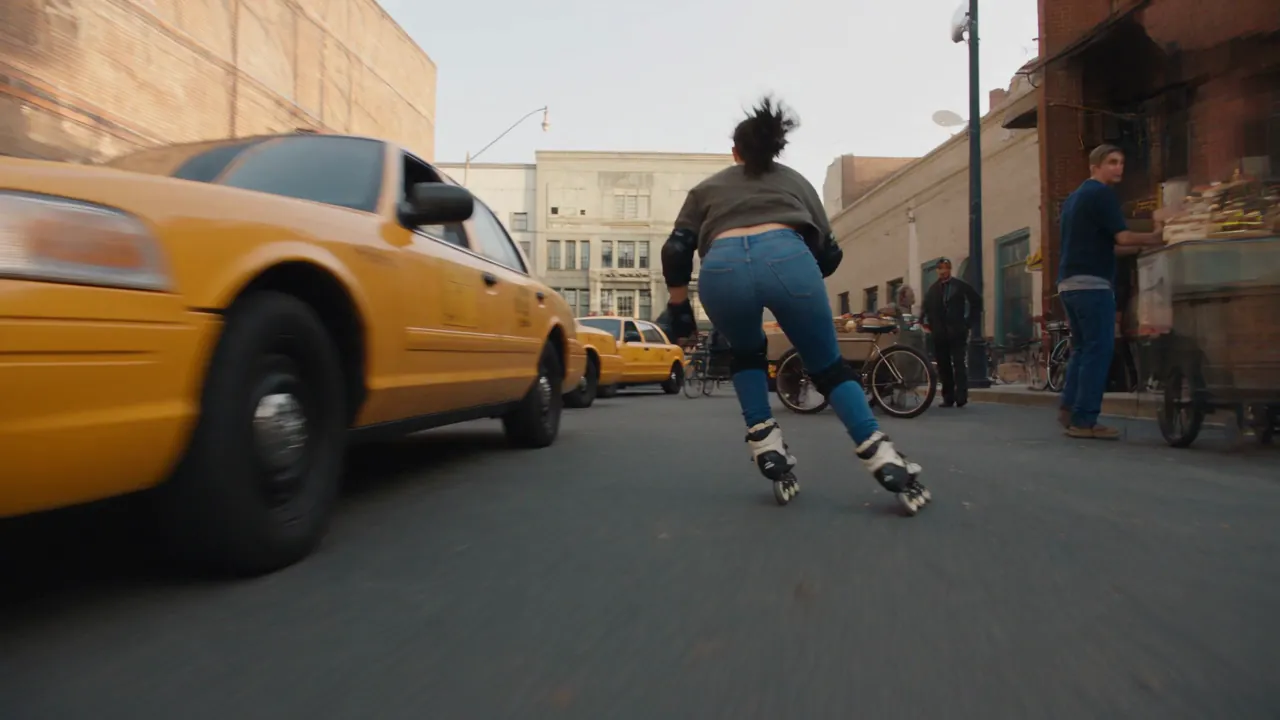
看看 Seedance 2.5 Flash 如何用提示词和原始图片生成有表现力的短片,按要求控制动作、保持画面连贯、灵活构图,并支持音频。
原始图片
视频
提示词
A 15-second photorealistic urban inline-skating stunt sequence on a closed downtown film set. Follow the same adult woman throughout: dark ponytail, fitted blue jeans, a charcoal top that fully covers her waist, black protective pads, and black-and-cream inline skates. Keep her face, outfit, and equipment consistent across all cuts. 0–3s — A wheel-level tracking shot follows her as she slaloms between staged taxis, bicycles, and market stalls. Vendors and pedestrians are visible along the sidewalks. She checks over her shoulder, drops her center of gravity, and accelerates hard. 3–7s — The camera races alongside as she launches off a short curb ramp and clears the low hood of a slowly rolling picture car. She lands on both skates with bent knees, takes one powerful stride, and immediately jumps over a low vendor cart. She lands cleanly and carries her speed into the side street. 7–10s — She crouches under a low crossbar, then grabs a railing with one hand at the corner. In a quick whip pan, she swings around the railing, releases it, and lands back on the pavement facing down the alley. 10–13s — An overhead shot follows her through the narrow alley. She launches off a short loading ramp and clears the low front ends of a row of diagonally parked picture cars. Both skates touch down cleanly, and she vanishes around a tight corner. 13–15s — Cut to a slow-motion hero shot as she skates into a sunlit downtown block. The camera rises above street level and pulls back as sunlight reflects across the buildings. Use fast FPV tracking, tire-level angles, natural motion blur, and realistic wheel grip. Show the push-off, airborne body position, and knee compression on each landing. Let wheel rumble and landing impacts carry the rhythm.
Seedance 2.5 Flash AI 视频模型的主要功能
Seedance 2.5 Flash 将提示词控制、图片引导、参考素材和音频支持融入 AI 视频制作流程。
文字转视频
用详细的提示词生成视频,控制主体、动作、环境、运镜、构图、光照、节奏和视觉风格。
用一到两张图片引导生成
上传首帧图片,设定开场构图。也可以添加尾帧,控制镜头如何收尾。
参考素材生成视频
用图片、视频片段或音频作为参考,引导场景、动作或声音。可以混用不同类型的素材,也可以只用音频作为参考。
生成带声音的视频
文字转视频、图片转视频和参考素材生成视频这三种方式都可以生成带声音的视频。
Seedance 2.5 Flash AI 视频生成器的用途
使用 Seedance 2.5 Flash,将提示词控制、图片引导、参考素材和音频用于创意制作和营销。
营销与产品故事
用提示词和参考素材指导动作与声音,制作产品亮相短片、品牌场景、推广创意、电商视频和营销活动初稿。
社交媒体内容
用提示词、原始图片或精选参考素材,构思创作者故事、活动预告、吸引观众的产品开场,以及适合发布平台的内容。
影视创意
用详细的提示词和参考素材构思音乐视频,制作有表现力的镜头、转场、氛围短片、预告片和预演片段。
图片动效与叙事
让一张图片动起来,或用两张图片引导片段的开头和结尾,探索角色动作、场景转场、画面连贯性和叙事节奏。
如何使用 Seedance 2.5 Flash AI 视频生成器
只需三个步骤,即可用提示词、一到两张原始图片或参考素材生成 Seedance 2.5 Flash 视频。
第 1 步:选择创作方式
在「文字/图片转视频」中,仅输入文字提示词,或上传首帧并按需添加尾帧;也可切换到「参考素材生成视频」,添加图片、视频或音频参考。
第 2 步:设置输出选项
选择分辨率和视频时长。只有纯文字转视频和「参考素材生成视频」支持选择宽高比。
第 3 步:生成并查看
生成短片并查看效果,再调整提示词、帧图片或参考素材,制作另一个版本。
在 Twitter 上探索 Seedance 2.5 Flash AI 视频作品

More ideas to try. Less time waiting. ⚡ Introducing Dreamina Seedance 2.5 Flash: results close to flagship Seedance 2.5, with nearly twice the generation speed. For 720p text-to-video and image-to-video generation, pricing is USD 0.152 per second, approximately 34% lower than

Seedance 2.5 vs Gemini Omni 1.2 Flash I put them side by side. Watch both clips and tell me which shot you’d keep in the edit. 🎬 I tried to run a few more tests, but I keep hitting a wall with Omni 1.2 Flash. Generated with Topview AI (link in bio)

ByteDance's Seedance 2.5 Flash: 2x faster video generation, ~$0.148/sec for 720P text- and image-to-video — ~34% cheaper than Seedance 2.5. Volcano Engine says it's the closest yet to 2.5 quality, at a lower creation cost.

Seedance 2.5 Flash AI 视频生成器常见问题
更多 Seedance 2.5 Flash AI 相关文章与资讯
你的下一个创意从这里开始
开始使用 Seedance 2.5 Flash AI 视频生成器
使用 HeyDream AI 将创意转化为 3D 模型、图片和视频。探索创意工具,尝试不同模型,让构想成为现实。