
Dreamina Seedance 2.5 Flash Now Available! Faster generation, fewer credits. Introducing Dreamina Seedance 2.5 Flash - Shorter wait times, and lower cost for high-frequency creation and multi-version testing, ideal for batch generation and repeated refinement. Try it now on
Seedance 2.5 Flash AI Video Generator with Native Audio
Create cinematic clips with Seedance 2.5 Flash on HeyDream. Start with a scene description, guide the shot with an image, or build a sequence from references.
0 / 5000
Loading...
Introduction to Seedance 2.5 Flash AI Video Generator
Explore text-to-video, image-to-video, and Reference-to-Video creation with audio support.
Seedance 2.5 Flash turns detailed prompts, frame images, or reference media into videos with sound. Use it for social content, marketing concepts, ecommerce, and cinematic ideas.
Examples of Seedance 2.5 Flash AI Video Generation
Explore how Seedance 2.5 Flash turns prompts and source images into expressive video clips with directed motion, visual continuity, flexible framing, and audio support.
Original Image
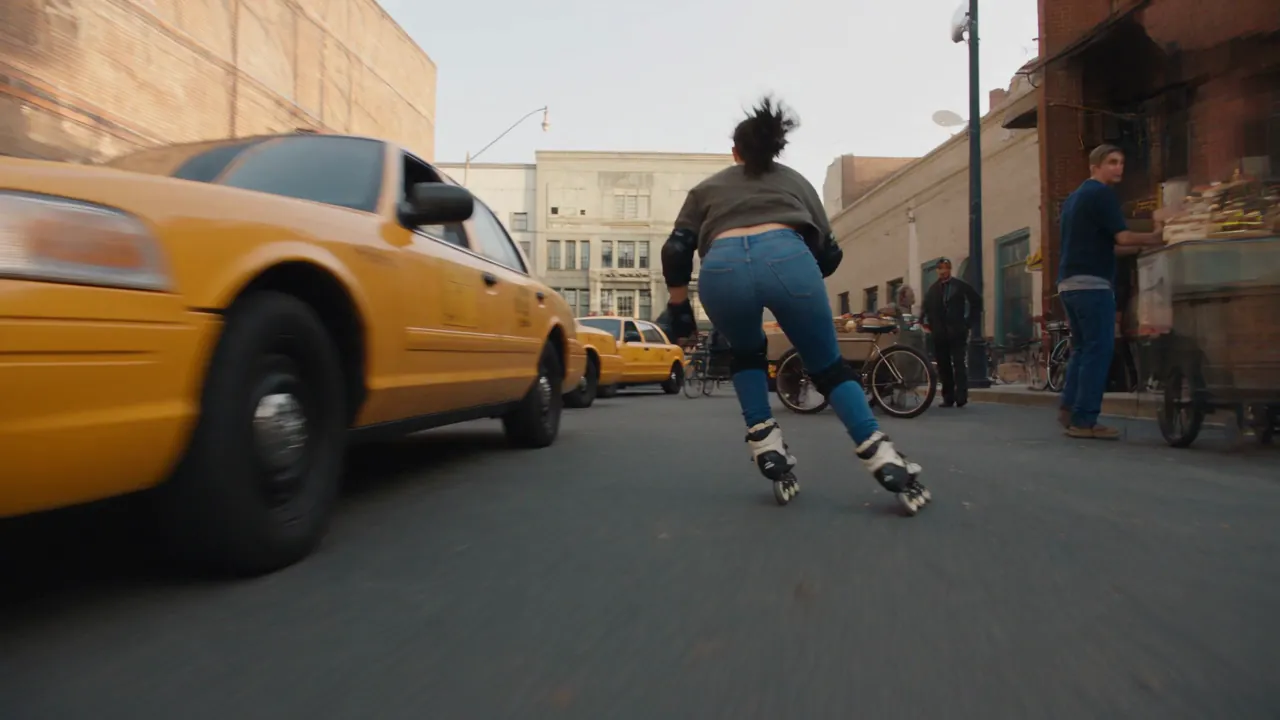
Video
Prompt
A 15-second photorealistic urban inline-skating stunt sequence on a closed downtown film set. Follow the same adult woman throughout: dark ponytail, fitted blue jeans, a charcoal top that fully covers her waist, black protective pads, and black-and-cream inline skates. Keep her face, outfit, and equipment consistent across all cuts. 0–3s — A wheel-level tracking shot follows her as she slaloms between staged taxis, bicycles, and market stalls. Vendors and pedestrians are visible along the sidewalks. She checks over her shoulder, drops her center of gravity, and accelerates hard. 3–7s — The camera races alongside as she launches off a short curb ramp and clears the low hood of a slowly rolling picture car. She lands on both skates with bent knees, takes one powerful stride, and immediately jumps over a low vendor cart. She lands cleanly and carries her speed into the side street. 7–10s — She crouches under a low crossbar, then grabs a railing with one hand at the corner. In a quick whip pan, she swings around the railing, releases it, and lands back on the pavement facing down the alley. 10–13s — An overhead shot follows her through the narrow alley. She launches off a short loading ramp and clears the low front ends of a row of diagonally parked picture cars. Both skates touch down cleanly, and she vanishes around a tight corner. 13–15s — Cut to a slow-motion hero shot as she skates into a sunlit downtown block. The camera rises above street level and pulls back as sunlight reflects across the buildings. Use fast FPV tracking, tire-level angles, natural motion blur, and realistic wheel grip. Show the push-off, airborne body position, and knee compression on each landing. Let wheel rumble and landing impacts carry the rhythm.
Key Features of Seedance 2.5 Flash AI Video Model
Seedance 2.5 Flash brings prompt direction, image guidance, reference media, and audio support into practical AI video workflows.
Text-to-Video Generation
Turn detailed prompts into video while directing the subject, action, environment, camera movement, composition, lighting, pacing, and visual style.
One-to-Two-Image Guidance
Upload a first frame to set the opening composition. Add a last frame if you want to guide how the shot ends.
Reference-to-Video Workflow
Use images, video clips, or audio as references to guide the scene, motion, or sound. Mix reference types or use audio as your only reference.
Video with Sound
Create videos with sound in all three modes: text-to-video, image-to-video, and reference-to-video.
Applications of Seedance 2.5 Flash AI Video Generator
Use Seedance 2.5 Flash for creative and marketing workflows that benefit from prompt direction, image guidance, reference media, and audio support.
Marketing and Product Stories
Create product reveals, branded scenes, promotional concepts, ecommerce videos, and campaign drafts with prompt direction, reference cues, motion, and sound.
Social Media Content
Develop creator stories, campaign teasers, product hooks, and platform-ready concepts from a prompt, source images, or selected reference media.
Cinematic Concepts
Develop expressive shots, visual transitions, mood pieces, trailers, music-video ideas, and previsualization clips from detailed prompts and reference cues.
Image Animation and Storytelling
Animate one source image or guide both ends of a sequence with two images to explore character motion, scene transitions, visual continuity, and story beats.
How to Use Seedance 2.5 Flash AI Video Generator
Create a Seedance 2.5 Flash video from a prompt, one or two source images, or reference media in three practical steps.
Step 1: Choose a Creation Workflow
Use a text prompt on its own, upload a first frame with an optional last frame, or switch to Reference-to-Video and add image, video, or audio references.
Step 2: Set Your Output Options
Choose the resolution and clip length. Aspect ratio selection is available only in Text-to-Video and Reference-to-Video.
Step 3: Generate and Review
Generate the clip, review the result, and refine the prompt, frame images, or reference media for another version.
Explore Seedance 2.5 Flash AI Video Creations on Twitter

More ideas to try. Less time waiting. ⚡ Introducing Dreamina Seedance 2.5 Flash: results close to flagship Seedance 2.5, with nearly twice the generation speed. For 720p text-to-video and image-to-video generation, pricing is USD 0.152 per second, approximately 34% lower than

Seedance 2.5 vs Gemini Omni 1.2 Flash I put them side by side. Watch both clips and tell me which shot you’d keep in the edit. 🎬 I tried to run a few more tests, but I keep hitting a wall with Omni 1.2 Flash. Generated with Topview AI (link in bio)

ByteDance's Seedance 2.5 Flash: 2x faster video generation, ~$0.148/sec for 720P text- and image-to-video — ~34% cheaper than Seedance 2.5. Volcano Engine says it's the closest yet to 2.5 quality, at a lower creation cost.

FAQs about Seedance 2.5 Flash AI Video Generator
More Articles & News about Seedance 2.5 Flash AI
Your next idea starts here
Start with Seedance 2.5 Flash AI Video Generator
Turn your ideas into 3D models, images, and videos with HeyDream AI. Explore creative tools, try different models, and bring your next project to life.