
Dreamina Seedance 2.5 Flash Now Available! Faster generation, fewer credits. Introducing Dreamina Seedance 2.5 Flash - Shorter wait times, and lower cost for high-frequency creation and multi-version testing, ideal for batch generation and repeated refinement. Try it now on
오디오를 직접 생성하는 Seedance 2.5 Flash AI 비디오 생성기
HeyDream에서 Seedance 2.5 Flash로 영화 같은 클립을 만드세요. 장면을 글로 설명하거나, 이미지로 샷을 연출하거나, 참조 자료로 시퀀스를 구성할 수 있습니다.
0 / 5000
Loading...
Seedance 2.5 Flash AI 비디오 생성기 소개
텍스트, 이미지, 참조 미디어로 소리가 있는 비디오를 만드는 방법을 살펴보세요.
Seedance 2.5 Flash는 상세한 프롬프트, 프레임 이미지 또는 참조 미디어를 소리가 있는 비디오로 만듭니다. 소셜 미디어 콘텐츠, 마케팅 콘셉트, 이커머스, 영화 같은 연출 아이디어에 활용해 보세요.
Seedance 2.5 Flash AI 비디오 생성 예시
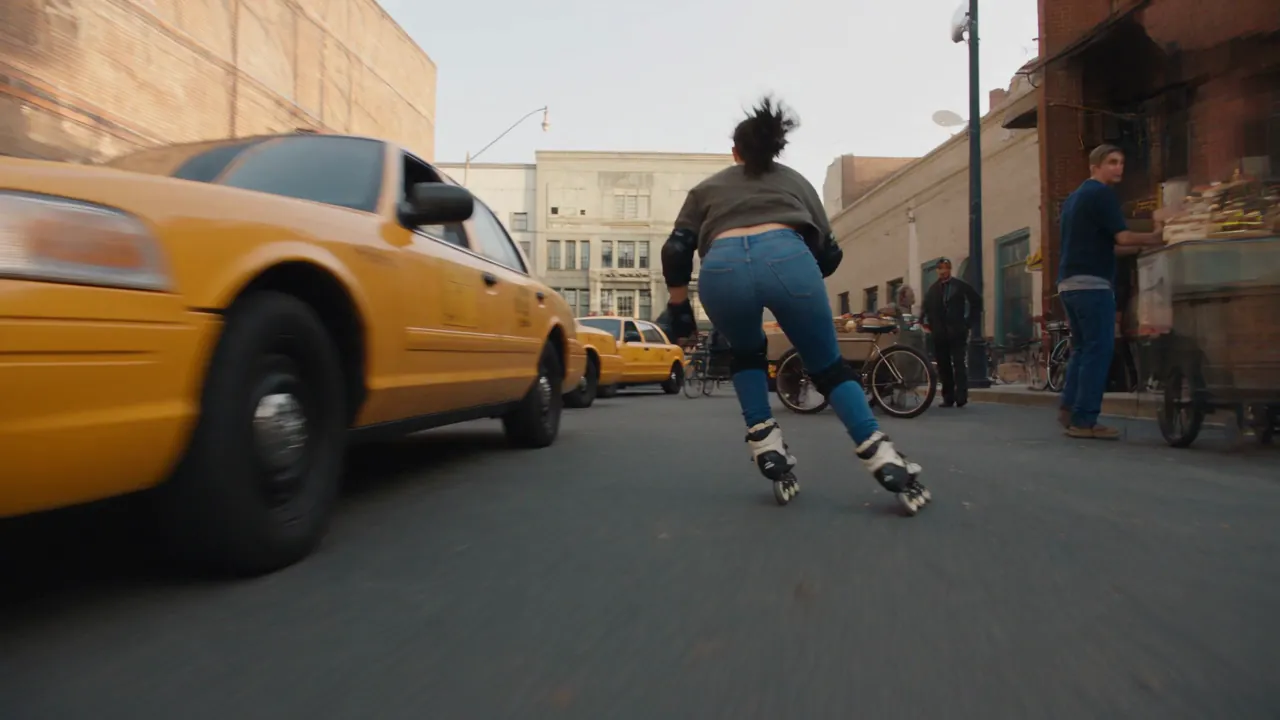
Seedance 2.5 Flash가 프롬프트와 원본 이미지로 움직임을 연출하고 시각적 연속성을 유지하며, 유연한 구도와 오디오를 활용해 표현력 있는 클립을 만드는 예시를 살펴보세요.
원본 이미지
비디오
프롬프트
A 15-second photorealistic urban inline-skating stunt sequence on a closed downtown film set. Follow the same adult woman throughout: dark ponytail, fitted blue jeans, a charcoal top that fully covers her waist, black protective pads, and black-and-cream inline skates. Keep her face, outfit, and equipment consistent across all cuts. 0–3s — A wheel-level tracking shot follows her as she slaloms between staged taxis, bicycles, and market stalls. Vendors and pedestrians are visible along the sidewalks. She checks over her shoulder, drops her center of gravity, and accelerates hard. 3–7s — The camera races alongside as she launches off a short curb ramp and clears the low hood of a slowly rolling picture car. She lands on both skates with bent knees, takes one powerful stride, and immediately jumps over a low vendor cart. She lands cleanly and carries her speed into the side street. 7–10s — She crouches under a low crossbar, then grabs a railing with one hand at the corner. In a quick whip pan, she swings around the railing, releases it, and lands back on the pavement facing down the alley. 10–13s — An overhead shot follows her through the narrow alley. She launches off a short loading ramp and clears the low front ends of a row of diagonally parked picture cars. Both skates touch down cleanly, and she vanishes around a tight corner. 13–15s — Cut to a slow-motion hero shot as she skates into a sunlit downtown block. The camera rises above street level and pulls back as sunlight reflects across the buildings. Use fast FPV tracking, tire-level angles, natural motion blur, and realistic wheel grip. Show the push-off, airborne body position, and knee compression on each landing. Let wheel rumble and landing impacts carry the rhythm.
Seedance 2.5 Flash AI 비디오 모델의 주요 기능
Seedance 2.5 Flash는 프롬프트를 통한 연출, 이미지 기반 제어, 참조 미디어, 오디오 지원을 하나의 AI 비디오 제작 과정에 담았습니다.
텍스트로 비디오 생성
상세한 프롬프트로 비디오를 만들면서 피사체, 동작, 배경, 카메라 움직임, 구도, 조명, 전개 속도, 시각적 스타일을 연출할 수 있습니다.
이미지 1~2장으로 프레임 지정
첫 프레임을 업로드해 시작 구도를 정하세요. 샷의 마무리까지 연출하려면 마지막 프레임을 추가하세요.
참조 미디어로 비디오 생성
이미지, 비디오 클립 또는 오디오를 참조로 사용해 장면, 움직임, 소리를 연출하세요. 여러 유형을 섞거나 오디오만 참조로 사용할 수 있습니다.
소리가 있는 비디오
텍스트, 이미지, 참조 미디어의 세 가지 생성 방식 모두 소리가 있는 비디오를 만들 수 있습니다.
Seedance 2.5 Flash AI 비디오 생성기 활용 사례
프롬프트 연출, 이미지 기반 제어, 참조 미디어, 오디오가 필요한 창작과 마케팅 작업에 Seedance 2.5 Flash를 활용하세요.
마케팅과 제품 스토리
프롬프트로 연출하고 참조 자료, 움직임, 소리를 활용해 제품 공개 영상, 브랜드 장면, 홍보 콘셉트, 이커머스 비디오, 캠페인 초안을 만드세요.
소셜 미디어 콘텐츠
프롬프트, 원본 이미지 또는 선택한 참조 미디어로 크리에이터 스토리, 캠페인 티저, 제품에 시선을 끄는 도입부, 플랫폼에 맞는 콘셉트를 만드세요.
영화 같은 연출
상세한 프롬프트와 참조 자료를 바탕으로 표현력 있는 샷, 화면 전환, 분위기를 담은 영상, 예고편, 뮤직비디오 아이디어, 사전 시각화 클립을 만드세요.
이미지 애니메이션과 스토리텔링
원본 이미지 한 장에 움직임을 더하거나 이미지 두 장으로 시퀀스의 시작과 끝을 연출해 보세요. 캐릭터의 움직임, 장면 전환, 시각적 연속성, 이야기의 주요 순간을 표현할 수 있습니다.
Seedance 2.5 Flash AI 비디오 생성기 사용 방법
프롬프트, 원본 이미지 한두 장 또는 참조 미디어로 세 단계에 걸쳐 Seedance 2.5 Flash 비디오를 만드세요.
1단계: 생성 방식 선택
‘텍스트 / 이미지로 비디오 만들기’에서 텍스트 프롬프트만 쓰거나 첫 프레임을 업로드하세요. 마지막 프레임은 선택 사항입니다. 또는 ‘참조 미디어로 비디오 생성’으로 전환해 이미지, 비디오 또는 오디오를 참조로 추가하세요.
2단계: 출력 옵션 설정
해상도와 클립 길이를 선택하세요. 화면 비율은 텍스트만으로 생성하거나 ‘참조 미디어로 비디오 생성’을 사용할 때만 선택할 수 있습니다.
3단계: 생성하고 결과 확인
클립을 생성한 뒤 결과를 확인하세요. 다른 버전을 만들려면 프롬프트, 프레임 이미지 또는 참조 미디어를 조정하세요.
Twitter에서 Seedance 2.5 Flash AI 비디오 작품 살펴보기

More ideas to try. Less time waiting. ⚡ Introducing Dreamina Seedance 2.5 Flash: results close to flagship Seedance 2.5, with nearly twice the generation speed. For 720p text-to-video and image-to-video generation, pricing is USD 0.152 per second, approximately 34% lower than

Seedance 2.5 vs Gemini Omni 1.2 Flash I put them side by side. Watch both clips and tell me which shot you’d keep in the edit. 🎬 I tried to run a few more tests, but I keep hitting a wall with Omni 1.2 Flash. Generated with Topview AI (link in bio)

ByteDance's Seedance 2.5 Flash: 2x faster video generation, ~$0.148/sec for 720P text- and image-to-video — ~34% cheaper than Seedance 2.5. Volcano Engine says it's the closest yet to 2.5 quality, at a lower creation cost.

Seedance 2.5 Flash AI 비디오 생성기 자주 묻는 질문
Seedance 2.5 Flash AI 관련 글과 소식 더 보기
다음 아이디어는 여기서 시작됩니다
Seedance 2.5 Flash AI 비디오 생성기 시작하기
HeyDream AI로 아이디어를 3D 모델, 이미지, 영상으로 바꾸세요. 창작 도구를 살펴보고 다양한 모델을 시도하며 다음 프로젝트를 실현하세요.