
Created with Google Flow. Visuals, Sound Design, and Voice were prompted using Veo 3 text-to-video. Welcome to a new era of filmmaking.
Flow動画生成ツール: 高度なGoogle動画AI
Flow動画生成ツールなら、Veo 3.1、Omni Flashなどの高度なモデルを使い、テキストや画像から滑らかなAI動画を簡単に作成できます。アイデアを入力するだけで、ソーシャルメディアへの投稿やマーケティングなどに使う動画を素早く生成できます。
生成した動画
Flow動画生成ツールの紹介
プロンプトまたは画像から始め、対応するAI動画モデルを選択し、利用可能な設定を調整して、一貫性のある短尺動画を生成できます。
プロンプトまたは画像から始め、対応するAI動画モデルを選択し、利用可能な設定を調整して、一貫性のある短尺動画を生成できます。
Flow動画生成ツールの作例
テキストからの動画生成、画像からの動画生成、フレームガイド、モデル選択、プロンプト最適化、出力設定を一つの実用的なAI動画制作ワークフローにまとめます。
元画像
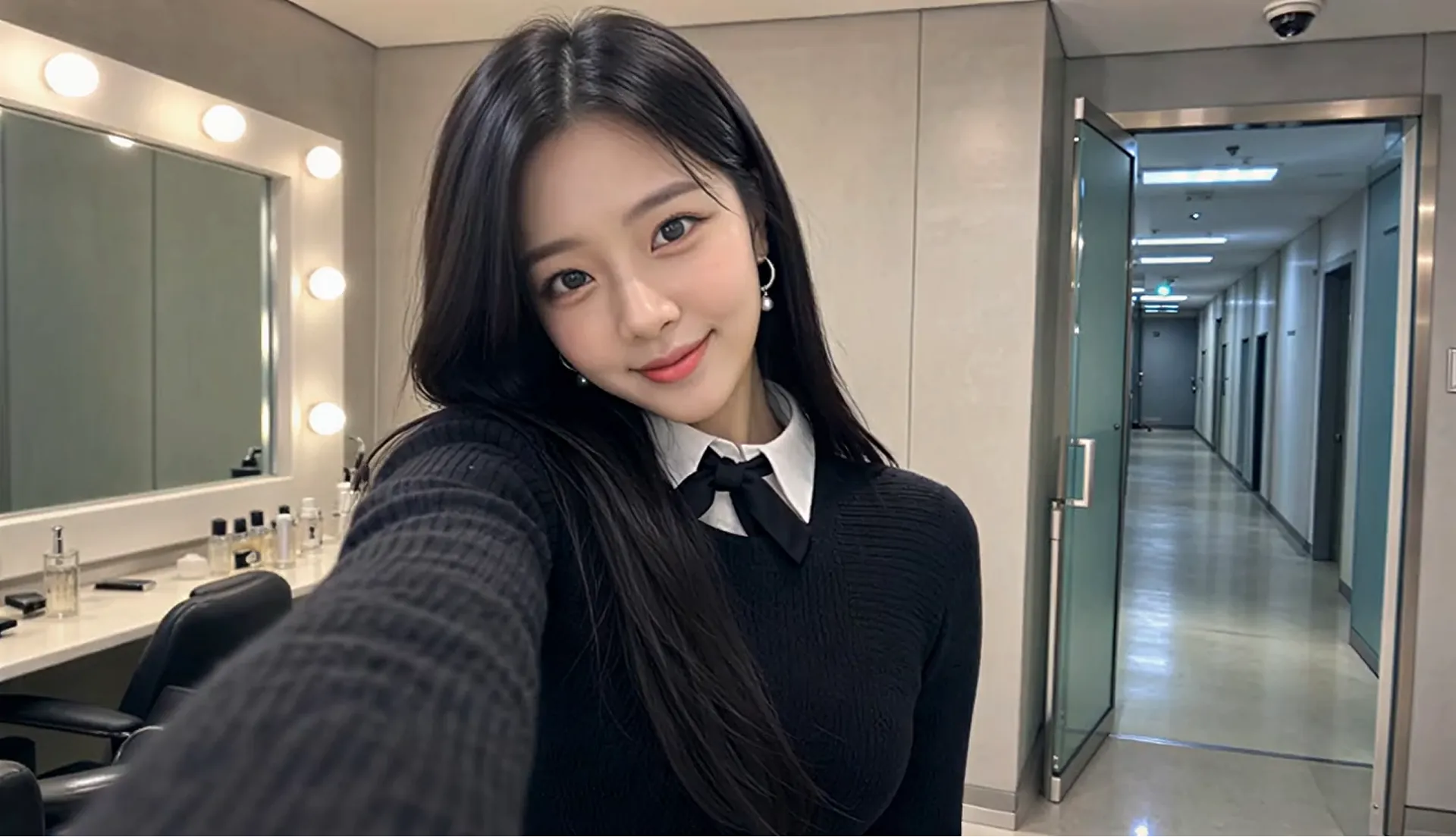
動画
プロンプト
Style: 8K photorealistic phone/mirrorless vlog, no 3D/anime. K-pop idol YouTube BTS: handheld selfie, punchy cuts, whip-pans, snap-zooms. Lighting: vanity bulbs key + soft spill, K-beauty glow, high-key face. Color: mono 60:30:10 warm gray/black wardrobe/pink accents. Camera: phone selfie (wide) + handheld, micro-shake, 180° shutter. Skin: pore dewy K-beauty, blush, glossy lips, catchlights. Acting: bubbly smiles, playful micros, eye contact, alive. Physics: hair bounce, skirt flare, real shadows. Continuity: same RENA/outfit/room. 24fps snappy 8K. Audio: cheerful, bright Korean lines, lip-sync. RENA: 20yo idol 166cm slim cute: round face full cheeks, big dark brown eyes +aegyo-sal, small nose, glass skin, coral lips, left beauty mark. Long straight black hair past chest, center part, face strands. Pearl-silver drop earrings. Black ribbed knit + oversized pleated collar + black ribbon, white collar peek, black micro pleated skirt + buckle, crew socks, chunky platform loafers. Scene: MV studio waiting room daytime. Vanity bulbs left; rack behind; gray couch + pink fan right; door upstage. Alone glam, phone vlog, fast handheld. CUT1(~2s) Selfie: close grin +finger-heart, hair swing, eyes sparkle. "하이 여러분~!" CUT2(~2s) Whip-pan: flip phone across vanity/rack/couch/fan back to face. "여기는 대기실!" CUT3(~2s) Zoom mirror: fix strand, press lips, nod. "예쁘죠?" CUT4(~1.5s) Macro: straighten ribbon, earring sway, collar. Fabric rustle. CUT5(~2s) Spin: skirt flare hair fan, land hands-frame. "짜잔~!" CUT6(~2s) Couch: sip banana milk, puff cheeks. "음~ 맛있어!" CUT7(~1.5s) Bottle to face, tap twice, grin. "이거 최고." CUT8(~2s) Knock, wide eyes, wave wink double-heart, spring up. Hold mirror. "가자! 안녕~!"
Flow動画生成ツールの主な機能
テキストからの動画生成、画像からの動画生成、フレームガイド、モデル選択、プロンプト最適化、出力設定を一つの実用的なAI動画制作ワークフローにまとめます。
テキストから動画・画像から動画の作成
テキストからの動画生成、画像からの動画生成、フレームガイド、モデル選択、プロンプト最適化、出力設定を一つの実用的なAI動画制作ワークフローにまとめます。
開始フレームと終了フレームのガイド
テキストからの動画生成、画像からの動画生成、フレームガイド、モデル選択、プロンプト最適化、出力設定を一つの実用的なAI動画制作ワークフローにまとめます。
モデルと出力設定
テキストからの動画生成、画像からの動画生成、フレームガイド、モデル選択、プロンプト最適化、出力設定を一つの実用的なAI動画制作ワークフローにまとめます。
プロンプト最適化ワークフロー
テキストからの動画生成、画像からの動画生成、フレームガイド、モデル選択、プロンプト最適化、出力設定を一つの実用的なAI動画制作ワークフローにまとめます。
Flow動画生成ツールの特長
プロンプト、画像、モデル設定、フレームガイドを組み合わせ、動画の下書きからマーケティング向けのアイデアまで手軽に作成できます。
初心者にも使いやすい動画制作
プロンプト、画像、モデル設定、フレームガイドを組み合わせ、動画の下書きからマーケティング向けのアイデアまで手軽に作成できます。
柔軟なモデル選択
プロンプト、画像、モデル設定、フレームガイドを組み合わせ、動画の下書きからマーケティング向けのアイデアまで手軽に作成できます。
ガイド付きプロンプトワークフロー
プロンプト、画像、モデル設定、フレームガイドを組み合わせ、動画の下書きからマーケティング向けのアイデアまで手軽に作成できます。
日常的な動画ニーズに対応
プロンプト、画像、モデル設定、フレームガイドを組み合わせ、動画の下書きからマーケティング向けのアイデアまで手軽に作成できます。
Flow動画生成ツールの使い方
分かりやすいプロンプトまたは画像を用意し、モデルと設定を選んで動画を生成します。プレビューを確認しながら必要に応じて調整してください。
ステップ1: プロンプトを入力するか画像をアップロード
分かりやすいプロンプトまたは画像を用意し、モデルと設定を選んで動画を生成します。プレビューを確認しながら必要に応じて調整してください。
ステップ2: モデルと設定を選択
分かりやすいプロンプトまたは画像を用意し、モデルと設定を選んで動画を生成します。プレビューを確認しながら必要に応じて調整してください。
ステップ3: 確認、調整、書き出し
分かりやすいプロンプトまたは画像を用意し、モデルと設定を選んで動画を生成します。プレビューを確認しながら必要に応じて調整してください。
TwitterでFlow動画生成ツールの作品を探索

We just discovered the 🔥 COOLEST 🔥 trick in Flow that we have to share: Instead of wordsmithing the perfect prompt, you can just... draw it. Take the image of your scene, doodle what you'd like on it (through any editing app), and then briefly describe what needs to happen
We've seen amazing Flow videos created using JSON prompts! It's not the only or even "best" way, just one way to help structure hyper-specific visual directions. No JSON? No problem! Regardless of how you prompt, it helps to be specific with your setting, subject, action,

Same tide. Same vibe. 4 different perspectives Test which view you like the most, or create an interesting effect for your content with this 2x2 grid prompt using Gemini Omni. Try it out for yourself 👇

