
Created with Google Flow. Visuals, Sound Design, and Voice were prompted using Veo 3 text-to-video. Welcome to a new era of filmmaking.
Flow Video Generator: Adavanced Google Video AI
Flow Video Generator lets you easily turn text or images into smooth AI videos using Veo 3.1, Omni Flash, and other advanced models. Just enter your idea and quickly generate videos for social posts, marketing, etc.
Video Creations
Introduction to Flow Video Generator
Explore Flow Video Generator, an easy AI video creation workflow for text-to-video, image-to-video, model selection, and first-frame or end-frame guidance.
Flow Video Generator is built around a streamlined video creation process: start with a prompt or image, choose a supported AI video model, adjust available settings, and generate a coherent short video. It is useful for creators who want smooth motion, clear scene direction, and practical output for social content, marketing, education, and brand storytelling.
Example of Flow Video Generator
Explore practical prompt examples to see how Flow Video Generator turns story ideas, reference images, first and end frames, camera direction, and model settings into smooth AI video concepts.
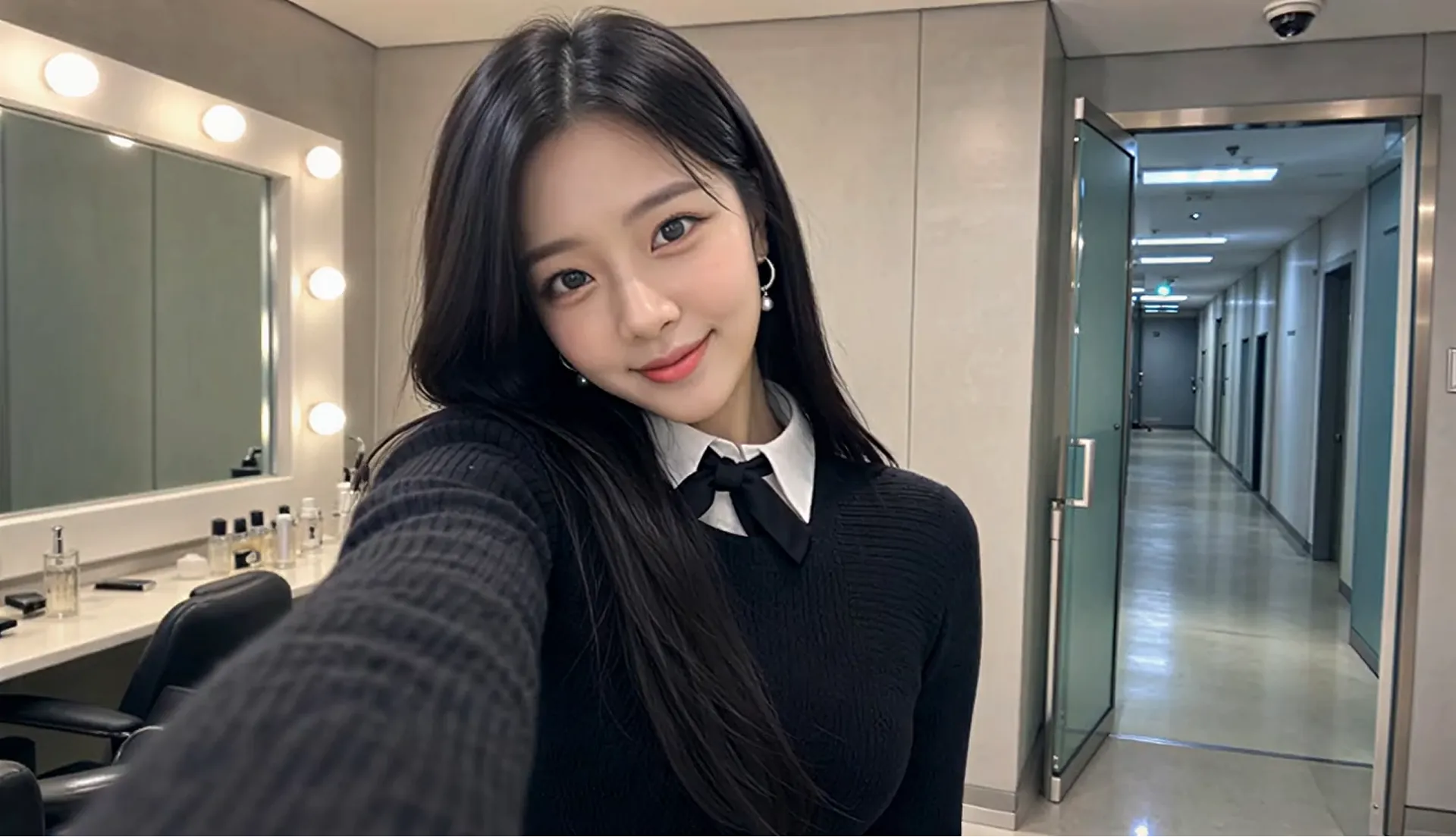
Original Image
Video
Prompt
Style: 8K photorealistic phone/mirrorless vlog, no 3D/anime. K-pop idol YouTube BTS: handheld selfie, punchy cuts, whip-pans, snap-zooms. Lighting: vanity bulbs key + soft spill, K-beauty glow, high-key face. Color: mono 60:30:10 warm gray/black wardrobe/pink accents. Camera: phone selfie (wide) + handheld, micro-shake, 180° shutter. Skin: pore dewy K-beauty, blush, glossy lips, catchlights. Acting: bubbly smiles, playful micros, eye contact, alive. Physics: hair bounce, skirt flare, real shadows. Continuity: same RENA/outfit/room. 24fps snappy 8K. Audio: cheerful, bright Korean lines, lip-sync. RENA: 20yo idol 166cm slim cute: round face full cheeks, big dark brown eyes +aegyo-sal, small nose, glass skin, coral lips, left beauty mark. Long straight black hair past chest, center part, face strands. Pearl-silver drop earrings. Black ribbed knit + oversized pleated collar + black ribbon, white collar peek, black micro pleated skirt + buckle, crew socks, chunky platform loafers. Scene: MV studio waiting room daytime. Vanity bulbs left; rack behind; gray couch + pink fan right; door upstage. Alone glam, phone vlog, fast handheld. CUT1(~2s) Selfie: close grin +finger-heart, hair swing, eyes sparkle. "하이 여러분~!" CUT2(~2s) Whip-pan: flip phone across vanity/rack/couch/fan back to face. "여기는 대기실!" CUT3(~2s) Zoom mirror: fix strand, press lips, nod. "예쁘죠?" CUT4(~1.5s) Macro: straighten ribbon, earring sway, collar. Fabric rustle. CUT5(~2s) Spin: skirt flare hair fan, land hands-frame. "짜잔~!" CUT6(~2s) Couch: sip banana milk, puff cheeks. "음~ 맛있어!" CUT7(~1.5s) Bottle to face, tap twice, grin. "이거 최고." CUT8(~2s) Knock, wide eyes, wave wink double-heart, spring up. Hold mirror. "가자! 안녕~!"
Key Features of Flow Video Generator
Flow Video Generator combines text-to-video, image-to-video, frame guidance, model selection, prompt optimization, and output settings in one practical AI video creation workflow.
Text-to-Video and Image-to-Video Creation
Enter a detailed prompt or upload a reference image to generate AI videos with clear subjects, natural motion, camera direction, and coherent visual style.
First and End Frame Guidance
Use available first-frame and end-frame controls to guide how a video starts or finishes, helping product shots, character moments, and story ideas follow a clearer visual direction.
Model and Output Settings
Choose from supported AI video models and adjust available settings such as aspect ratio, resolution, duration, prompt optimization, and audio options when supported by the selected model.
Prompt Optimization Workflow
Refine scene ideas with prompt optimization and clear creative direction, helping users describe motion, camera behavior, lighting, and output goals before generating the final video.
Advantages of Flow Video Generator
From quick video drafts to marketing-ready creative concepts, Flow Video Generator gives creators a simple way to combine prompts, images, model settings, frame guidance, and preview-ready AI video generation.
Beginner-Friendly Video Creation
Start with a prompt or image, choose a model, and generate a video without manual editing timelines, production equipment, or advanced motion design skills.
Flexible Model Choices
Select from supported AI video models to match different needs for realism, motion quality, speed, image guidance, or creative style depending on the current creation goal.
Guided Prompt Workflow
Use clear prompt fields, prompt optimization, and optional image guidance to describe subjects, motion, camera behavior, lighting, and scene goals with less trial and error.
Useful for Everyday Video Needs
Create social clips, product openers, educational visuals, brand stories, and campaign drafts with a workflow that supports fast iteration and practical creative output.
How to Use Flow Video Generator
Step 1: Enter a Prompt or Upload an Image
Write a clear prompt with the subject, setting, camera movement, visual style, and scene goal. Upload a reference image when you want image-to-video creation or stronger visual direction.
Step 2: Choose Model and Settings
Select a supported AI video model, adjust available settings such as aspect ratio, resolution, duration, first frame, end frame, prompt optimization, or audio options when available.
Step 3: Review, Refine, and Export
Preview the generated video, adjust weak scenes or prompt details, create variations, and export the best result for social media, ads, presentations, websites, or creative review.
Explore Flow Video Generator Creations on Twitter

We just discovered the 🔥 COOLEST 🔥 trick in Flow that we have to share: Instead of wordsmithing the perfect prompt, you can just... draw it. Take the image of your scene, doodle what you'd like on it (through any editing app), and then briefly describe what needs to happen
We've seen amazing Flow videos created using JSON prompts! It's not the only or even "best" way, just one way to help structure hyper-specific visual directions. No JSON? No problem! Regardless of how you prompt, it helps to be specific with your setting, subject, action,

Same tide. Same vibe. 4 different perspectives Test which view you like the most, or create an interesting effect for your content with this 2x2 grid prompt using Gemini Omni. Try it out for yourself 👇

