AI Video Generator
Create AI videos from text and images
Turn a pet photo into a dance video with HeyDream. Upload or replace the dance reference so your cat or dog follows the moves, then edit the prompt to keep the look you want. Audio comes from the dance clip by default.
Explore video, image, and 3D tools on Hey Dream AI to generate and refine creative assets.
Browse clips built from a pet photo plus a dance reference. Each form hint includes the source photo, motion reference, and an editable prompt so you can see the full workflow.
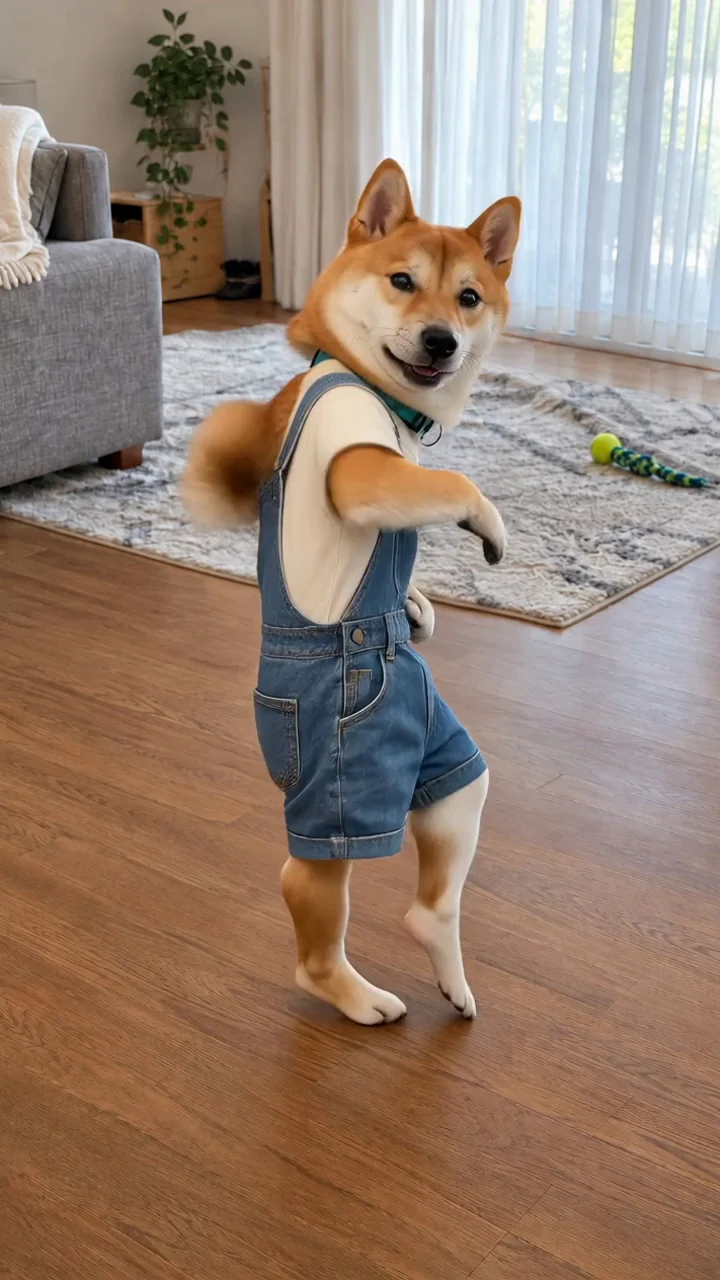
The clothed Shiba Inu shown in <<<image_1>>> performs the popping dance from <<<video_1>>>, following its rhythmic footwork, small hops, body bounces, turns and simple bent-foreleg swings. Keep the same Shiba Inu face, orange-and-cream fur, teal collar, cream short-sleeve T-shirt, blue denim bib shorts and living-room setting from <<<image_1>>> throughout. The shirt and shorts remain securely worn and fully cover the chest, belly and lower abdomen during every movement and turn. Keep natural compact canine proportions, fur-covered legs and small compact dog paws. Both front paws stay softly curled as whole paws; adapt the arm accents into whole-paw movements without separate finger gestures. Keep the complete dog, ears, tail and feet visible in one continuous fixed-camera shot, with room around its body. Natural fabric folds and realistic fur motion. No human hands, fingers, skin, muscular human arms, human feet, shoes, extra limbs, text or watermark. Vertical 9:16 video. Keep the original audio from <<<video_1>>>.
Match your pet's look to the choreography in a dance reference clip. Your pet follows the moves through motion transfer—keep the photo, reference, and prompt together as you generate.
Use a clear photo of your cat or dog so the model can keep its face, breed look, markings, and body proportions consistent in the dance video.
Keep the sample clip or upload your own 3–30s dance reference. Your pet follows the choreography and timing from that video.
The example prompt already references the loaded image and video. Tune it to emphasize your pet's appearance and natural paws. Audio follows the dance reference by default—there is no separate music control.
Browse dog and cat dance references. Load a starting point, preview the result, and swap in your own pet photo.
Unlike template-only apps, you bring the dance clip. Start with an example that pairs the photo, reference video, and prompt, then focus on your pet and the moves you want.
Open with a dance example already loaded. Swap the sample image for your cat or dog photo, then review the prompt and settings before you generate.
Stick with the sample motion clip or upload your own dance reference. Your pet follows that choreography instead of a fixed in-app template.
Describe face, breed look, markings, and body proportions so the model stays true to your pet. Ask for compact paws and grounded steps that fit an animal frame.
Download a short dancing-pet clip ready for social. Try another reference, compare takes, and refine the prompt for your next post.
Make your pet dance for social feeds, greetings, or edits. Pick a dance reference that matches the energy you want to post.
Post a dancing cat or dog clip on Reels, TikTok, or YouTube Shorts. Keep your pet easy to recognize while the reference drives clear moves.
Drop a dancing pet into a birthday or holiday message. Choose an upbeat dance reference and add the finished clip to your greeting.
Swap photos between pets or test a new dance reference on the same pet. Compare takes to find the clip that fits your channel.
Generate a short dancing-pet insert, then drop it into a vlog, montage, or story edit when you need a playful beat.
Upload your pet photo, keep or replace the dance reference, then generate and download the clip.
Start from the loaded example or pick another hint. Replace its image with a clear photo of your dog or cat that shows the body and paws.
Keep the sample video or upload your own 3–30s motion reference. Audio comes from that dance clip by default. Edit the prompt, check credits, then select Generate.
Track the task in history. Review your pet's look, paw movement, and timing against the reference, then download or tweak for another take.
Your next idea starts here
Turn your ideas into 3D models, images, and videos with HeyDream AI. Explore creative tools, try different models, and bring your next project to life.