這份 Seedream 5.0 AI 圖像提示詞指南,示範如何把模糊想法轉換成更清晰的提示詞,以便在 HeyDream AI 上產出更精緻的視覺成品。內容為創作者、行銷人員、設計師、電商賣家、社群媒體管理者、部落客,以及想在文字轉圖像與圖像轉圖像工作流程中獲得更好成果的 AI 圖像新手而寫。
以 Seedream 5.0 AI Image Generator 作為主要模型頁面,接著依你是從文字、參考圖片或既有視覺開始,選用 HeyDream 的 AI Image Generator、Text to Image、Image to Image 與 Image to Prompt 工具。

快速摘要:Seedream 5.0 提示詞應包含哪些內容
好的 Seedream 5.0 提示詞應該像製作簡報(production brief)一樣描述圖片,而不只是說一個主題。與其寫「高級保養品廣告」,不如描述產品、場景、鏡頭角度、打光、材質、情緒、構圖、比例,以及成品的用途。
在多數 HeyDream AI 工作流程中,建議包含以下要素:
- 主體(Subject):主要產品、人物、物件、場景或角色。
- 場景(Setting):攝影棚、廚房、城市街道、電商背景、臥室、奇幻地點或工作空間。
- 構圖(Composition):特寫、俯拍、分割畫面、置中產品主視覺、直式社群版面或寬幅部落格封面。
- 風格(Style):寫實、編輯風、產品攝影、商業、3D、動漫、插畫或電影感概念藝術。
- 光線(Lighting):柔和棚燈、自然窗光、陰天光、電影感輪廓光、溫暖傍晚光或戲劇性聚光。
- 細節(Details):材質、紋理、顏色、道具、氛圍與負面限制(negative constraints)。
- 輸出目標(Output goal):海報、產品照、社群貼文、電商圖片、部落格封面、概念藝術或品牌資產。
提示詞越具體,就越容易判斷 Seedream 5.0 是否遵循了需求簡報。

將 HeyDream AI 作為 Seedream 5.0 的主要工作流程平台
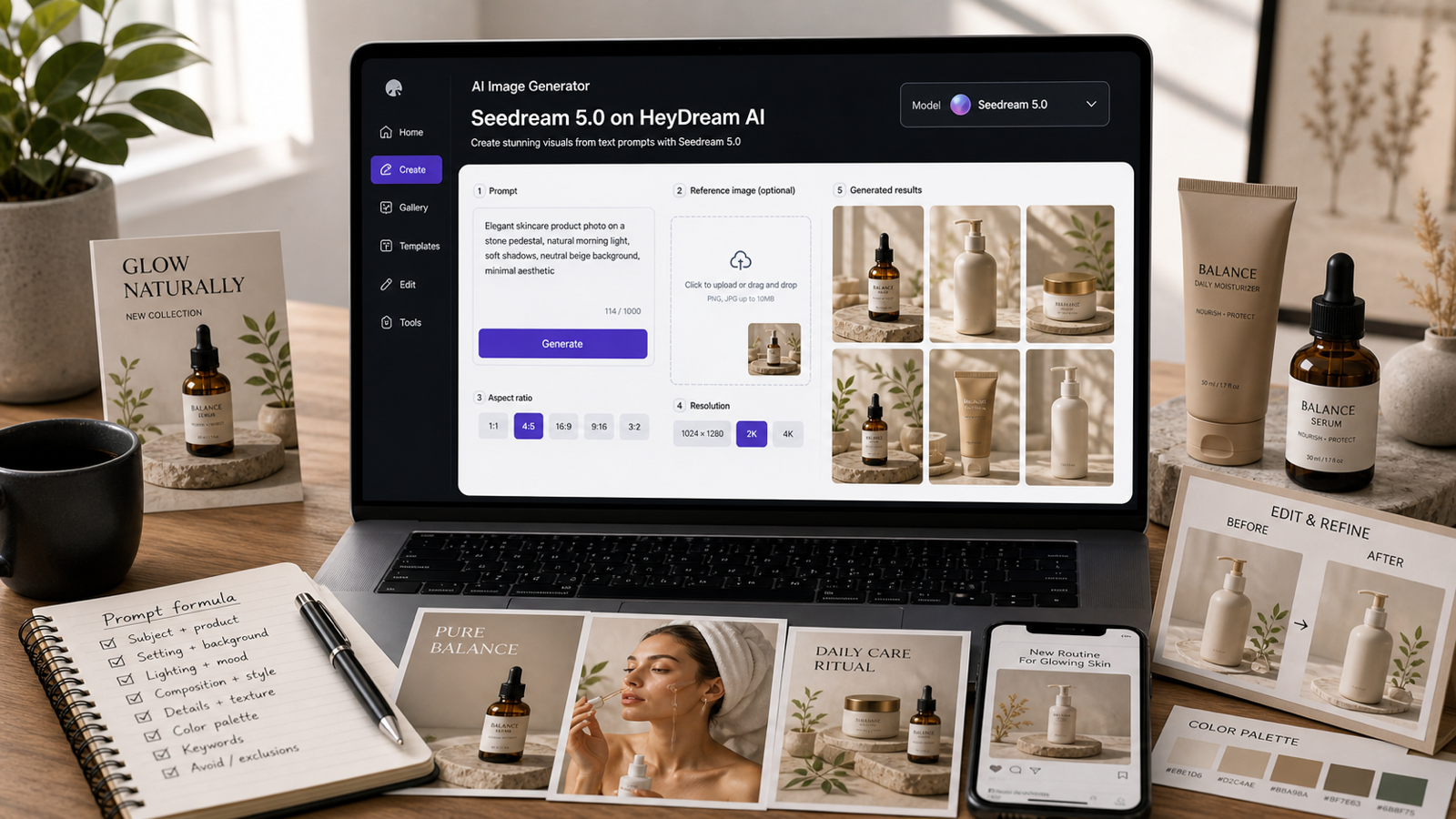
本指南推薦使用 HeyDream AI,因為它把模型頁面與實用創作工具串在一起。需要直接存取時用 Seedream 5.0 模型頁面;要廣泛測試提示詞用 AI Image Generator;做純提示詞概念用 Text to Image;要參考圖引導的編輯用 Image to Image;想把視覺參考轉成更好的提示詞則用 Image to Prompt。
在發布或販售輸出前,請確認線上平台的即時資訊。Seedream 5.0 的可用性、點數成本、免費試用、支援的長寬比、解析度選項、商業權利、水印規則、上傳隱私與模型命名都可能變動。若頁面區分 Seedream 5.0 與 Seedream 5.0 Lite,除非平台明確表示相同,否則不要視為同一模型。
一個實用的工作流程如下:
- 只有想法時,先從 Text to Image 開始。
- 有參考視覺但沒有提示詞時,用 Image to Prompt。
- 想保留構圖、產品外形或風格時,用 Image to Image。
- 使用 Seedream 5.0 產出更精緻的視覺草稿。
- 發布前檢查文字、寫實度、一致性與權利問題。
這樣能保持流程彈性,而不是假設一段提示詞就一定能一次生成成品圖。

用於寫實、吸引人的 Seedream 5.0 提示詞公式
想要可重複的品質時,使用提示詞公式。公式能幫你避免漏掉比例、光線、背景或負面限制等基本資訊。
可重用的提示詞公式:
Create a high-quality, photorealistic, appealing [content type] using Seedream 5.0 for [target audience/use case]. Subject: [main subject/product/person/object]. Setting: [environment/background]. Composition: [framing, angle, layout, visual hierarchy]. Style: [photorealistic/editorial/3D/anime/illustration/product/commercial]. Lighting: [natural/studio/cinematic/soft/dramatic]. Details: [materials, textures, colors, props, mood]. Output goal: [poster/product photo/social post/concept art/ecommerce image/blog cover]. Ratio: [1:1/4:5/9:16/16:9]. Avoid [fake logos, unreadable text, distorted anatomy, clutter, copyrighted characters, misleading claims].
範例:
Create a high-quality, photorealistic, appealing ecommerce hero image using Seedream 5.0 for a home office product page. Subject: a wireless desk lamp. Setting: modern workspace with laptop, notebook, and warm evening shadows. Composition: wide 16:9 product hero with the lamp clearly visible on the right and clean space on the left for text. Style: realistic commercial product photography. Lighting: warm lamp glow with soft ambient fill. Details: matte metal texture, clean desk surface, subtle shadows, cozy productivity mood. Output goal: ecommerce image. Ratio: 16:9. Avoid messy background, fake logos, distorted proportions, and tiny text.
這套公式不是為了無故把提示詞寫得更長,而是一份用來掌控畫面的檢查清單。

文字轉圖像工作流程:從想法到可用視覺
文字轉圖像最有效的方式,是一次只做一個主要創意決策。先把主體與輸出目標講清楚,拿到第一版結果後,再逐步精修場景、風格、光線與構圖。
針對產品與行銷視覺,先從實際使用情境出發。產品圖提示詞應強調可視性、材質、尺度、光線與背景;社群提示詞應強調直式版面、視覺鉤子、留白與氛圍;部落格封面應強調寬幅構圖、清楚焦點與足夠乾淨的空間以利排版。
可使用以下精修手法:
- 如果畫面太雜,要求更少道具與更多留白。
- 如果產品不清楚,要求清楚的產品可視性與寫實比例。
- 如果風格不一致,指名一種風格,避免混太多。
- 如果畫面太平,指定光線方向與氛圍。
- 如果成品不符合平台需求,重申長寬比與版面布局。
Seedream 5.0 可能很適合做精緻視覺,但提示詞仍需要給出製作方向。

圖像轉圖像與參考圖提示詞寫法
當一致性很重要時,參考圖非常有用。當你希望保留產品外形、構圖、姿勢或視覺方向,同時更換背景、光線或質感時,使用 Image to Image。
好的參考圖提示詞,會清楚區分哪些必須保留、哪些可以改變。例如,在要求新棚拍背景之前先寫「保持產品外形、顏色與標籤位置一致」。若你要做風格轉換,則寫「保留主體姿勢與取景,但把風格改成高品質的編輯風海報」。
如果你有參考圖但難以描述,請在編輯前先使用 Image to Prompt AI。先把圖片轉成結構化提示詞,再為 Seedream 5.0 進一步簡化或精修。這對產品照、情緒版(mood board)、視覺參考與品牌資產特別有幫助。
不要假設能做到完美的身份一致或無瑕的編輯。使用結果前務必檢查臉部、手部、文字、產品標籤、Logo 位置與背景細節。

可直接複製使用的 Seedream 5.0 圖像提示詞範例
以下 Seedream 5.0 圖像提示詞範例可作為起點,再依主體、比例與輸出目標調整。
- Create a high-quality, photorealistic, appealing product image of a luxury skincare serum bottle on a warm beige stone surface. Use soft studio lighting, realistic glass reflections, clean shadows, minimal botanical props, and premium editorial composition. Leave clean space for headline text. Ratio: 4:5. Avoid fake logos and unreadable labels.
- Create a high-quality, photorealistic, appealing vertical social media ad image for a ceramic coffee mug. Show the mug on a wooden desk with morning sunlight, a notebook, cinnamon sticks, and soft steam. Style: cozy lifestyle photography. Mood: calm, warm, and handmade. Ratio: 9:16. Avoid clutter and fake brand text.
- Create a high-quality, photorealistic, appealing ecommerce hero image for a wireless desk lamp. Show the lamp glowing in a modern workspace with a laptop, notebook, and warm evening shadows. Emphasize realistic material, soft light falloff, and clean product visibility. Ratio: 16:9. Avoid messy background and unrealistic proportions.
- Create a high-quality, photorealistic, appealing Pinterest pin image for a small bedroom organization guide. Show a bright compact bedroom with under-bed storage, floating shelves, folded blankets, and a clean bedside table. Style: photorealistic interior design photography. Leave space for text overlay. Ratio: 2:3. Avoid tiny labels.
- Create a high-quality, photorealistic, appealing fashion editorial image of a model wearing a neutral oversized coat on a quiet city street after rain. Use soft overcast lighting, realistic fabric texture, shallow depth of field, and a premium magazine style. Ratio: 4:5. Avoid celebrity resemblance and distorted hands.
- Create a high-quality, appealing brand mood board for a fictional organic tea company. Include tea leaves, ceramic cup, packaging mockup, color swatches, soft paper textures, and natural green tones arranged on a designer desk. Style: polished photorealistic brand presentation. Ratio: 16:9. Avoid copied logos.
- Create a high-quality, photorealistic, appealing cinematic fantasy concept image of a lone explorer standing before a glowing ancient sea gate. Include mist, wet stone, lantern light, deep blue shadows, and dramatic scale. Style: realistic fantasy film still. Ratio: 16:9. Avoid copyrighted characters.
- Create a high-quality, appealing app launch poster for a fictional productivity tool. Show a phone mockup with abstract task cards, a notebook, coffee cup, and bright morning workspace. Text area should be clear but do not generate tiny unreadable UI text. Ratio: 4:5. Avoid real app logos.
- Create a high-quality, photorealistic, appealing food photography image of a strawberry yogurt bowl with granola, honey drizzle, linen napkin, and bright kitchen daylight. Composition: top-down editorial food photo with crisp texture and appetizing color. Ratio: 1:1. Avoid fake nutrition labels.
- Create a high-quality, appealing character concept portrait of an original sci-fi courier wearing a practical jacket, shoulder bag, and subtle glowing device. Setting: rainy neon alley. Composition: waist-up portrait. Lighting: blue and amber cinematic rim light. Ratio: 4:5. Avoid copyrighted franchise references.
- Edit the reference product image while keeping the product shape, color, and label placement consistent. Change only the background to a clean, photorealistic studio setup with soft shadows and appealing premium ecommerce lighting. Ratio: 1:1. Avoid altering the product identity.
- Use the reference image as the main composition. Keep the subject pose and framing, but change the style into a high-quality, appealing editorial poster with better lighting, cleaner background, and more professional color grading. Ratio: 4:5. Avoid changing facial identity or adding extra objects.
- Create a high-quality, photorealistic, appealing YouTube thumbnail concept for “Seedream 5.0 Prompt Guide.” Show a clean AI image generation dashboard, prompt box, image preview grid, and side-by-side before/after prompt improvement visual. Style: bright SaaS creator workspace. Ratio: 16:9. Avoid real brand logos and tiny text.
- Create a high-quality, photorealistic, appealing product lifestyle image for a travel backpack on a hotel bed with packing cubes, passport, sunglasses, and folded clothes. Lighting: warm daylight. Mood: practical, organized, travel-ready. Style: realistic ecommerce lifestyle photography. Ratio: 4:5. Avoid fake airline logos.
調整這些提示詞時,一次只改一個元素,會更容易學到 Seedream 5.0 在你的工作流程中對哪些資訊最敏感。

產品、行銷、電商與社群媒體提示詞技巧
商業視覺比隨意的概念圖需要更高的控制度。如果輸出要用在產品頁、廣告、部落格文章或社群活動上,請用能指定版面、產品可視性,以及哪些內容不該被「憑空捏造」的提示詞。
電商用途:要求正確外形、清楚打光、寫實材質與乾淨背景。社群用途:要求強烈視覺鉤子、直式或正方比例,以及清楚留白以放文案。海報用途:描述標題留白區、視覺層級、焦點主體與簡潔背景。品牌資產:要求情緒版元素、色票、包裝 mockup,且僅使用虛構品牌識別。
避免要求模型生成真實 Logo、名人長相、受版權保護的角色、虛假宣稱,或小到不可讀的文字。如果文字很重要,建議在生成後用設計工具再加上最後的字體排版。
這也是 Seedream 5.0 在產品圖、行銷視覺與電商設計上最有價值的地方:它不是一鍵成品,而是快速視覺打樣工具。

Seedream 5.0 輸出檢查清單
每張輸出在發布前都要檢查。即使是強大的 AI 圖像模型,也可能生成奇怪文字、不一致物件、扭曲的手、非寫實反射,或與提示詞不符的細節。
請檢查以下項目:
- 符合提示詞:是否符合主體、場景、風格、比例與輸出目標?
- 文字渲染:畫面中任何可見文字是否可讀、符合意圖且拼字正確?
- 產品準確性:模型是否改變了產品外形、顏色、標籤位置或比例?
- 參考一致性:Image to Image 是否保留了你在意的細節?
- 構圖:是否有足夠留白放文案或版面?
- 寫實度:陰影、反射、手部、材質與尺度是否可信?
- 品牌安全:是否有假 Logo、受版權保護角色或抄襲藝術家風格?
- 權利與隱私:上傳規則、商用條款、水印規則與儲存政策是否可接受?
如果有一項重大檢查未通過,請先修提示詞,而不是一次想把所有問題都補救掉。

FAQ 與最終工作流程建議
Seedream 5.0 和 Seedream 5.0 Lite 一樣嗎?
不一定。除非線上平台清楚說明它們相同,否則請把 Seedream 5.0 與 Seedream 5.0 Lite 當作不同名稱。若要比較,請標註你測試的確切頁面與模型標籤。
Seedream 5.0 能在圖像中生成完美文字嗎?
不要預期完美的文字渲染。你可以留出標題文字區,或要求大而可讀的文字,但最後的排版通常在設計工具中完成會更安全。
Seedream 5.0 新手最好的第一個提示詞是什麼?
從簡單的產品圖、社群貼文或部落格封面提示詞開始。包含主體、場景、構圖、風格、光線、比例、輸出目標與負面限制。
在使用 Seedream 5.0 前,該先用 Image to Prompt 嗎?
是的,如果你有視覺參考但無法清楚描述。Image to Prompt 可以把可見細節轉成結構化提示詞,讓你更容易簡化、重用。
我可以把 Seedream 5.0 生成的圖片用於商業用途嗎?
在商用前請查看 HeyDream AI 最新條款、商業權利、水印規則、上傳隱私與模型頁資訊。不要只因模型名稱就假設一定能安全商用。
結論
一份好的 Seedream 5.0 AI 圖像提示詞指南,應該幫你寫出更清楚的視覺簡報,而不只是更長的提示詞。在 HeyDream AI 上,用 Seedream 5.0 生成精緻圖像草稿;用 Text to Image 做純提示詞創作;用 Image to Image 做參考圖引導編輯;用 Image to Prompt 把視覺參考轉成更好的提示詞。最佳流程很簡單:寫結構化提示詞、生成、檢查、一次只修一個變數,並在發布前確認平台條款。