
Wait… the football star is sitting in the audience?! ⚽️
Kling 3.0 Turbo AI Video Generator: Fast Kling 3.0 AI
Kling 3.0 Turbo AI Video Generator is a faster and more cost-effective model based on Kling 3.0. It retains the multimodal video generation, supporting unified creation of visuals and audio (including dialogue, sound effects, background music), with innovative 'Storyboard' and 'Elements 3.0' systems for automatic multi-shot editing and consistent character and prop control in AI-generated videos.
Video Creations
Introduction to Kling 3.0 Turbo AI Video Generator
Explore Kling 3.0 Turbo AI Video Generator, a Kuaishou Kling video model built for faster text-to-video and first-frame image-to-video workflows.
Kling 3.0 Turbo is a fast Kling video creation experience for short cinematic clips. It supports text-to-video and image-to-video generation, 720p and 1080p output, 16:9, 9:16, and 1:1 aspect ratios, 3 to 15 second durations, and structured multi-shot scene planning with up to six shots for more controllable short video creation.
Example of Kling 3.0 Turbo AI Video Generator
Explore practical prompt examples to see how Kling 3.0 Turbo AI Video Generator turns scene descriptions, camera directions, and first-frame references into polished short AI videos.
Original Image
Video
Prompt
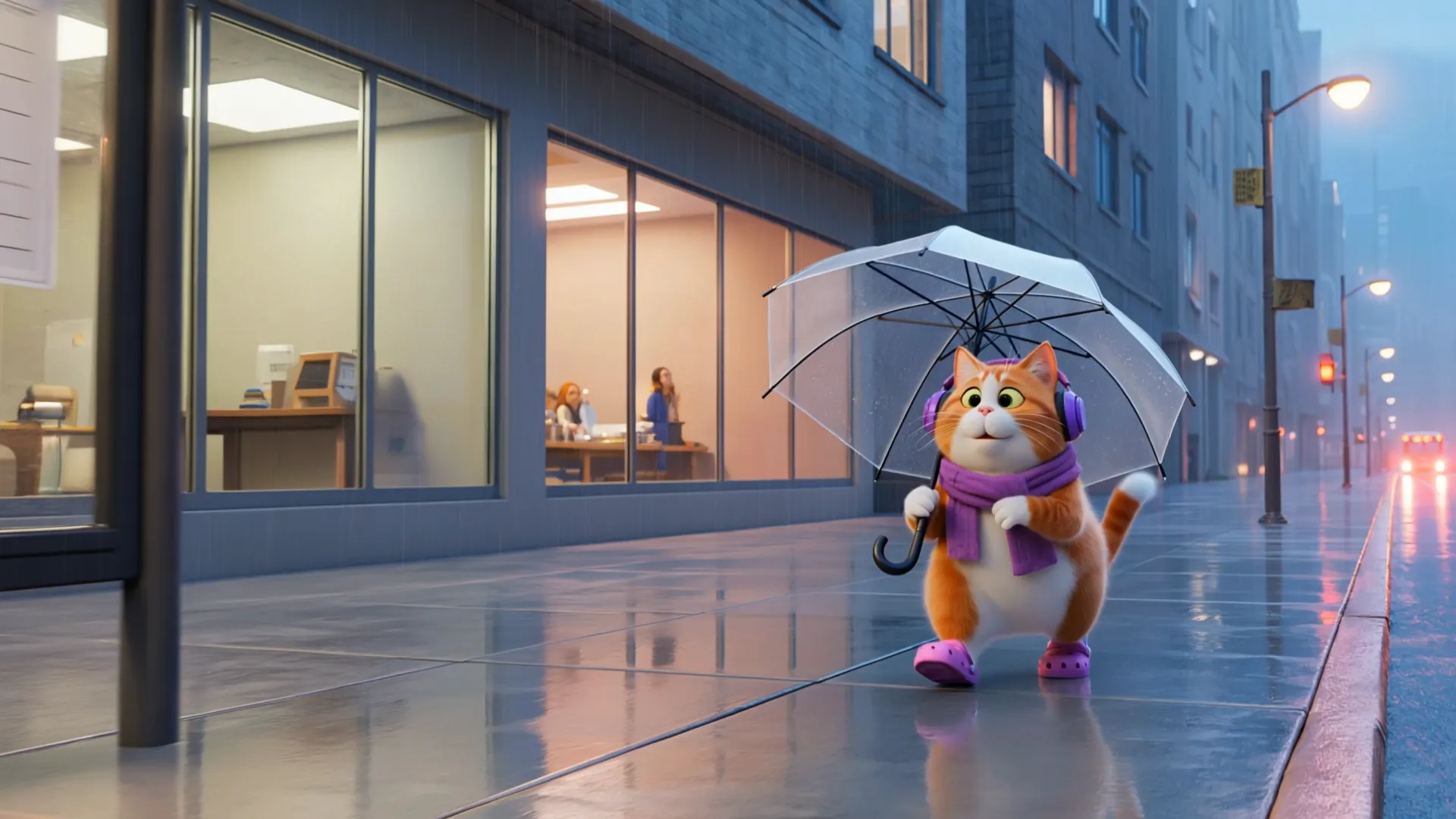
Cinematic ultra-realistic 3D animated cat daily vlog, cozy rainy evening aesthetic, adorable chubby orange-and-white British Shorthair cat acting like a human commuter, wearing purple headphones, purple scarf, purple tote bag, and purple Crocs throughout the entire video, consistent character design in every scene. Soft rainy city atmosphere, reflective wet streets, cinematic depth of field, warm indoor lighting, highly detailed fur physics, realistic rain droplets, smooth Pixar-style animation mixed with realistic textures. Scene 1 — 17 :31 GET OFF WORK The cat exits a modern office building during rain while holding a transparent umbrella, walking confidently on wet reflective pavement, city lights glowing softly, cinematic tracking shot. Scene 2 — 17 :47 THE CAR HAS ARRIVED The cat waits at a rainy bus stop with umbrella, bus headlights approaching through misty rain, soft ambient traffic reflections, emotional urban vibe. Scene 3 — 18 :07 I'M SO SLEEPY Inside public transport, the cat sits sleepily near a rainy window, eyes closed while listening to music, soft vehicle motion, cozy evening commute feeling. Scene 4 — 18 :27 ARRIVED AT THE COMMUNITY Rear view of the cat walking through a quiet residential community in rain, umbrella dripping water, playground and apartment lights blurred in background. Scene 5 — 18 :31 WAIT FOR THE ELEVATOR The cat stands patiently in front of an apartment elevator holding the folded transparent umbrella, warm hallway lighting, realistic reflections on elevator doors. Scene 6 — 18 :40 FINALLY HOME The cat enters a cozy apartment hallway, removes the tote bag and umbrella, relaxing after work, warm cinematic home atmosphere. Scene 7 — 18 :52 TAKE A BATH FIRST Cute bathroom scene, cat removing scarf before shower, soft white lighting, realistic steam and bathroom reflections, adorable expression. Scene 8 — 19: 12 THE TAKEOUT HAS ARRIVED Food delivery person hands takeout to the cat at the apartment door, cat now wearing soft purple
Key Features of Kling 3.0 Turbo AI Video Model
Kling 3.0 Turbo combines fast AI video generation with practical controls for text-to-video, first-frame image-to-video, short duration selection, and multi-shot prompt structure.
Turbo Text-to-Video Generation
Convert detailed prompts into short AI videos with controlled subject action, lighting, camera movement, and scene rhythm for ads, story concepts, creator clips, and branded social content.
First-Frame Image-to-Video Animation
Upload a supported JPG, JPEG, or PNG first-frame image and guide the animation with prompt details, helping preserve the starting composition while adding natural motion and camera direction.
Multi-Shot Prompt Control
Plan up to six shots in one prompt by defining shot order, shot duration, and individual shot descriptions, making Kling 3.0 Turbo useful for compact narrative clips up to 15 seconds.
Advantages of Kling 3.0 Turbo AI Video Generator
From rapid concept testing to short-form video production, Kling 3.0 Turbo AI Video Generator offers a practical balance of speed, prompt control, and output flexibility for storyboard previews, product reveal clips, and modern AI video creation.
Faster Short Video Production
The Turbo workflow is designed for quicker idea testing, helping creators move from prompt drafts to usable short video variations without building every scene manually.
Clear Output Controls
Choose supported resolution, aspect ratio, and duration options such as 720p or 1080p, vertical 9:16, square 1:1, or landscape 16:9 to match common publishing formats.
Stronger Scene Planning
Structured multi-shot planning helps control pacing, transitions, and story order, which is valuable for product reveal clips, social hooks, storyboard previews, and short-form ad variations.
Flexible Text and Image Inputs
Start from a written scene idea or a first-frame reference image, then refine the prompt to guide motion, camera behavior, atmosphere, and visual style.
How to Use Kling 3.0 Turbo AI Video Generator
Step 1: Enter a Prompt or Upload a First-Frame Image
Describe your scene for text-to-video, or upload a supported first-frame image for image-to-video generation. Include subject action, camera movement, lighting, style, and shot timing.
Step 2: Set Resolution, Aspect Ratio, and Duration
Choose available options such as 720p or 1080p, 16:9, 9:16, or 1:1, and a 3 to 15 second duration. Use multi-shot scene planning when you need tighter pacing for storyboard previews or short-form ad variations.
Step 3: Review, Refine, and Export
Preview the generated video, adjust prompt details or shot descriptions if needed, create variations, and export the best result for campaigns, social media, websites, or presentations.
Explore Kling 3.0 Turbo AI Video Creations on Twitter

First Look New Kling Update! Upgraded O3 There's also Fast versions Looks noticably better! Image to Video Use the uploaded image as the exact identity reference for the woman: confident playful expression, light skin, stylish modern look. Convert her into realistic


Kling 3.0 Turbo and O3 upgrades is now live on fal! Turbo: faster generation, lower costs, superior lip-sync, stable motion Omni: stronger prompt and reference consistency Up to 15s clips with full 4K generation with Omni Smarter storyboards and high quality multishot workflows

The Kling vs Seedance race is getting spicy. Kling will drop 3.0 Fast / Omni upgrade tomorrow. Kling😊: Here’s 3.0 Fast — faster, cheaper, better lip-sync. Seedance 😁: Cute. Here’s 2.0 Mini, cheaper and faster than Fast. Kling 🙄: Also Omni supports 15s and 4K in/out. Seedance


Comparing Seedance 2.0 vs. Kling 3.0 Turbo Which one wins your workflow? Dropping my full initial review in the comments soon!
Kling 3.0 Turbo and O3 upgrades is now live on fal! Turbo: faster generation, lower costs, superior lip-sync, stable motion Omni: stronger prompt and reference consistency Up to 15s clips with full 4K generation with Omni Smarter storyboards and high quality multishot workflows

