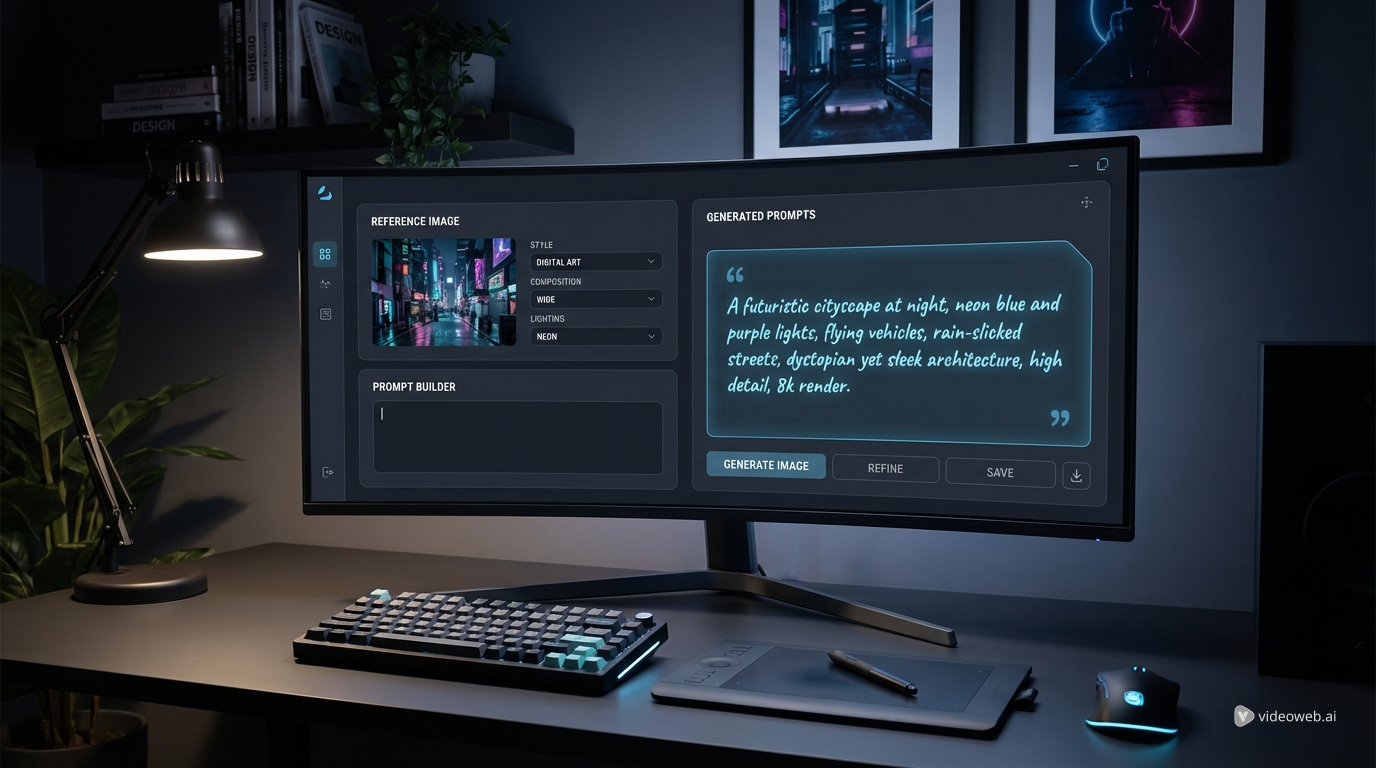
Writing a strong prompt is often harder than generating the image itself. Many users know what they want visually, but they struggle to describe style, lighting, composition, and subject details in a way that an AI model can actually use. That is where HeyDream AI’s free prompt tools become practical. Instead of guessing the right wording from scratch, you can use a visual reference or a short idea and turn it into a cleaner, more usable prompt.
撰寫一個強而有力的提示詞,往往比生成圖像本身更困難。許多使用者在視覺上很清楚自己想要什麼,但他們難以用 AI 模型真正能夠理解的方式,來描述風格、光線、構圖和主體細節。這正是 HeyDream AI 免費提示工具變得實用的地方。你不必從零開始猜測正確的用詞,而是可以利用視覺參考或一個簡短想法,把它轉換成更乾淨、更好用的提示詞。
HeyDream offers two especially useful tools for this workflow: the image-to-prompt AI tool and the Nano Banana 2 prompt generator. One helps you convert an existing image into prompt language. The other helps you refine a text idea into a stronger instruction set for generation. Used together, they make prompt building much faster and more consistent.
HeyDream 在這個流程中特別提供了兩個實用工具:image-to-prompt AI 工具與 Nano Banana 2 提示詞產生器。一個幫你把現有圖片轉換成提示語言,另一個幫你把文字想法打磨成更強而有力的生成指令集。兩者搭配使用,可以讓提示詞的建立變得更快速且更一致。
Why These Prompt Tools Are Useful
為什麼這些提示工具很實用
A good prompt does more than name a subject. It gives structure to the image, clarifies the style, and improves the chances of getting a useful result on the first few attempts. Many people waste time because their request is too vague, too long, or full of conflicting details. A better AI image prompt helps reduce that problem.
一個好的提示詞不只是點出主題而已。它會為圖像賦予結構、明確風格,並提高在前幾次嘗試就獲得有用結果的機率。許多人之所以浪費時間,是因為他們的請求太模糊、太冗長,或充滿互相衝突的細節。一個更好的 AI 圖像提示詞可以減少這類問題。
If you already have a reference image, a visual-first workflow is usually easier than trying to describe every feature manually. An image-to-text prompt tool can identify key visual elements and turn them into reusable wording. If you do not have a reference image and only have an idea in mind, prompt optimization becomes more useful. That is why HeyDream separates these two needs into different tools instead of forcing everything into one generic box.
如果你已經有參考圖片,從視覺出發的工作流程通常比試著手動描述每個特徵要容易得多。image-to-text prompt 工具可以辨識關鍵視覺元素,並把它們轉換成可重複使用的文字描述。如果你沒有參考圖片、只有腦中一個想法,那麼提示詞優化就會特別有用。這也是為什麼 HeyDream 將這兩種需求拆分成不同工具,而不是勉強塞進同一個通用介面裡。
How to Use Both Tools Step by Step
兩個工具的逐步使用方式
The easiest way to think about these tools is simple: use one when you have a picture, and use the other when you have only an idea.
理解這兩個工具最簡單的方法是:有圖片時用其中一個,只有想法時用另一個。
First, open the image-to-prompt generator if you already have a reference image. Upload the image, then choose the output type that matches your target model. For example, you might want Seedream prompts for a cleaner descriptive output or a Midjourney prompt format for a more stylized result. After that, generate the prompt, review the wording, copy it, and adapt it if needed.
如果你已經有參考圖片,先開啟 image-to-prompt 產生器。上傳圖片之後,選擇與目標模型相符的輸出類型。舉例來說,你可能會選擇 Seedream 提示詞來獲得更乾淨的描述性輸出,或選擇 Midjourney 提示詞格式,以取得更具風格化的結果。接著生成提示詞,檢查文字描述,將其複製,並在需要時進一步調整。
If you do not have a reference image, open the Nano Banana 2 prompt generator instead. Type your idea into the input box, then run the optimization flow. Review the improved prompt and edit any details that need to be more specific, such as camera angle, color palette, environment, or mood.
如果你沒有參考圖片,就改為開啟 Nano Banana 2 提示詞產生器。將你的想法輸入文字框,然後執行優化流程。檢視優化後的提示詞,並針對需要更具體的細節進行修改,例如鏡頭角度、色彩配置、環境或情緒氛圍等。
After either workflow, the next step is to test the result in an image generation tool. Prompt extraction and prompt optimization are most useful when they lead directly into practical generation and revision.
不論採用哪一種流程,下一步就是在圖像生成工具中測試結果。提示詞擷取與提示詞優化,在能直接銜接實際的生成與修正時,價值才會最大化。
What the Free Image-to-Prompt Tool Does Best
免費 Image-to-Prompt 工具最擅長做什麼
HeyDream’s image-to-prompt generator is built for users who want to reverse-engineer a picture into prompt language. You upload an image, choose the output prompt type, and generate a description suited to a specific model style. The interface supports output types such as Nano Banana, Seedream 4.0, Flux, Midjourney, Stable Diffusion, and Universal.
HeyDream 的 image-to-prompt 產生器是為那些想把圖片「反向工程」成提示語言的使用者所設計。你只要上傳圖片、選擇輸出提示類型,就能生成適配特定模型風格的描述。介面支援的輸出類型包括 Nano Banana、Seedream 4.0、Flux、Midjourney、Stable Diffusion 和 Universal 等。
This is useful when you want to recreate a visual mood, learn how a certain style can be described, or turn a saved reference into a more structured prompt template. For example, an image prompt generator can help you break down an image into subject, atmosphere, lighting, framing, and texture, which is often more effective than vague phrasing like “make it cinematic” or “make it look cool.”
當你想重現某種視覺氛圍、學習如何描述特定風格,或把已保存的參考圖轉成更有條理的提示模板時,這個工具特別有用。舉例來說,image prompt generator 可以協助你將圖像拆解為主體、氣氛、光線、取景與材質等要素,這通常比單純使用「拍成電影感」或「看起來很酷」這種模糊表述更有效。
Because the tool is available as image-to-prompt free, it works well for quick experiments, model comparison, and prompt study without adding friction to the workflow.
由於這個工具是 image-to-prompt free,你可以用它來做快速實驗、模型比較,或研究提示詞,而不會為工作流程增加多餘阻力。
When the Nano Banana 2 Prompt Generator Is the Better Choice
什麼時候 Nano Banana 2 提示詞產生器是更好的選擇
The dedicated Nano Banana 2 prompt generator is better when you already know the scene you want but need to improve the wording. Instead of starting from an image, you begin with a typed idea and let the tool optimize it into something more structured.
當你已經很清楚自己想要的場景,但需要改進文字描述時,專門的 Nano Banana 2 提示詞產生器會是更好的選擇。你不是從圖片出發,而是從輸入的想法開始,讓工具把它優化成更有結構的提示詞。
This is especially useful for users who want cleaner Nano Banana AI prompts for product visuals, concept art, design mockups, stylized portraits, or content creation tasks. If your draft prompt feels flat, repetitive, or too casual, the optimization tool can help sharpen it into a more model-friendly format.
這對於想要更乾淨的 Nano Banana AI 提示詞以用於產品視覺、概念藝術、設計模型、風格化人像或內容創作任務的使用者特別有幫助。如果你的提示草稿顯得平淡、重複或過於口語化,這個優化工具能把它打磨成更適合模型理解的格式。
It also works well as a drafting tool before you move to image generation. You can start with a simple idea such as “a futuristic perfume bottle on reflective glass with soft blue lighting,” then refine it into a more polished prompt before testing it in a generator.
它同樣適合作為圖像生成前的草擬工具。你可以從一個簡單的想法開始,例如「一個未來感香水瓶,放在反光玻璃上,伴隨柔和藍色光線」,再在送入生成器前,將其細化為更完整精緻的提示詞。
Tips for Better Prompts Across Different Models
在不同模型中撰寫更好提示詞的技巧
The best prompts are usually clear, specific, and organized. Whether you start from an image or from text, try to think in layers: subject, setting, style, lighting, composition, and constraints. This approach makes almost any AI image prompt easier to refine.
最好的提示詞通常都具備清楚、具體且有組織三個特點。無論你是從圖片還是文字出發,都可以嘗試用「分層」思考:主體、場景、風格、光線、構圖以及限制條件。這個做法能讓幾乎所有的 AI 圖像提示詞都更容易被細緻調整。
It also helps to adjust wording for the model you plan to use. Some models respond well to straightforward descriptive language, while others benefit from more stylized phrasing. Seedream prompts often work well with clean visual detail, while a Midjourney prompt may benefit from more art-direction language and mood cues. If you are working from a reference image, keep the source clear and uncluttered so the image-to-prompt AI tool can read it more effectively.
針對你要使用的模型調整用詞也很關鍵。有些模型對直接的描述性語言反應較好,有些則更適合帶有風格化的表達。Seedream 提示詞 通常搭配乾淨的視覺細節會有不錯效果,而 Midjourney 提示詞則可能更適合加入美術指導式語言與情緒線索。如果你是從參考圖片出發,盡量讓原圖清晰且沒有太多雜訊,讓 image-to-prompt AI 工具能更有效地讀取。
One common mistake is making prompts longer instead of better. More words do not always mean better results. A focused description with well-chosen details usually works better than a long paragraph packed with redundant adjectives.
一個常見錯誤,是只把提示詞寫得更長,而不是更好。文字越多並不代表結果越佳。具備精準挑選細節的聚焦描述,通常比塞滿冗餘形容詞的長段落來得有效。
From Prompt Building to Image Creation
從提示詞建立到圖像創作
These tools are most valuable when they become part of a larger workflow. The image-based converter helps you analyze visuals and turn them into usable prompt language. The text-based optimizer helps you improve rough ideas before generation. Together, they shorten the gap between inspiration and output.
當這些工具成為整體工作流程的一部分時,它們的價值最高。以圖像為基礎的轉換器,協助你分析視覺內容並將其轉換成可用的提示語言;以文字為基礎的優化工具,則幫助你在生成前打磨粗略想法。兩者搭配,可大幅縮短從靈感到成果之間的距離。
Once your prompt is ready, the natural next step is HeyDream’s AI Image Generator. That is where the prompts you build actually become testable images. Instead of treating prompt generation as an abstract exercise, you can move directly from reference analysis or prompt polishing into real creation, compare outputs, and refine faster.
當你的提示詞準備好後,下一個自然步驟就是使用 HeyDream 的 AI Image Generator。在那裡,你所建立的提示詞會真正轉化成可測試的圖像。你不再只是抽象地「寫提示」,而是能從參考分析或提示打磨,直接走向實際創作,比較輸出結果並加速迭代。
For anyone who wants a simpler and more practical prompt workflow, HeyDream’s free tools offer a useful combination: one tool to understand images, one tool to improve ideas, and one generator to bring them to life.
對任何想要更簡單、更實用提示工作流程的人來說,HeyDream 的免費工具提供了一個相當實用的組合:一個用來理解圖片,一個用來優化想法,再加上一個將它們化為成品圖像的生成器。
Recommended Other Tools
推薦其他工具
- AI Image Generator
- Image to Image
- Text to Image
- HiDream AI Image Generator
- Photo to Anime
- Old Photo Restorer
- Free Background Remover
- Image to 3D
Related Article
相關文章
- HeyDream AI Image Generator Guide: Best Models for Text-to-Image and Image-to-Image
- Nano Banana 2 vs Qwen Image 2.0 vs Seedream 5.0: Which HeyDream Model Fits Your Workflow?
- Seedream 5.0 Image Generation Guide on HeyDream AI (Step-by-Step + Best Tools)
- How to Turn Real Photos into Anime Art with HeyDream AI