Writing a strong prompt is often harder than generating the image itself. Many users know what they want visually, but they struggle to describe style, lighting, composition, and subject details in a way that an AI model can actually use. That is where HeyDream AI’s free prompt tools become practical. Instead of guessing the right wording from scratch, you can use a visual reference or a short idea and turn it into a cleaner, more usable prompt.
HeyDream offers two especially useful tools for this workflow: the image-to-prompt AI tool and the Nano Banana 2 prompt generator. One helps you convert an existing image into prompt language. The other helps you refine a text idea into a stronger instruction set for generation. Used together, they make prompt building much faster and more consistent.
Why These Prompt Tools Are Useful
A good prompt does more than name a subject. It gives structure to the image, clarifies the style, and improves the chances of getting a useful result on the first few attempts. Many people waste time because their request is too vague, too long, or full of conflicting details. A better AI image prompt helps reduce that problem.
If you already have a reference image, a visual-first workflow is usually easier than trying to describe every feature manually. An image-to-text prompt tool can identify key visual elements and turn them into reusable wording. If you do not have a reference image and only have an idea in mind, prompt optimization becomes more useful. That is why HeyDream separates these two needs into different tools instead of forcing everything into one generic box.
How to Use Both Tools Step by Step
The easiest way to think about these tools is simple: use one when you have a picture, and use the other when you have only an idea.
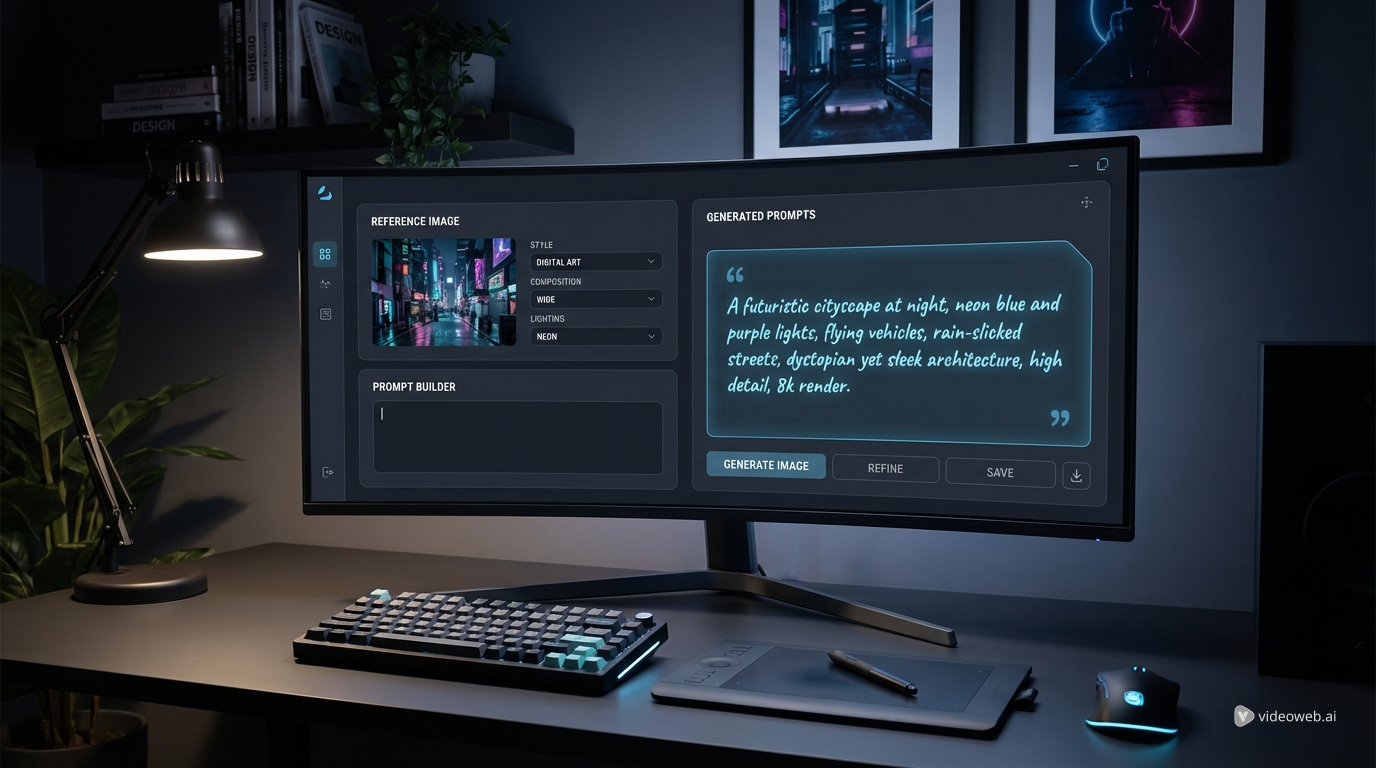
First, open the image-to-prompt generator if you already have a reference image. Upload the image, then choose the output type that matches your target model. For example, you might want Seedream prompts for a cleaner descriptive output or a Midjourney prompt format for a more stylized result. After that, generate the prompt, review the wording, copy it, and adapt it if needed.
If you do not have a reference image, open the Nano Banana 2 prompt generator instead. Type your idea into the input box, then run the optimization flow. Review the improved prompt and edit any details that need to be more specific, such as camera angle, color palette, environment, or mood.
After either workflow, the next step is to test the result in an image generation tool. Prompt extraction and prompt optimization are most useful when they lead directly into practical generation and revision.
What the Free Image-to-Prompt Tool Does Best
HeyDream’s image-to-prompt generator is built for users who want to reverse-engineer a picture into prompt language. You upload an image, choose the output prompt type, and generate a description suited to a specific model style. The interface supports output types such as Nano Banana, Seedream 4.0, Flux, Midjourney, Stable Diffusion, and Universal.
This is useful when you want to recreate a visual mood, learn how a certain style can be described, or turn a saved reference into a more structured prompt template. For example, an image prompt generator can help you break down an image into subject, atmosphere, lighting, framing, and texture, which is often more effective than vague phrasing like “make it cinematic” or “make it look cool.”
Because the tool is available as image-to-prompt free, it works well for quick experiments, model comparison, and prompt study without adding friction to the workflow.
When the Nano Banana 2 Prompt Generator Is the Better Choice
The dedicated Nano Banana 2 prompt generator is better when you already know the scene you want but need to improve the wording. Instead of starting from an image, you begin with a typed idea and let the tool optimize it into something more structured.
This is especially useful for users who want cleaner Nano Banana AI prompts for product visuals, concept art, design mockups, stylized portraits, or content creation tasks. If your draft prompt feels flat, repetitive, or too casual, the optimization tool can help sharpen it into a more model-friendly format.
It also works well as a drafting tool before you move to image generation. You can start with a simple idea such as “a futuristic perfume bottle on reflective glass with soft blue lighting,” then refine it into a more polished prompt before testing it in a generator.
Tips for Better Prompts Across Different Models
The best prompts are usually clear, specific, and organized. Whether you start from an image or from text, try to think in layers: subject, setting, style, lighting, composition, and constraints. This approach makes almost any AI image prompt easier to refine.
It also helps to adjust wording for the model you plan to use. Some models respond well to straightforward descriptive language, while others benefit from more stylized phrasing. Seedream prompts often work well with clean visual detail, while a Midjourney prompt may benefit from more art-direction language and mood cues. If you are working from a reference image, keep the source clear and uncluttered so the image-to-prompt AI tool can read it more effectively.
One common mistake is making prompts longer instead of better. More words do not always mean better results. A focused description with well-chosen details usually works better than a long paragraph packed with redundant adjectives.
From Prompt Building to Image Creation
These tools are most valuable when they become part of a larger workflow. The image-based converter helps you analyze visuals and turn them into usable prompt language. The text-based optimizer helps you improve rough ideas before generation. Together, they shorten the gap between inspiration and output.
Once your prompt is ready, the natural next step is HeyDream’s AI Image Generator. That is where the prompts you build actually become testable images. Instead of treating prompt generation as an abstract exercise, you can move directly from reference analysis or prompt polishing into real creation, compare outputs, and refine faster.
For anyone who wants a simpler and more practical prompt workflow, HeyDream’s free tools offer a useful combination: one tool to understand images, one tool to improve ideas, and one generator to bring them to life.
Recommended Other Tools
- AI Image Generator
- Image to Image
- Text to Image
- HiDream AI Image Generator
- Photo to Anime
- Old Photo Restorer
- Free Background Remover
- Image to 3D
Related Article
- HeyDream AI Image Generator Guide: Best Models for Text-to-Image and Image-to-Image
- Nano Banana 2 vs Qwen Image 2.0 vs Seedream 5.0: Which HeyDream Model Fits Your Workflow?
- Seedream 5.0 Image Generation Guide on HeyDream AI (Step-by-Step + Best Tools)
- How to Turn Real Photos into Anime Art with HeyDream AI